
Google redirect virus is a browser hijacker targeting google and other search engine search results and redirecting user to infected pages. These pages can be porn–related or full of advertising banners that make creators of this parasite money. Also, these pages might force you to pay something or give away your bank account details. Thus Google redirect virus is quite dangerous.
How To Fix Google Redirect Virus Browser Hijacker Problem quicklinks
- Causes of Google redirect virus
- My hosts file is very long, should I be concerned?
- I am in correct folder, but can’t see hosts file. Am I infected?
- I can’t edit hosts file even as Administrator
- Malware – based Google redirect virus FAQ
- Why don’t you recommend “insert name” tool?
- I can’t launch anti-malware programs. What to do?

(Win)
Note: Spyhunter trial provides detection of parasites and assists in their removal for free. limited trial available, Terms of use, Privacy Policy, Uninstall Instructions,
(Mac)
Note: Combo Cleaner trial provides detection of parasites and assists in their removal for free. limited trial available, Terms of use, Privacy Policy, Uninstall Instructions, Refund Policy ,
There are couple different streaks of Google Redirect viruses, and some of them might need heavy scanning with reputable Anti-malware solution like NOD32 Antivirus, Kaspersky, Malwarebytes. Sometimes Google results Redirect virus even blocks reputable sites and it is tough to download automatic software. However, there are couple easy steps to solve less complex problems.
Note, that before trying to fix other things, you are suggested to scan and check if anti-malware programs can identify more precise reason of Google redirect hijacker. We recommend spyhunter, Hitman Pro for this task. You should always scan after performing all these steps as well, as doing anti-rootkit scan might reveal trojans that were hidden due to other infections. In some cases, rootkits will be detected and removed by anti-malware programs.

Basically, there two types of Google redirect viruses:
a) Hijacking search engine settings aka choosing which search engine to use. Your default search engine is named not google, yahoo, or bing, but something else. The first suspect is a plugin – based hijacker, though other cases are possible. Quite often a justification for change is provided, for example redirect virus claims that your search is “safer” or “better” and it will try to avoid the name virus whenever it can.
b) Hijacking results of the search engine when you click on them. Your default search engine is the same, but you get different results when clicking on them. The main suspect would be malware infection, but malicious proxy, dns settings, infected router and even hosts file are possible. Such redirect viruses do not justify their actions, they just try to make money fast and prevent removal.
Causes of Google redirect virus
The problem with this parasite group is that Google (and search engine in general) redirects can be implemented in several different ways. We have compiled a list of possible causes and symptoms associated with them.
| Cause | Hosts file | DNS | Extension | Proxy | Router/ISP | Malware |
|---|---|---|---|---|---|---|
| Multi-OS | NO | Possible | Sometimes | Sometimes | YES | NO |
| Single-Browser | NO | NO | Possible | Possible | NO | Possible |
| Clickjacking | Possible | Possible | Unlikely | Unlikely | Unlikely | YES |
| Domain-specific | Yes | Yes | Unlikely | Unlikely | Unlikely | AV websites only |
| Resolving errors | Yes | Yes | Unlikely | Unlikely | Unlikely | Possible |
| Timeouts | Possible | Unlikely | Unlikely | Yes | Unlikely | Yes |
| Certificate errors | Yes | Yes | Unlikely | Unlikely | Unlikely | Possible |
| New Tab | Unlikely | Unlikely | YES | Unlikely | Possible | Possible |
Clickjacking means that pressing on one link (in search results) opens completely different result than expected. Such redirect viruses are highly malicious usually and sign of serious trojan infection.
Multi-OS – Multiple devices or different OS are affected. This means that the likely cause is outside single device or settings between devices were synchronised. Besides plugin, some configurations can affect multiple devices or it might be router or ISP.
Steps 1-5 deals with regular hijacking of search results that are due to malicious settings or plugins. Steps 6 and above deal with malware infections that result in Google redirect virus symptoms and are more difficult to detect and fix. However, If any of antivirus programs are stopped from execution this means malware infection and you will have to scan your PC with anti-virus and anti-malware programs.
Step 1. Check your hosts file for Google redirect virus malicious entries
Hosts file resides on C:/Windows/System32/Drivers/etc/hosts on Windows system and /etc/hosts on OS/X and linux-based systems. It was one of favourite ways to create simple and hard to detect redirect virus. 
Where Windows is your windows installation directory. Open the file with Notepad.
Note: On windows 7/vista/8, you should open your hosts file with administrative privileges or you will not be able to save it. To do so, On Win 7/vista do following:
- Press Start (or round button usually in bottom left corner and enter notepad. Do not press enter
- Right-click on the item in the list above
- Choose Run as administrator
- File->Open and browse to hosts file.
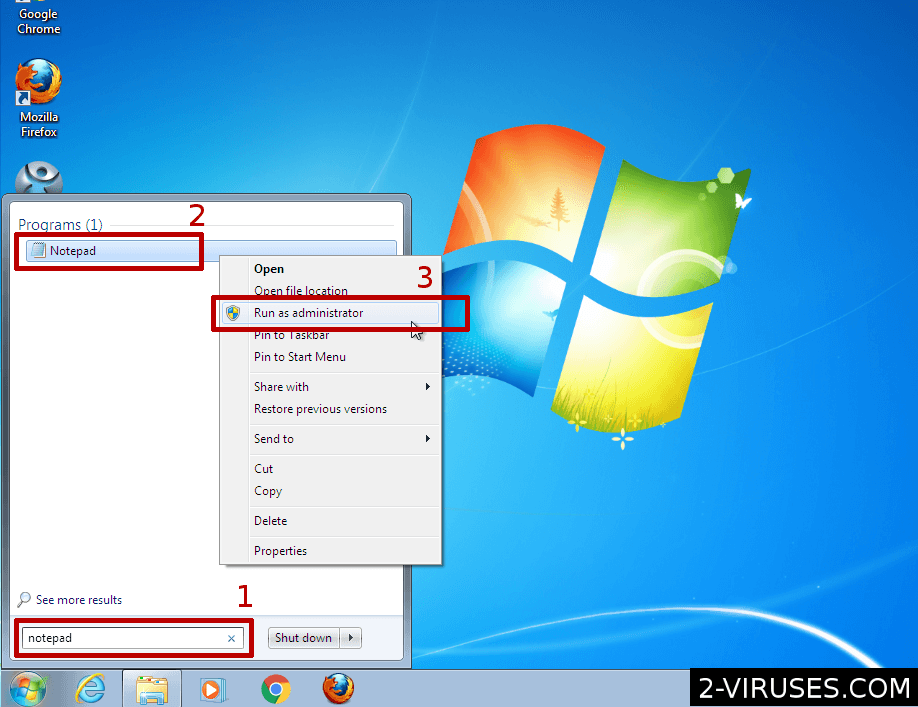
On Windows 8, enter notepad in search box or type right in the metro interface. Perform steps 2-4 like in Win 7.
Google Redirect virus symptoms might be result of malware adding malicious entries to this file and are removed easily as well.
Hosts file should look like this: 
There might be line referencing ::1 as well. This is IPv6 local address and perfectly normal. If you see more lines of code and IPs, you should delete these, especially if they rewrite google or Microsoft subdomains. This is a sign, that you either had or have infection on your PC, as this file can not be accessed remotely usually.
Common questions related to hosts file and Google hijackers
My hosts file is very long, should I be concerned?
You should check the commented with # section. If the writes were done by Spybot S&D or Hosts-file (HP-Host) and there are thousands of them, they are legitimate and prevent your PC from opening suspected websites. Personally, I do not use them.
Note that for Google redirect to be caused by hosts file, it should contain line mentioning it. Typical malicious hosts file is short or medium length (up to several hundred lines) and not longer.
I am in correct folder, but can’t see hosts file. Am I infected?
The hosts file might be hidden with either hidden or system attributes. Make sure you see such files. It is possible to create a regular file named hosts on desktop (an empty one) and move it to the correct location. If system asks to overwrite, then the file is hidden. If not, there was not host file.
Note, that the system will work without any problems with no hosts file (Windows one) in most of the cases.
I can’t edit hosts file even as Administrator
Hosts file can be protected by system and readonly attributes sometimes. To reset these, follow these steps:
- Press Start (or circular icon in bottom-left)
- enter CMD in the filed, DON’T press enter
- Right-click on it, select run as administrator. Accept to elevate its permissions.
- Enter in black window following command : attrib -H -R -S C:/Windows/System32/Drivers/etc/hosts where C:\Windows is your windows install folder.
- If it fails, try using file unlockers
Step 2. Check DNS (Domain Name Server) settings
Domain name servers are used to determine what server to access when opening website addresses. Hijacking these settings would allow hijacking various websites including search ones. Such redirect viruses included notorious DNSChanger . Antivirus engines have very poor detection for such parasites.
1. Go to Control Panel->Network Connections and select your local network.
2. Right-click your local network icon and select Properties. 
3. A window will open, then select Internet Protocol (TCP/IP) and click Properties. 
4. You will see a window like the one below – this is the Internet Protocol window. Select “Obtain an IP address automatically” and “Obtain DNS server address automatically” OR enter known good dns servers ( 8.8.8.8 and 8.8.4.4 are good choice – a public DNS servers offered by Google). Both options have its own Pros and Cons : using static DNS IP’s might be a bit slower on some networks, but it prevents some ISP and router caused hijacks. 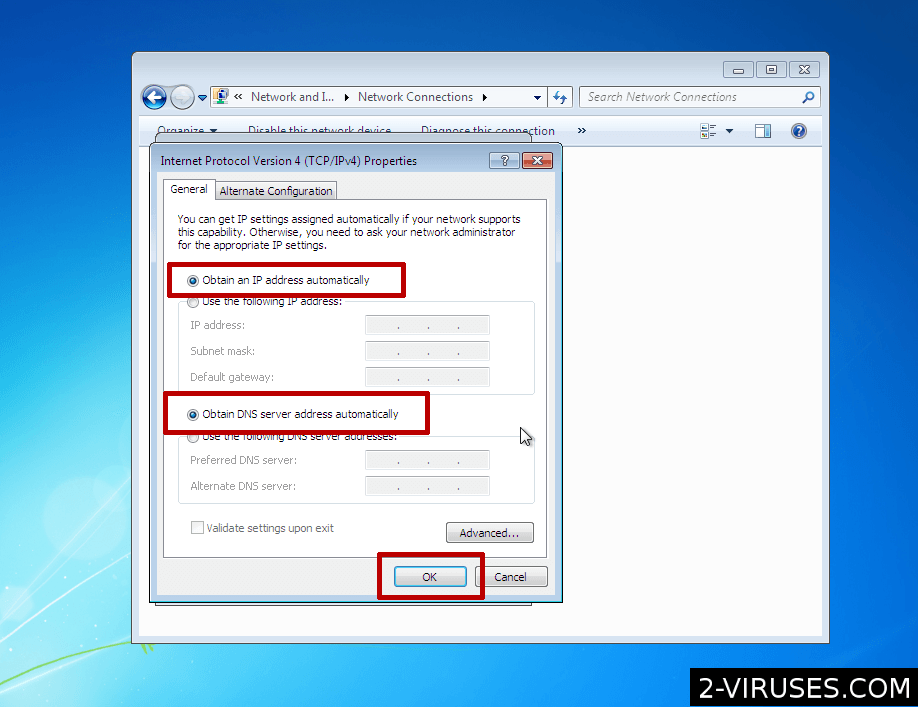
5. Click OK to save changes.
Step 3. Checking your proxy settings for Google redirect virus
Proxy server settings can be used to implement Google search result hijacking as well. Most of the internet programs use system proxy settings that are accessed from internet explorer and Edge browsers or from control panel. This is simple to fix too:
1. Launch your internet explorer.
2. Tools ->Internet Options, Connections tab. Press LAN Settings 
3. Unselect everything or enter parameters that were given by system administrator.
4. Press OK.
Proxie – based redirect viruses are always common. The proxy might be local process (which is detected by anti-malware usually) or remote server (which is hard to detect).
Step 4. (Optional) Check your proxy settings on Mozilla Firefox
1. Launch Mozilla Firefox.
2. Tools ->Options. Press Advanced and open Network tab. Then, press Settings button. 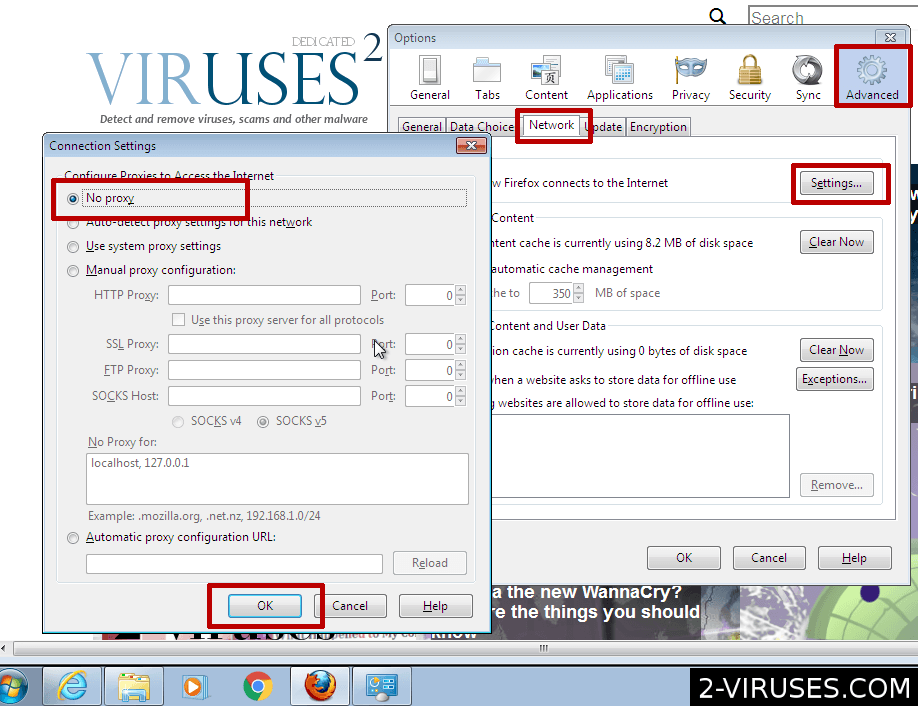
3. Select “No proxy” or enter parameters that were given by system administrator.
4. Press OK.
Step 5. Check your browser addons and reset your search settings in browsers
If your search engine changed to unknown one, you might have browser settings changer plugin or program. Typically, these programs will be detected in Step 6, but you will have to fix settings manually. This type of Google redirect virus might affect both single browser or all of them, however, each browser is infected separately. Browser ad-ons are installed separately into each browser and reside in different locations.
5.a. Remove Google Redirect Virus ad-ons from IE.
If your browser is hijacked in IE only, check IE browser add-ons. Note: there are malicious plugins that affect both IE and firefox and result in Google redirects in both of the pages. Before this step, make sure you clean your Control Panel from unknown, spammy looking programs.
- Launch your internet explorer.
- Tools->Manage Addons
- Disable all unverified addons (there might be some useful ones, but better re-install them later).
- Delete all add-ons that look spammy/unknown
- Click arrow on the right of search box
- Do following: On IE8-9 choose Manage Search providers, On ie7 click change search defaults
- Remove the unnecessary search engines from the list
- If settings revert after restart, you will have to do Step 6 and repeat step 5 again.
5.b. Check your Firefox extensions and reset search settings
- Press Firefox->Addons
- Go through list and disable all unknown or spamy addons.
- Repeat the same for Plugin list.
- Enter “about:config” in url bar. This will open settings page
- Type “Keyword.url” in the search box. Right click it & reset it.
- Type “browser.search.defaultengine” in the search box. Right click it & reset it.
- Type “browser.search.selectedengine” in the search box. Right click it & reset it.
- Search for ‘browser.newtab.url’. Right-click and reset. This will make sure that the search page won’t launch on each new tab.
- If the settings revert after browser restart, you will need to delete user.js from Firefox profile or/and perform Step 6 and repeat Step 5.
5.c. Check your Chrome extensions and reset search settings
- Click 3 horizontal lines icon on browser toolbar
- Click on Extensions. Review extensions there and disable ones you do not need.
- Select Settings
- Select Basics ->Manage Search engines
- Remove unnecessary search engines from list
- Go back to settings. On Startup choose open blank page ( you can remove undesired pages from the set pages link too).
Step 6. Scan for Google Redirect Virus with spyware/antivirus removers:
Symptoms: No setting changes are found and all other options are exhausted. Other devices behave normally. OR clicks on search results open completely different pages than expected.
- Spyhunter has a very good anti-malware database and quite strong focus against both browser hijackers and Trojans. Review for Spyhunter can be found here. Spyhunter is Windows program, if you use Mac, I recommend Combo Cleaner as second choice.
- Hitman. Its a second opinion scanner that uses multiple antivirus databases in the cloud. It is windows based application and handles trojan – based Google redirect viruses well.
These removers should detect majority of google redirects of that kind, sometimes it is useful to use a more niche tool.
Symptoms: The anti-malware tools detected some parasites as trojans/adware but failed to fix them and symptoms persist. OR you can’t launch anti-malware programs.
TDSS and Zero Access rootkits both cause Google redirection symptoms in some cases. Both these rootkits require dedicated programs for removal, and might require alternate OS scanners in worst case. For this specific rootkit a remover can be downloaded from here : support.kaspersky.com/downloads/utils/tdsskiller.exe. Another options is to scan your PC from safe mode or with alternate OS scanners.
Symptoms: Internet is not working after malware got removed or google redirects/clickjacking still present.
Sometimes, the internet connection chain gets corrupted and requires specific fix. These cases are extremely rare today. You might have to fix your winsock 2 settings with LSPFix utility.
Download LSPFix. This is a dangerous program as you have to investigate each item it lists. Some are allowed and legitimate, others are not.
Malware – based Google redirect virus FAQ
Why don’t you recommend “insert name” tool?
These anti-malware programs are not random picks, but cover wide range of possible causes for redirection. While specific other tools might be needed or useful, these tools have the best chance to identify the cause. Some of the other applications (Namely, LSPFix, Combofix, etc) might be somewhat dangerous as they are more professional repair tools than malware removal ones. E. G. I would recommend to start with TDSS killer when rootkit infections are more likely, and for browser plugin caused Google redirects Spyhunter or Adwcleaner might be the best option.
I can not recommend tools that don’t work well with the ones I recommend as well. This would cause more problems you rather than help.
I can’t launch anti-malware programs. What to do?
In most cases this is caused by either false positive in antivirus or a malware – based redirect virus. Try renaming the anti-malware executable extension from .exe to .com and launch it again. Another approach would be alternate OS scanners – bootable CDs that can scan your hard drive as long as it is not encrypted. The third option would be Hitman Kickstart.
Step 7. Investigate other possibilities for browser redirects
Symptoms: All devices in the network behave the same, especially if they have different OS.
One more possibility is infected router or ISP hijacking both DNS and http requests. It is hard to debug such Google redirect virus problems, but a common sign for these would be same hijacking happening while in the same network, e.g. while at home on several devices and not while in work or somewhere else.
Router google redirect viruses are caused by poor router passwords or well-known vulnerabilities of popular router brands. While an exact fix will be different, you will have to download an updated image and flash your router with it.
For router infections you will need to download router image and reset your router with it. This depend on particular type of device and we can’t provide instructions for all of them in this guide. Afterwards, make sure your router has a strong admin password.
Update 2017.08
I have decided to add quick answers section to particular steps and remove questions/answers about common problems or not relevant to this guide. This is done for usability: most of the comments ask for repeated questions and quick answers add more value.
Read "How to fix Google Redirect Virus problem" in other languages
- Wie man das Problem des Google Redirect Virus löst (de)
- Comment fixer problème de Le virus Google redirection (fr)
- Como eliminar Google Redirect Virus? (es)
- Como resolver o problema Google Redirect VÃrus (pt)
- Hoe u het Google Redirect Virus probleem (browserkaper hijacker) kunt herstellen (nl)
- Hur man löser Google Redirect Virus problem (se)
- Come sistemare il problema del Google Redirect Virus (reindirizzatore di browser) (it)
- SÃ¥dan klarer du problemet med Google Redirect Virus (Browser hijacker/kaprer) (dk)
- Googleリダイレクトウイルスå•é¡Œã®ä¿®å¾©æ–¹æ³• (jp)
- Google 리다ì´ë ‰íŠ¸ ë°”ì´ëŸ¬ìŠ¤ ë¬¸ì œ í•´ê²° 방법 (kr)



Just got done resolving a redirection — and worse – problem which was caused by a problem with our router.
The virus/Trojan had changed router setting to direct DNS searches to their web address. They returned bogus address.
Look into your router settings to make sure you’re settings have not been messed with. We ended up Restting the router to factory settings and reinstalled the router.
The issue with facebook redirecting to say pricegrabber isn’t always a virus or malware.
Linksys routers are sometimes the culprit…a fix that may help for some people (specifically using linksys wrt160n or any other linksys router).
Network Connections > Right click your connection > Properties > Select TCP/IP > Properties > Set your DNS manually (see below for what DNS servers).
To determine the DNS servers to input here: Get to CMD Prompt > IPCONFIG /ALL > You will see 2 IP’s under the DNS Servers section > Enter those 2 numbers in the TCP/IP DNS configuration.
I use OPENDNS, which is configured on the router and now manually set in the tcp/ip, and have never once seen this facebook redirect occur again.
James: Completely true. People should change their router default password in all cases.
I worked on three computers that had this same problem:
Windows 7:
I logged in as another (administrator user and ran MS Security Essentials, then logged back into the infected side and turned off the Proxy server setting:
Internet Explorer -> Tools -> Internet Options -> Connections tab
LAN settings button: clear all the check-boxes. (Do this even if you do not have another user login). The proxy server was checked only in one out of 3 machines I helped with.
Find the AppData folder of this user (with infection) and delete two *.bat files and the *.exe file in the AppData folder.
Windows Server 2003 (similar to Windows XP):
Find the Application Data folder for the user (under Documents and Settings and delete any *.exe files there and the *.bat files.
NOTE: You might find EXE files in the AppData or Application Data folders that belong to Google, Adobe etc. If you see any UNINSTALL programs there run them and then take out all remaining files. (I don’t think these are essential programs.
Find the TEMP folder of the User’s folder and delete all the files there. The EXE file that generates new names is there. It is called by the BAT files o do this. The one I found is ‘e.exe’.
Good Luck and let’s hope FBI catches those who gave so much misery to people are caught, fined and jailed for the rest of their lives. (It’s not hard to find them, FBI)
This worked for me.
Just make sure guys that when you’re about to edit the host file, “read only” is UNCHECKED in the files properties.
And if you are having problems with overwriting the file, double click it when you are saving.
for those of you that are having problems editing host file. I highly recommend HostsXpert v4.4. A free program for managing your host file. get it here:
http://www.funkytoad.com/index.php?option=com_content&view=article&id=13&Itemid=31&28d444df85eb4f435055ed9d39c02f03=d315773113eab5e724959c494ea17358
Step 4 worked for me, but as I understand it, the automatic setting of proxies still has fake information somewhere, right? How do I fix this to get rid of the problem completely?
Train42: in some cases the original infection is already gone (removed by antivirus), but proxy settings remain. However, I would recommend scanning PC with decent antivirus. If you have no other symptoms, I would recommend scanning with Hitman Pro, as it is fast and scans with multiple antivirus engines http://www.2-viruses.com/reviews/hitman-pro .
Hate this. I’ve had this problem multiple times, did all of the above fixes, and it changed nothing. Something was still delivering both the fake antivirus program and the redirects in Google, to the machine. Even went as far as to reformat the machine. Then, upon entering dns and static ip info, the machine got infected again. BUT, the server machine (which was really just another computer acting as a server) was not infected. We scanned that thing thoroughly. ODD and extremely stealth, these things are.
Ryan: this guide is for cases when there is no obvious trojan in the system. In your case, I would first do tdss killer scan (and see if it detects), and if not, do a scan with Alternate OS scanners, and then repeat all the steps here.
Ummm… Hi every time i click on a link in google or any other search site it redirects me to a ramdon Porn Site. i can avoid this by coping the direct link into the serch bar but its a pain doing that all the time.Ive use spyware doctor
And it only found cookies and one medium RogueAntiSpyware.Antivirus360 and that has nothing to do with my browser or somthing like that But please help me!!
My computer took a turn for the worse today. After much digging and grueling trying to find out what it was – my two biggest clues of my search engine searches being redirected and music/radio/ads playing in background and the help of my secondary computer – it came down to a virus. I bought norton, ran malwarebytes and ran spybot S&D as well as TDSSKILLER….and then ran all the checks you listed here. I am still having issues. Any ideas?
Rebecca Ldj:
2 issues are most likely :
First one is yet unknown trojan /adware. For this, try hitman pro, Spyware Doctor, SuperAntiSpyware.
Second one is malicious browser add-on (if the music plays only after browser is launched) or proxy.
Melissa : Aviras Boot CD is a software that has to be burned on CD. You instert CD in your disk drive and reboot, choose to boot from that CD. It might detect parasites that prevent detection while their run.
I am trying to track down why this one site (i built) does not go to the actual web address URL from any browser when clicking on the google search results. My host file is fine, proxies, etc look good. Any ideas. The site shows up first if you type mcgonigles as the google search term. Thanks.
Joe : your site is infected. It shows infected pages only if you click on search results. This is due malicious plugin in WP or other CMS you use. OR the server itself is infected. If you need help, ask admin. To reduce the risk, your url was removed from post.
Okay, thanks. It is odd though because I have a number of sites on that same server and none of them are behaving this way. Any thoughts?
For the version I had, that infects Firefox, Malwarebytes found nothing, but Hitman fixed it.
Alyssa: MBAM works poorly with rootkit – based malwares, but works ok against some common trojans that cause similar problems. For some rootkits, we have good results with Spyhunter atm ( http://www.2-viruses.com/reviews/spyhunter )
First of all, many thanks to those who asked and responded above.
Had trojan tracur detected and removed a couple of days ago, only symptom leftover was a chrome redirect from google.com results. Tried 3 (malm, superantispyware, and hitmanpro, all trials, in that order 🙂 ) Malwarebytes detected 2 registry entries:
Registry Values Detected: 1
HKLM\SOFTWARE\Microsoft\Windows\CurrentVersion\Explorer\Associations|bak_Application (Hijacker.Application) -> Data: http://go.microsoft.com/fwlink/?LinkId=57426&Ext=%s -> Quarantined and deleted successfully.
Registry Data Items Detected: 1
HKLM\SOFTWARE\Microsoft\Windows\CurrentVersion\Explorer\Associations|Application (Hijacker.Application) -> Bad: (……….Malicious url removed …..) Good: (http://shell.windows.com/fileassoc/%04x/xml/redir.asp?Ext=%s) -> Quarantined and repaired successfully.
the others subsequently scanned clean, yet the search redirect persisted. proxy, DNS, and other settings normal. Looked into the above comment #462, searched for chrome browser user data, found this:
http://support.google.com/chrome/bin/answer.py?hl=en&answer=142059
renamed the default file described and voila, no more redirects in Chrome.
I am running Norton business suite AV, and given the 3 recent scans (and active mbam) can I be relatively certain no further infections exist?
John : yes.
Have the problems with S.M.A.R.T. data recovery program and cannot remove.
I tried downloading the three programs in “safe mode with networking” (the only mode booting, at present), but when it comes to “Installation”, I get the Yellow Exclamation point and it says: “System Administrator has set policies to prevent this installation”. This, I definitely have not done.
What now! ………………….. THANKS!
JARNKM: You should read guide on specific parasite. For example, you could try fake-register the malware. Also, it is possible to fix the registry so that instalations would be allowed again. http://www.2-viruses.com/remove-smart-data-recovery
I have not tried these solutions but was searching for something on another computer, trying to fix this problem. My Google was not working properly and whenever I searched a term, the first page had weird links. Also, if I typed, “Why are” normally Google shows a list of frequent phrases. It wasn’t doing this and when typing in the same search from 2 separate computers, one was working as it should and what I’m used too, and one was clearly working wrong. Anyways, I found this online and tried it. While I was waiting for the comp to reboot I ran across this site still looking for other solutions in case it didn’t work. Well it worked. So if you’re having this problem, try this out….
1.) Exit out of all programs
2.)goto run enter
C:\WINDOWS\system32
3.) then scroll to the bottom of the page and find wdmaud.sys just rename it to BAD_wdmaud.sys
4.) Immediately reboot the system
5.) Test the results
it is important that you do not just search for wdmaud.sys because there is a valid file on your computer named that… but any file in the C:\WINDOWS\system32 folder with that name can be deleted/renamed to fix the problem.
Bryan: This should be detected by anti-malware or anti-rootkit program scan. There might be couple other fake .sys file names used,always scan with anti-malware programs.
This has happened to me before but it pisses me off so much. First of all I NEVER go to porn sites and the main sites I go to are facebook, youtube, hotmail, and my work website. When I type in http://www.facebook.com this is what the browser goes to: < malicious url removed >. WTF???? It’s so annoying, I can’t get to facebook via my laptop, any of the other computers in this house, on my ipod touch, or even on my android. My brother fixed it once but I don’t know how. Apparently it’s our whole network or something and I need to know how I can avoid this in the future and how to fix this because I’m really annoyed. >:(
Whitney: If all your PC and phones show the same result, your PC is not infected, but your router is or DNS server changed. Ask someone to reset your router to network defaults. This might be some sort of ISP problem too.
There is no chance that Android would be infected with PC malware.
I spent the last 2-3 days working on removing this virus and finally got there. I’m using a laptop running Windows 7 Ultimate and Internet Explorer 9. This virus caused Google, Yahoo and Bing all to re-direct, but ASK and DuckDuckGo and Google’s Advanced Search was not affected. I am more willing than others to go into various questionable sites and try new things, mostly because I back-up weekly and have multiple PC’s. Some without any modem so they’re completely clean from the Internet (aka Big Brother).
1. scanned with Norton Internet Security – scan came back clean, re-direct still exists same search engines
2. de-installed NIS and installed Microsoft Security Essentials – scan in Safe Mode came back clean, re-direct still exists
3. restored defaults on IE9 and defaults for manage network connections, for windows 7, c:\windwos\system32\ncpa.cpl
3. found out that the hosts file in C:\windows\system32\drivers\etc has been corrupted. Note the file does not have an extension. I created a new Hosts file with the ip address 127.0.0.1 and ::1 properly defined – re-direct still exists
4. found a site suggesting a registry edit for the TDSS system file on my PC, nothing found was abnormal, also searched for specific registry variables associated with TDSS nothing there either. Also never change the registry unless you’re absolutely confident or you can restore you PC without stress
5. decided to try TDSSKiller by Kaspersky, again re-direct still exists.
6. searched on rootkit viruses and read all sorts of pages but nothing new
7. ran Norton Power Eraser and found a DLL file that it cleaned up. I am resetting some registry variables because NPE will delete specific user variables.
Jessica : In your case it was malware (malicious DLL injection) and maybe some other problems. I recommend running scans with Hitman Pro (and spyhunter ) besides antivirus. Hitman checks files/processes against 5 antivirus engines instead of one. Spyhunter has good detection ratio for rootkits and other malware. Only then I would look through DNSes, as these changes are less popular now when DNS Changer malware is no longer distributed.
I’m at a total lost now Admin. I have ran through all steps on your site re-ran TDSSkiller and nothing found. I found another blog that details looking at all the system files that run at startup that are located in the driver folder. He is recommending doing a manual removal if you can find the virus source. Here is the ntbtlog file can you spot anything that shouldn’t be there. Any more help will be greatly apperciated
[content snipped]
Bob. Scan with GMER (have you scanned with ComboFix?), SuperAntiSpyware and Spybot S&D. For me, it looks that it is not the drivers. Use FULL scan with SuperAntiSpyware.
I finally found something that removed the redirect virus on my pc. I just got this viruns within the last 30 days. I have a Norton account and went there to see what they had to clean this up. I downloaded their “Power Eraser” software and ran it. It found a file titled dqzev.dll in my c:\users\[user]\appdata\local\ folder. The software removed the file and rebooted my pc. I no longer am redirected when I click on a link in search results.
Bob R: typically, malware makers earn money different way from redirects. Some site owners pay (though various advertising networks) for a traffic. Sometimes they do not know that they pay for malware-generated and thus useless traffic, sometimes even advertising network does not know.
Possible Solution/fix:
Google browser hijacked and redirected to 7search, search qandas com, and other advertising sites.
I fought the Google browser redirect issue for 2 weeks, only Google searches in IE8 were affected, using Bing in IE8 worked OK. I reset to IE8 default settings, tried blocking with IE8 security settings, disabled browser add-ons, and followed many other tech articles/solutions with no luck.
Listed first below is the SOLUTION I finally found to the Google browser redirect problem:
HitMan Pro 64 bit found a variant of TDL rootkit/bootkit infecting the Master Boot Record, cleaned and fixed on first scan and reboot. I installed the Free version good for thirty days and will be buying the full license. Marked some Punkbuster files from my games as suspicious but left them alone.
I installed many antivirus, security, and antimalware programs: both retail versions and freeware.
Following is a list of programs that missed the TDL Rootkit.
Norton Internet Security which is my primary and favorite security suite which was installed and up to date but never found the TDL Rootkit.
Webroot Secure Anywhere Trial was installed but never found the TDL Rootkit. This is my second favorite security suite but tends to interfere more with online games.
AVG Free 2013 installed but never found the TDL Rootkit.
SuperAntiSpyware retail version purchased but never found the TDL Rootkit. Seems to be an OK program, but I was disappointed in overall results. Install free version and wait a day or two, and following a scan the program will offer a discounted 1 PC license for 9.95 or 2 PC license for 14.95.
Spybot Search and Destroy free version installed but missed the TDL Rootkit.
Malwarebytes free version installed but never found the TDL Rootkit.
Xoftspy SE trial version installed but missed the TDL Rootkit.
Windows Malicious Software Removal Tool ran but never found the TDL Rootkit.
I did not use any McAfee security products because I had a very bad experience with a poor version of McAfee software many years ago and do not use McAfee software.
Daniel. For 64bit system I would use Tess killer instead of Hitman if root kit gets detected. But if everything got cleared that’s ok. Hitman is great as second opinion scanner.
Oh wow! You’ve helped so many people, it’s actually kind of mindblowing! The sheer effort into responding to these people’s requests for help in diagnosing the problem. Kudos! Kudos! Kudos!
This is a FYI. I am having many of the symptoms described by Paul above. After significant trial and error over a 2 day period we (my IT Person and me) determined this behavior was associated with a rootkit virus. The actual detection was very tricky. We finally identified it using a renamed copy TDSSkiller from a USB drive. The problem software was identified as Rootkit.Boot.SST.b – one very bad hombre.
Unfortunately the clean option did not work. The next step was to create a boot disk with GPARTed on it to locate and delete the infected partition. The jury is still out on this fix as it takes quite a long time to run.
The fix is discussed here: http://community.norton.com/t5/Tech-Outpost/Rootkit-Boot-SST-b-is-NOT-coming-off-PLEASE-help/td-p/588858
Hope this helps shed some light on Paul’s issue.
AFITgrad86 : Some of the symptoms Paul and you have are not directly caused by rootkit, but by the mess-up of registry due to the infection. In very difficult cases, I recommend using Norton Power Eraser or Kaspersky boot CD instead of modifying infected PCs hard disk.