
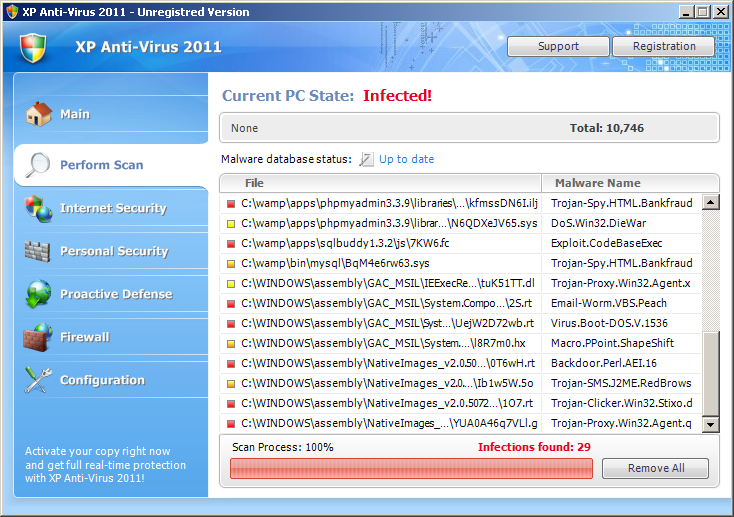
XP Anti-virus is fake antivirus software which mostly comes unexpected. It is a very close resemblance of Vista Anti-virus (2011), Win 7 Anti-virus (2011) or many other crimewares that will change their name according to OS found running on your computer. All these computer viruses hailing from multi-named virus family seem to be getting way more active these days as they infect computers in unbelievable frequency. Be aware that your computer may also get infected, so install ‘licensed’ anti-spyware to have the real time protection and avoid security holes that are used by XP Anti-virus 2011 for getting inside.
XP Anti-virus is installed with a help of Trojans but may also be propagated through fraudulent social engineering routines, like browser hijacking. The reason why it is reloaded instead of any other executable you want is additional modification of the registry. XP Anti-virus 2011 may also drop some harmless files in your system with the intension to find them and return as malware in its fake scan reports. As you may have realized, you will also receive tons of alerts and scanners that all will announce computer problems detected and them will offer to purchase XP Anti-virus 2011 license. This hazardous program will completely bombard you with such alerts:
XP Anti-virus 2011 Firewall Alert
XP Anti-virus 2011 has blocked a program from accessing the internet
Internet Explorer is infected with Trojan-BNK.Win32.Keylogger.gen
Private data can be stolen by third parties, including credit card details and passwords
Of course, it must be remembered that XP Anti-virus has no capabilities to find and remove spyware detected. Just like any other cyber threat from this malicious name-changing family, it will generate its misleading ads until you won’t get rid of it. All its pop-ups will be finished with the same event each time – recommending you to install and activate licensed copy of XP Anti-virus 2011. Note that full version is not for free, so later will find you ripped off. Never pay for this nasty rogue and its creators!
Please, remove XP Anti-virus 2011 because if left eventually it will make your system slow and almost functional. Use this removal guide and also run spyhunter or Malwarebytes Anti-Malware in order to remove it completely. To disable XP Anti-virus 2011, use this code of registration: 1147-175591-6550 or 9443-077673-5028 (updated 2012.01.14).
Multiname
Automatic Malware removal tools
(Win)
Note: Spyhunter trial provides detection of parasites and assists in their removal for free. limited trial available, Terms of use, Privacy Policy, Uninstall Instructions,
(Mac)
Note: Combo Cleaner trial provides detection of parasites and assists in their removal for free. limited trial available, Terms of use, Privacy Policy, Uninstall Instructions, Refund Policy ,
My computer was infected with XP anti-virus 2011. Completely unable to open a browser or email. I was told to either wait 6 days and the virus would self destruct or turn ahead the clock on the computer and the same would happen immediately. I waited the 6 days and sure enough it was gone without a trace. I am too much a novice to try the safe mode removal so I was delighted to see it gone.
“either wait 6 days and the virus would self destruct or turn ahead the clock on the computer ” seems to have worked. thank you
Eric : Unlikely. The trojan should not be removed, but stays dormant for new signal of malware authors. I would recommend scanning the PC.
I tried using the above code of registration (1147-175591-6550)
to disable XP anti-virus 2011. However, this number was
apparently invalid. Is there an updated registration number
that I can use to disable it? I intend to buy a full copy of
Spyware Doctor as soon as I can disable this virus. Thanks
Lee
Hey, I have been trying to get rid of this thing for hours, I tried your code and it just registered it and uploaded again, please help 🙁
The code needs dashes in it, hope this helps 🙂
hey eric, i might try that. . .
it worked. thank u
The code kinda activated the program, How do i remove it now? my computers getting sooo slow, and its been longer then 6 days and hasnt dissapeared 🙁
Reboot, scan with anti-malware programs.
Click crtl-alt-del and look for a process like lig.exe (or j, could be lji but not jqs.exe=java quick start) and end it. Then wait for the process to end (just a minute or two) and you can run malwarebytes or some other anti-virus software to take some of it down. Afterwards follow the advice above and clear up your registry to remove it completely. I think it waits until you run into something on the internet that activates it again. I’m sorry I don’t have the exact .exe name; I was trying to get rid of it fast because my computer was crashing. Still I recall it to be nearest to that lig/lij/lji.exe type name.
Okay so for two days Ive been seeing all that fake “I have a virus” crap popping up, I cant open up any programs, not even IE and all of a sudden Im on my lappy and the net opens but no more XP AV 2011 popups…but I still cant open anything up…WTF is that about???I also checked my processes and dont have any 3-letter processes at all…I already had Mal-warebytes installed but I cant access it at all, not even manually…
Oh… Then when I DL’ed SPYWARE Doctor an error message pops up when I try to install it that says “This file does not have a program associated with it for performing this action. Create an association in the Folder Options control panel.”
Angeelicious
Try creating another user on your PC and running removal programs from that new user.
I downloaded stopzilla for free and it detected over 30 infections on my computer and it removed the windows xp virus. I had to load the info onto a flash drive because I couldn’t even get a browser. All my files were hidden and I couldn’t access them at all. I thought I lost everything so I’m happy that I was able to recover them.
Moveebuff: When using stopzilla, make sure you double check each files it detects. Stopzilla is very aggressive at detecting, so it has more than one false positives. That is my experience with it.
I bought the program without reading this =( I wanna get my $59.95 back. I cannot find contact info to reach their customer service. My computer got infected and I had to buy another security protection for $59.95. Can anyone help me, PLEASE?!?!
bustachic : Contact your bank, not their customer care.
I had this virus five months ago and my system was completely disabled – couldn’t run any scanners, my anti virus software was infected, couldn’t run in safe mode, couldn’t use a usb with Malwarebytes installed, couldn’t use system restore. So I gave up and left the laptop off for 5 months and a couple of days ago I decided I have to try again to remove the virus and when I turned it on there were no fake alerts and internet explorer seemed to work. I was able to download Malwarebytes and Avast (I had to remove my old infected Avira). The scans were many and thorough until all corrupted files were removed. I had to turn on automatic updates as well. So leaving the computer dorment must disable the virus and then you can download real anti virus software to get rid of it.