
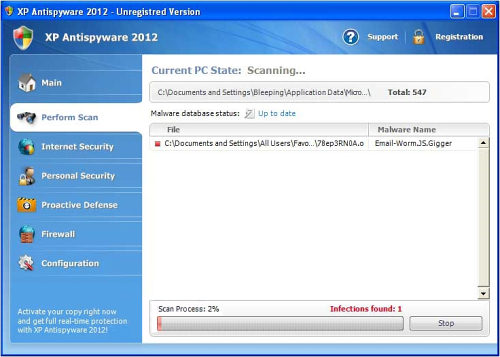
XP Home Security, Vista Home Security 2011, Win 7 Internet Security are new versions of multi -named Rogue Anti-spyware from Braviax family. These rogues are named randomly, depending on Operating System, and have always OS version in the name. This distinguishes them from majority of legitimate software and other rogues.
The names of parasites are as follows:
Note: They can go with year information (2011 in the end) or without.
| Win 7 names | Vista names | XP names |
|---|---|---|
| Win 7 Anti-virus (2011) | Vista Anti-virus (2011) | XP Anti-virus (2011) |
| Win 7 Anti-Spyware (2011) | Vista Anti-Spyware (2011) | XP Anti-Spyware (2011) |
| Win 7 Home Security (2011) | Vista Home Security (2011) | XP Home Security (2011) |
| Win 7 Total Security (2011) | Vista Total Security (2011) | XP Total Security (2011) |
During install, Win 7 Home security/XP Home security pretends to be a security update for appropriate windows version. It even mimics Automatic updates windows and alerts closely, to prevent early suspicious from the user. Once inside, Win 7 /Vista /XP Internet security 2011 starts its own dirty work. First, it creates its own executable (3 random letters usually) with couple of additional files. Then it modifies registry information to prevent execution of legitimate programs. Lastly, it makes itself known to force users into paying for its “full” version.
First you might notice alerts when you try launching legitimate programs. These alerts look like this:
Win 7 Home security 2011 Firewall Alert
Win 7 Home security 2011 has blocked a program from accessing the internet
Internet Explorer is infected with Trojan-BNK.Win32.Keylogger.gen
Private data can be stolen by third parties, including credit card details and passwords.
Although it looks legitimate, most of antiviruses would just disable the keylogger addon from infected IE if this was the case. Thus it is obvious, that this message is false.
Then it starts showing message alerts, claiming that your PC is under attack or heavily infected.
System danger!
Your system security is in danger. Privacy threats detected. Spyware, keyloggers or Trojans may be working the background right now. Perform an in-depth scan and removal now, click here.
System Hijack!
System security threat was detected. Viruses and/or spyware may be damaging your system now. Prevent infection and data loss or stealing by running a free security scan.
Privacy threat!
Spyware intrusion detected. Your system is infected. System integrity is at risk. Private data can be stolen by third parties, including credit card details and passwords. Click here to perform a security repair.
Stealth intrusion!
Infection detected in the background. Your computer is now attacked by spyware and rogue software. Eliminate the infection safely, perform a security scan and deletion now.
If you press on any of the alers, a scan window will appear that will detect various threats in harmless files. These threats are fake, and should be ignored. Deletion of the listed files by Win 7 Antivirus 2011 might lead to system failure or would require repair install. This parasite will refuse to repair the detected infections without payment, which is a ruse to get your credit card details.
These rogues will block legitimate webpages as well. This is done by adding a proxy server to your browser so you can visit only their webpages or get warning that the site is infected.
It is obvious, that you should remove this Win 7/Vista/XP Security, as it is fake and rogue nuisance. Removal guide bellow.
Special removal instructions for Win 7/Vista/XP Anti-Virus/AntiSpyware/Total Security/Internet Security/Home Security/ Security (2011)
1. You can use this key to disable majority of popups: 1147-175591-6550 or 2233-298080-3424 . Enter it in its manual registration section. This will not remove all the trojans. We are thankful for Xylitol for this key.
2. Reboot into safe mode with networking, download and run process explorer: https://www.2-viruses.com/wp-content/uploads/PE/eXplorer.exe (backup location). Start it and stop all 3-letter named processes, also processes named like garbage. You might need to edit out registry first.
3. Search for malware files on hard disk and delete them, edit registry OR scan with decent anti-malware programs : spyhunter, Spyhunter, Malwarebytes Anti-Malware, Hitman Pro
4. Reboot, update your antivirus programs (preferably to internet security versions) and scan again. Make sure you got all the trojans out.
UPDATE: 2012 version of Braviax multiname rogue.
In June 2011, we noticed rogue changing its year number to 2012. Although generally the same parasite, Win 7/Vista/XP Anti-Virus 2012 has a slight changes to its skin and files.
Thus now the parasite names look like this :
| Win 7 names | Vista names | XP names |
|---|---|---|
| Win 7 Antivirus 2012 | Vista Antivirus 2012 | XP Antivirus 2012 |
| Win 7 Antispyware 2012 | Vista Antispyware 2012 | XP Antispyware 2012 |
| Win 7 Home Security 2012 | Vista Home Security 2012 | XP Home Security 2012 |
| Win 7 Total Security 2012 | Vista Total Security 2012 | XP Total Security 2012 |
| Win 7 Security 2012 | Vista Security 2012 | XP Security 2012 |
| Win 7 Internet Security 2012 | Vista Internet Security 2012 | XP Internet Security 2012 |
There is an updated registration codes for this family of rogues announced my malware researcher Siri : 2233-298080-3424 or 3425-814615-3990 (updated on 2011.11.29) or 9443-077673-5028 (updated 2012.01.14).
An useful trick to disable These rogues like Win 7 Internet Security 2012 and others is changing PC time to 6-7 days in the future and then rebooting PC. After that you can reset the date to correct time. After this, scan your PC with Spyhunter or spyhunter to remove all trojans that caused the infection.
Full version of Spyhunter, spyhunter, or Malwarebytes Anti-Malware would have likely protected from infection.
Video guide how to remove rogue programs from Braviax family is provided below:
UPDATE: 2013 version of Braviax multiname rogue.
In 2012, Braviax has surprised with one more series with multinname rogues. Nothing much has changed since the 2012 version was released. Here is a list of the infections the were released on regular bases since October 2012.
| WIN 7 NAMES | VISTA NAMES | XP NAMES |
|---|---|---|
| Win 7 Protection 2013 | Vista Protection 2013 | XP Protection 2013 |
| Win 7 Defender Plus 2013 | Vista Defender Plus 2013 | XP Defender Plus 2013 |
| Win 7 Anti-Spyware 2013 | Vista Anti-Spyware 2013 | XP Anti-Spyware 2013 |
| Win 7 Internet Security 2013 | Vista Internet Security 2013 | XP Internet Security 2013 |
| Win 7 Home Security 2013 | Vista Home Security 2013 | XP Home Security 2013 |
| Win 7 Internet Security Pro 2013 | Vista Internet Security Pro 2013 | XP Internet Internet Security Pro 2013 |
| Win 7 Antivirus Pro 2013 | Vista Antivirus Pro 2013 | XP Antivirus Pro 2013 |
| Win 7 Antispyware Pro 2013 | Vista Antispyware Pro 2013 | XP Antispyware 2013 |
| Win 7 Antivirus Plus 2013 | Vista Antivirus Plus 2013 | XP Antivirus Plus 2013 |
| Win 7 Total Security 2013 | Vista Total Security 2013 | XP Total Security 2013 |
| Win 7 Security 2013 | Vista Security 2013 | XP Security 2013 |
| Win 7 Total Security 2013 | Vista Total Security 2013 | XP Total Security 2013 |
| Win 7 Total Security 2013 | Vista Total Security 2013 | XP Total Security 2013 |
To get rid of 2013 version of Braviax multiname rogue, follow the instructions below:
1. Start->Run
2. Enter https://www.2-viruses.com/downloads/spyhunter-i.exe and press enter
3. Choose continue unprotected and Save the executable on desktop.
4. Rename the executable to .com from .exe (make sure you see extensions) OR/AND download and run https://www.2-viruses.com/wp-content/uploads/exeregfix.reg
5. Run the executable. The XP antivirus pro 2013 windows should close.
6. Delete the files detected or disable XP Antivirus pro 2013 startup using msconfig.
Remember, that you get such rogues because your current security setup had failed. Running full versions of Malwarebytes Anti-Malware, Spyhunter or stopzilla would have reduced infection possibility.
Video guide on launching programs on infected machine
Automatic Malware removal tools
(Win)
Note: Spyhunter trial provides detection of parasites and assists in their removal for free. limited trial available, Terms of use, Privacy Policy, Uninstall Instructions,
(Mac)
Note: Combo Cleaner trial provides detection of parasites and assists in their removal for free. limited trial available, Terms of use, Privacy Policy, Uninstall Instructions, Refund Policy ,
omfg thank you so much i love you!!!!!!!!!!!!!!!!!!!
thank you!!!!
I got the xp total security on my wifes netbook somehow.and I can not get it off.it wo’t let her on internet
it wont let me run any programs unless i right click, run as administrator
Dude: That is enough for running anti-malware scans. Typically, they will fix registry as well.
Thank you so much guys you saved my life !
Keep helping people !
Thx alot man
It’s very easy just read the instruction here and you will remove put the key they provided on this website and then just read what to do next.
Thanx 2viruses.com
This is Great .. i used the codes then Safe mode with NET.
THEN MALAWARESSSSSSSS
NICE
Thank you so much!! Computer was completely inoperable because the “XP Home Security” and your steps made my computer all better 🙂
I went through your steps and it seems to have worked, thank you. However, now all programs, downloads etc. end with “open file with” and “choose the program you want to open file with”. I have gone to “look for the appropriate program on the Web” and downloaded files to fix this problem. When I try to open these file “fixes” in safe mode I get tossed to the same loop again. I have even tried “system restore” and get the same. What can I do?
Steve: http://www.dougknox.com/xp/file_assoc.htm . This is to repair file associations in Windows XP. on Win 7/ Vista you should be able to open programs by right-clicking on them and choosing run as administrator.
I keep getting these things from various question and answer sites like Ask.com. I’ve noticed one will be coming by the failed Java application error that pops up about 1 minute before these annoying malwares try to take over. Is there any way to get them in trouble for this fraud and thievery? Complain to the police, the Better Business Bureau, or someone?
While you are repairing you system, you can run programs without having to run as administrator. Just find the executable file with windows explorer. Then right click the file and select start instead of open.
Too bad this crap won’t let me boot my computer in any kind of safe mode in order to get rid of it.
ok i have this virus and im running vista…i know…i know…but it wont let me log unto the internet in safe mode. How am i suppose to download anything when i am unable to access the internet. Some one please help!
Ok I’m in safe mode with networking and none of my exe files are working. Anything I try to download either doesn’t work or says “open file with” and “choose the program you want to open file with”. I’m getting so frustrated because I don’t know what else I can do to help solve the problem and I’ve been working on this for 3 days now. Please HELP!!!!!
You need to modify registry to fix .exe file association. Do it with regedit or try with importing registry files : http://www.dougknox.com/xp/file_assoc.htm
I can’t gert rid of it!!!! Nothing is working….plz help!
OMG THAAAANK YOOOOOU!!!! Ive been trying to get rid of it forever!!! I LOVE YOOOUUU!!!!!
If you cant get into safe mode and you already have malwarebytes installed. go to control panel and change folder options to view file extensions. navigate to the program files> malwarebytes folder and change mbam.exe to mbam. com it can now be run. this wouldn’t work for ccleaner the last time i tried however
oh my goodness thank you so much! you are life savers if i knew you then oh my gosh i would give you the biggest hug ever! thank you!
@nick
dude enter the registration code it gets rid of it 🙂
i got the xp home security thing. Do i download the spyware doctor or do i have to uninstall it first. If yes, how do i unistall it
i downloaded the spyware doctor but it wont open when i click on it can you please help me
jason: try safe mode with networking, try registration codes prior launching or other tools
ok i understand it very well but i cant remove it how to remove it plz answer me very fast :):):):)
How to i get on to safe mode??
Reboot, while screen is still black press F8. A menu should be seen. Choose from menu.
I am beginning to think that the creaters of Spyware Doctor are the same ones that are creating Vista anti-spyware 2011 and all of the variants. I find it funny that spyware doctor is the only software that can remove these and unfortunately you have to pay for the program.
Chris: Try other software. At the moment, there are more software that can remove different strains of this parasite.
Where exactly do you enter the key?
FYI: I can access the internet as a non-administrator.
Ok i entered the registration key but it just says its invalid.
Guys, thank you so much. I got that bulls**t virus on my work computer while working from home. The thing is, I was only visiting what I thought were legit sites (CNN, MSN, Newsweek). This piece of garbage software was causing me not to be able to work. Everytime I opened an IE (or Mozilla and Chrome). It would take me to this bs site. Totally annoying. Thank You, Thank you, Thank you. Much appreciated. I’ll have our IT guy’s delete it in it’s entirety Monday.
I was tricked into buying that this evening!!!! How do I get my money back and disable this…?!?!?
Rachel Woods
Contact your bank.
@ayana
When you copied the key it probably also copied the SPACE after the last 0. Just delete the SPACE after the zero and it should work fine (that’s what happened when I tried it)
@admin
I ignored all the popups on Win7 and just a restore point that was 7 days previous to my infection. That took care of it – AS FAR AS I KNOW – is there any other way to check whether its still there someplace?
I tried everything on the list and tried to install Malware Bytes. It won’t let me. Even on safe mode. Now it’s changed me version of Windows, says it’s not a real version. So, I guess all I can do now is reformat. Which really sucks.
I actually had a virus, so I downloaded the full version with a key code I found on some site. Having searched for Win 7 nothing has came up? :s, I have currently downloaded the latest version of AVG and am running a full scan but nothing seems to be coming up. I am now not sure if it is on my computer and AVG doesn’t seem to have picked it up! What should I do ?!?! Please reply asap as this is causing myself and my parents great distress. 🙁
Hi thanks so much for informing us of this. I jusy bought mcafee after this virus got on my computer and its not finding this virus. Do I have to downoad the spyware doctor because I cant get on the internet to get it. How do I get it without the internet if thats the only thing thay will work. Thank you
You say to remove various hot key registry entires and security files. Do you still have to do this if you sucessfuly ran Malware Bytes Anti Malware? Also I was able to access the hot key registry but was unable to work out where the security files such as %AllUserProfiles% etc were located to delete them. Can you point me in the right direction?
what do you mean by the manual registration section?
Just to be sure… if I run malwarebytes and it comes across as clean, and if I can’t find any of the registry entries or files listed on this (and various other) websites that are known to be associated with this virus, does that mean I’m clean? Even though I only entered the reg-key and ran AVG then updated and ran malwarebytes, I can’t find anything else to get rid of…
Gini: No anti-virus or anti-malware is 100%. If you see some symptoms, you need to scan with other tools as well, as both MBAM and AVG can miss fresh versions of parasites. I recommend Hitman Pro in your case http://www.2-viruses.com/reviews/hitman-pro .
@admin: Thank you! Doing so.
@Shaina
Shaina, to get on the internet and access anti-virus software, you may have to use a separate computer, like one at a local library, and download the software onto a memory stick (you might want to give it a different name so your virus won’t detect it). You should be able to upload it from the stick to your computer and go from there.
Also, I recommend downloading alternate internet browsers that aren’t normally targeted by these viruses to use as back-up in the event of getting a virus, such as ones like Opera: http://www.opera.com
ilike accees from downloadddinq
and i can find any of the registry
Thx so much!!!!!!! I love u 4ever.
i purchase viste 2011 aniti-virus and i try to apply it it keeps telling me a registration key …i dont know whata that is .
Joshua: you got scammed, Vista Antivirus 2011 is not real program. contact your bank
Thanks so much!!!!!!
I used the key for the manual registration and I sill can’t find te file in my hard drive. I have runned several scans and only find cookies. I already got rid of the trojans but I can’t remove the vista antivirus program. My windows defender is gone and this is in its place.
Chris: Update SD before scan, or try Malwarebytes / Hitman . These kinds of malwares are updated daily. So sometimes one tool has better results against them, sometimes another.
I need help desperately I have no idea what 3 letter named processes im supposed to kill this is ridiculous :(All I see are svchost.exe mfevtps.exe mfefire.exe svchost.exe they are all in red do i kill all of them or what?
Well i got rid of the ones in red now my computer is crashing even more.This is just what I needed couldnt you hav been more SPECIFIC? Sheesh now im screwed .
OMG this is ridiculous now malwarebytes is NOT picking up anything even though its scanning!It keeps saying objects infected:0.
damnit now its saying its detected 2 things then crashed and wouldnt let it finish scanning.
tq for the key ..I am thinking how to remove it…
Is Windows Antivirus 2011 another name for it?.. I’m wondering
because it just came up on my other computer… I hope its not o.o
Well I just looked it up and Windows Antivirus 2011 / Fast Windows Antivirus 2011 is fake. Now I just have to find out how to get rid of it…
my son was about to blow a gasket. thanks!
This virus popped up on my computer tonight. It came at me as Win 7 Security 2012. I used the registration key provided and it removed the freeze from my computer. Restarted my computer, but couldn’t get it to open in safe mode. Had to access the internet somehow tho, so went ahead and downloaded the scan program from Malwarebytes. I can’t believe the amount of junk it has flagged already!! I missed the stop processes step… so will probably do that once the scan is done, download avg free, and some of the other useful tools provided on this website. I am so thankful for sites like this! Thank you!!
Hi i followed the instructions above and downloaded the spyware Doctor and ran a scan and it found like 200 odd corrupted files when this scan was over and i deleted item and rebooted my laptop the icon for Vista Antivrus 2012 was still there along with several new files on my desktop? how do i remove the virus completely after i have downloaded the anti virus programme? The only reason i can get on the net etc… is that i put in the manual key so that the pop ups stopped! Thanks for any help!
Elizabeth
Do you updated SD before scan? Make sure to do so. If yes, then you got fresh version of malware and you have to try more tools: Malwarebytes, Emsisoft. These parasites have more than one version. Alternatively, you can try to contact pctools support ( http://www.pctools.com/support ) and they will walk through removal process.
its saying the key is invalid when i put those numbers in.. any ideas?
shay: use alternate instructions from here.
Alright going to try and fix it after reading all the comments and guide…
Heres a trick to get rid of it. If you have vista and system recovery just go back to your last backup and run it, it was the easiest way I got rid of it. I then ran malwarebytes and went into task manager and checked that I only had one file of csrss.exe and drm.exe files, of which i did. This works great if you do backups quite often, you don’t lose anything in the recovery.
I also searched & confirmed that this vista 2012 thing was also a virus. I have verizon protection & it has been scanning, finding NO viruses on my system. But to be on the safe side, I went to microsoft.com & downloaded Microsoft® Windows® Malicious Software Removal Tool (KB890830). Both are scanning my system right now. I am going to disconnect from the internet & see if the scans find anything when I wake up.
I searched CNN to see if there was any information about this virus which seems to be running though windows but found no results. I guess the tech section cannot post every virus out there…..
The link for the microsoft download: http://www.microsoft.com/downloads/en/confirmation.aspx?FamilyId=AD724AE0-E72D-4F54-9AB3-75B8EB148356&displaylang=en
Uhm…. microsoft scan just finished and found NO threats on my system…
@L33
MS MSRT is not that efficient against some rogues. You have better results with 3-rd party malware removal programs.
FYI – if you purchase the program, you are out the money! You authorized the purchase and your bank can’t do anything. The web address on your statement is a invalid web address! CRAP! Out $70.00 and had to cancel my debt card and wait two weeks for a new one. Lesson learned!
Alright, I’ve gone through the bypassing part of this tutorial, but is there a good free version of any antivirus program? I can’t afford to buy the recommended antivirus and malwares suggested.
Rodney: Try mbam or hitman pro. Hitman pro got 30 days trial, it should be enough. Alternatively, try Kaspersky, 30 day trial as well.
Patty: That is why it is better to use CREDIT cards for online purchases. You have a lot of time to dispute the charges, and in most cases these can be reversed (at no or low cost).
I did the date and time switch a roo. It worked like a charm. How do I prevent this from happening again?
Chab: Consider getting firewall, antivirus, and anti-malware program with real time protection (Spyware Doctor, Malwarebytes, etc) OR decent Internet security suite (kaspersky, Eset, etc. ).
My wife had this virus this morning (on her laptop, not personally!),I went into windows safe mode and managed to get it to do a system restore to an earlier time, have upgraded software protection and all seems fine!
you guyz rockz , you really helped me. thank you !!!!!!!!!!!!!!!!!!!!!!!!!1
Excellent posting, thanks.
Fixed a friends infected laptop in approx. 2hrs.
Register the product with the code above
Remove the necessary registry entries
Manually remove the suspicious .exe programs
Restored .exe file association
Installed and ran SUPER Anti-spyware
Installed an Internet Security Suite
You Guys are the Best, I was just about to through my labtop out the window REALLY. I am unemployed, broke and a miserable mess. I love you guys. KEEP DOING A GREAT JOB.
CLUELESS! HELP!
okay, so done all that was instructed, and now when i open internet explorer, its sayin “set association blah blah” but how do i know what extension it is on the list whats tha name of it????????? baffled!
DiddlyDoh: start task manager (ctrl+shift+esc), new task, iexplore.exe . Your registry got messed up. You will have to fix it : http://filext.com/faq/broken_exe_association.php
Is there any way to find who is the creators of this malware?
After all they do receive credit card information from unsuspecting users.
As long as they remain unharmed by their actions they will have little incentive to stop harming others.
Thank you. I was pretty miffed when this virus took over, you saved my sanity.
Win 7 Home Security 2012 well designed little BLIGHTER.
K got internet working but i can download stuff from the net anymore….
….i mean i can’t not can
…..And I can’t retore exe file.. Something about “…not all data was successfully written to the registry. Some keys are open by the system or other processes
holy crap. i read this long way to do it, and that scared me. but the calendar thing worked like an amazing little miracle from heaven. im doing the scan right now with malwarebytes and i think i might just survive this 🙂 i was about to head off to best buy ready to spend 200 bucks! thankyouthankyouthankyou!!!!
Would Norton internet seurity work for the scan? at the end instead of the doctor program or is just the doctor program?
Newbie : Norton can remove some versions of this parasite, so does SD, Malwarebytes, Hitman pro and some other tools.
Well, this may not really help once you have been infected, but, I found a way around the virus so at least surfing the web is possible, but, some may not want to do this due to nature of Tor Browser but once this great piece of software is running you can use the firefox port app (included in tor browser download) and get on the web so you can do the research to fix this problem (I *just* did this to find this website! I have been surfing the web for ages and have *never* been hit with something like this). I would imagine this works in any situation when a piece of malware or what not is blocking once from using http protocol through a browser (both fire fox and ie were blocked for me).
Fu*k this piece of garbage and those who made it.
ahhhhhh please help nothing has worked ive tried using spyware doctor but it wont fix my computer unless i buy it ? ive tried opening my malware bytes but i cant et it to run and i even tried system restore with no luck what should i do?
Shauna: delete files manually, or try other tools.
I need help…….everytime I go to kill a program I get an error telling me “access denied”
Also..none of the keys work
I got rid of the virus but wireless modem does not work. It finds my (or neighbors) network but cannot Acquire Network Address. Just keeps trying. Cannot find it hard wired either.
Curt : scan with TDSS killer. Also, you might have to reinstal your wireless driver.
Replaced wireless driver and scanned with TDSS killer and still searching for network address.
Curt: something wrong with DHCP client. Temporally solution is to set static address from the same subnet as other PCs in your network.
I used the registration code and it removed the virus. Then I ran the SpyBot Malware program. The computer seemed to be working ok, but I could not access the internet using Internet Explorer 9. I could however get in using Mozilla FireFox. I shut down my computer and it ran through loading updates then closed. This morning when I turned the computer on, it won’t load Windows. It prompts me to either start Windows repair or start Windows normally. I have tried both and neither work. Can anyone help?
It might be the case that spybot messed up with some drivers. This parasite might come with rootkit and replace drivers required for system operation. First thing to try is to boot system into safe mode. Also, consider trying system restore from there, or repair install using Windows CD
Thank you soo much. This got rid of all them dam trojan and fake security viruses. <3
I tried System Restore- back 24 hrs.. no joy
This virus is called: Trojan32.FAKEAV.1cyr I could not run my Zone Alarm from the shortcut icon. I right clicked it into “Run as Administrator”. Zone alarm started it’s scan and identified a malware “rvu.exe” in two places on the “C” drive. I rebooted after the scan finisfed(as instructed) and my pc restarted as normal with the fake virus removed.
Jerry: Trojan32.FAKEAV.1cyr is in-company name for family of trojans distributing this rogue. For other companies, the name might be different. In many cases such generic names mean that the malware is detected by generic routine.
Can you please help me?? Win 7 internet security 2011 is effected with trojans-bnk.win32.keylogger.gen. How do i delete this from the computer, really appreciate all the help!
trojans-bnk.win32.keylogger.gen is fake infection. Scan with anti-malware programs and read the guide.
So I have done your steps, and everything seemed fine for a couple days. then I got the Virus back. I assumed it repaired itself. So i redid the whole thing this time manually removing it and downloading ccleaner and spybot and again everything seemed fine for a few days. Now it is back again and this time i am downloading hitman pro too. what should i do to keep it from coming back?
Eric: it is likely that you get reinfected. Several day gap from messages mean that braviax malware is removed. This might be a trojan downloader on your system or visiting infected website. I would scan with different program (hitman for example), and then get something with real time protection ( Kaspersky, ESET are good choices)
@admin
Ok, I figured it might have been an infected website issue. So I limited where i went. is it possible Yahoo.com and Youtube are infected?
Eric: unlikely.
@admin
I have “Steam” on my computer. i seem to have gotten rid of the virus but when I click to open steam and i put in my user-name and password it freezes up and does not respond. So I went to their website and re downloaded the file and clicked to repair it and this error pops up. “Error 1316 a network error occurred while attempting to read from the file:
C:Users\Feren\Documents\SteamInstall_English.msi
Is this from deleting certain registry items or something? If so what should I do?
This site helped out alot.. Got the virus out of my notebook
Another method is the ctrl+shift+esc to bring up task manager once you have it wait for rogue software to appear than in applications right click go to process will give you the 3 letter .exe than right click go to file location. i delete the files there from pc after ending the process and then do a reg edit to fix the cant open .exe file works fine. Unfortunately the site i like to go to is littered with the damn things killed 5 as of today for the week.
IM GOING TO RAGE ON THIS COMPUTER
The virus is in my safe mode as well. There is no way I can get to the internet to download anti malware. I tried to get a USB drive working to get files onto it before I tried the system restore and it won’t let me access it. I can’t even do a system restore- it won’t let me. There are very few things that I can actually do on my computer. The calendar switch didn’t change anything. What else can I do?
Sarah Boot in safe mode with networking. Press Ctrl+shift+esc, go to process tab and kill process with 3 letters in its name. The malware window will disappear (it will be restarted in couple mins). You then can download programs.
To launch programs, on Win 7/Vista, right-click on them and choose run as administrator.
it says invalid key when i enter the codes you gave me
@admin
How are you supposed to go to a website to fix the registry when you can’t even open a browser? I tried Google Chrome, Mozilla, and Internet Explorer and I get the loop “open file with” and “choose the program you want to open file with”. I think my Spyware Doctor quarantined the virus’ operations because I don’t see it in the processes to find where it’s coming from and delete any files. I have my Spyware Doctor running a full system scan but I can’t do anything else. Is there any way to get out of that loop without having to open a web browser? I’m on my husband’s computer trying to fix my own laptop.
@Heather
Ok, so I was able to use the Run as Admin on my Mozilla but the registry fix website won’t work for me! I when I try to do the command prompt REGEDIT.EXE it gives me the stupid loop again! Please help!
Heather : Download it to usb stick or move it through network. it is a single .reg file.
I used the date change method as described, then removed it with the Virus protection program already on the computer and it worked. Thanks so much for this public information!
guys..
i was stupid enough i have paid for it coz at that time i was so desperated..
and the day after i found out it was a fake one and was a hugs virus.
i have been trying to google/youtube how to remove it from my Pc..
i have donwload Superantispyware…and scanned my pc…seems to be ok..
but then it isn’t gone away…so i tried to donwload malwarebytes
seems like everything is ok but again… superantispyware said i still have detected items…
Gosh… somebody help meeeeeeeeeeeeeeeee i m using windows 7
Kwannie : SuperAntiSpyware is not too good against these parasites. It marks lots of cookies as well, which are harmless. If mbam fails, try spyware doctor.
I had this virus today, couldn’t uses Malaware even in safe mode.
I did a system restore back to a few days ago – no more pop- ups. I then ran Malaware and it found nothing. Hope it’s gone.
Has anyone suggested this method?
I should add that mine was 2012 version of the virus.
I have a foolish question. I am very new to this and just got this virus today. I put on the spyware doctor and I have the registration codes but it wants a name. I put in my name and it says those wont work. Help please!
Tawna Fisher
The code is for fake-registering malware. It should work with any name.
It’s not working for me. I’ll try again.
@nick
use registration code they provide to stop popups and internet block. then you can go back on to this site to download antimalware programs they suggest.Would recommend you also save programs onto usb incase something like this happens again.
*one code that worked for me mentioned on another site is 3425 814615 3990
Alternative: switch user, go in as guest and download antimalware programs onto usb **this worked for me.
Im using another computer mine got this virus. I got the blue scren and everything, can I still start it in safe mode?
Panda Security completely shut down by this virus. Ideas?
Thanks so much – the most recent code worked! Cannot express my appreciation.
Go to this Microsoft website. You can get rid of it.
Malwarebytes doesn’t work, Microsoft Security Essentials won’t stop it. I haven’t tryed Spyware Doctor.
http://answers.microsoft.com/en-us/windows/forum/windows_vista-security/how-do-i-remove-vista-home-security-2012-virus/1e3ea9ab-8b1b-486f-b840-1d1fd4988322
or try this download http://www.microsoft.com/downloads/en/confirmation.aspx?FamilyId=AD724AE0-E72D-4F54-9AB3-75B8EB148356&displaylang=en