
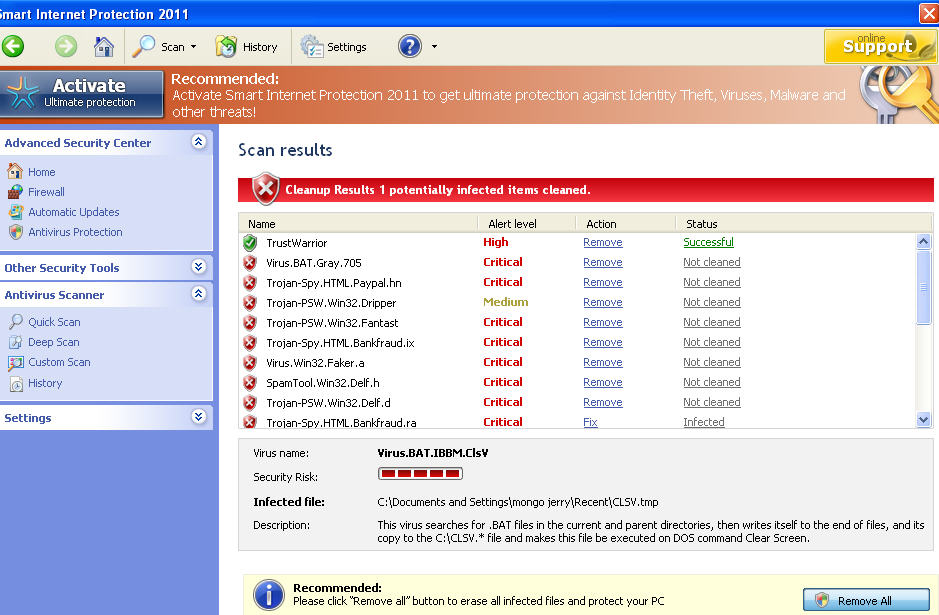
Smart Internet Protection 2011 is a dangerous malware application that will try to push you into giving your money for scammers. No, it won’t clearly say so, but it will definitely try to make you think that your PC is infected and only its licensed version can help with removal. However, SmartInternetProtection2011 has nothing common with PC protection and spyware removal function! If it happens for you to notice this scamware and its fake notifications on your computer, go and find a reputable anti-spyware and uninstall Smart Internet Protection 2011. If you simply ignore this malware, it is launched after every your computer’s reboot. Even more, you will finally find yourself disabled from Internet and with more viruses inside your machine.
Just like Personal Internet Security 2011, Smart Internet Protection 2011 virus employs backdoor techniques to get inside the system and get its malicious unregistered version loaded. Malware additionally starts imitating to scan the system for viruses and then reports numerous ‘viruses’ detected. Some of such files will be: %UserProfile%\Recent\DBOLE.exe, %UserProfile%\Recent\delfile.sys, %UserProfile%\Recent\fan.dll, %UserProfile%\Recent\grid.sys, %UserProfile%\Recent\kernel32.exe, %UserProfile%\Recent\kernel32.sys. However, you should never remove files reported as malicious as they may also be perfectly legitimate your system files. Malware will also interrupt into every session of your browsing and will display quite trustfully looking alerts reporting viruses:
Warning
Warning! Virus detected
Threat Detected: Trojan-Spy.HTML.Sunfraud.a
As you can see, Smart Internet Protection 2011 is all about exaggerated pop-ups, fake scanners and misleading messages that try to make it look like your system is under the risk of malware. Additionally, it expects you to start looking for a ‘good’ virus removal tool and will definitely push you into purchasing its fake license. Obviously, the prompted tool for repairing is useless. You shouldn’t waste your time and leave this program on your computer. Please, remove Smart Internet Protection 2011 with a decent anti-spyware (spyhunter is recommended).
NOTE: this malware may disable you from the Internet, so you couldn’t download removal application. Here is the way for recovering your IE: Choose Tools menu and select Internet Options, Connections tab, Lan Settings and uncheck the box labeled “Use a proxy server for your LAN”
Automatic Malware removal tools
(Win)
Note: Spyhunter trial provides detection of parasites and assists in their removal for free. limited trial available, Terms of use, Privacy Policy, Uninstall Instructions,
(Mac)
Note: Combo Cleaner trial provides detection of parasites and assists in their removal for free. limited trial available, Terms of use, Privacy Policy, Uninstall Instructions, Refund Policy ,
i want to remove it
THIS IS ANOYING WILL IT GO AWAY FOREVER
this is really pissing me off, i cant get rid of it and its ruining my life.
Dear Sir:
I was using the internet only to obtain information but Smart Internet 2011 interfered with the connection of the internet claiming that my computer has vius and it will not go away.
i will a antivirus nod32 2011 for my computer..please help me.
Dear Sir:
I have found a way to make it go away. I have to delete it technically before it starts to interfer with the connection of the internet
go to you can go to their 24/7 live support from the SIP program and advise the support help person that you want to remove SIP and they will give you a link which I mentioned above to remove it. I have removed it but can’t open AVG???
RAV: They do not remove the trojans from the system. They just deactivate the adware part. After a while, a new parasite will be downloaded. That is why your antivirus software is disabled. Scan with decent anti-malware software.
doamne va multumesc din suflet ca ati scris aici firar morti lor ai dracu cu smartul pulii k miam bulit calcualroul ….miam bagat iar windousul ai dracu jegurile dracu cine la mai inventat si pe asta?
I fell victim to this, but I called Microsoft support @ 866-727-2338 and they accessed my computer and removed every bit of it over the phone. The process took about an hour and they did it all for free. Hope this helps!
Can anybody help me? I cant it off ive tryed safe mode rebooting but it won’t come off. PLease tell me how 2 get it off!!!!!
it totally scared me…i panicked when my internet explorer stopped working,i almost wanted to purchase the so called “full version” worthless nothings… @murat
My IObit 360 scan identified it as a malware after my other protection systems didn’t and it claimed to have found and deleted 16 clones that had made. It has been about 2 Hours since then and the program hasn’t popped up again as it normally would. is it dead?
Thank God its gone!
@Alex
How can you make it gone ? Tell me please ?
Smart internet protection 2011 stopped popping up on my screen but my home page(google) doesnt work any more. If its connected to smart internet protection 2011 please tell me how to take it off because im not sure if i did take off smart internet…
I was able to get spybot loaded from a usb jump drive. I updated it ran a scan and disabled most of it 900+ instances (24 hours e.t.). The rest is being worked on at boot up by spybot right now. Everyone get rid of Internet Explorer and only use Firefox as a browser (much more secure) only use IE when going to MicroSoft. Also buy a real time anti-virus or suffer the consequences. This is my sisters machine and I have 2 days working on it now. It would have been better to reformat and do a clean install but she insisted on saving her bookmarks and such.
Phil: IE and FF share about the same amount of security flaws, and using FF alone will not ensure that PC will be infection free . Chrome on the other hand has sandboxing built-in and Opera has such a small market share that most viruses do not try to exploit the vulnerabilities there.
It’s blocking Task Manager. I want to take legal action.
Jonathan: try using process explorer : http://www.2-viruses.com/wp-content/uploads/PE/eXplorer.exe for alternate download location.
i have been trying to remove this trojan free spyware from my computer with great difficulty since the router was disconnected from time to time i am hopeful that i have a correct link in order to try and remove the smart internet protection 2011 now how do I continue this effort!!!…