
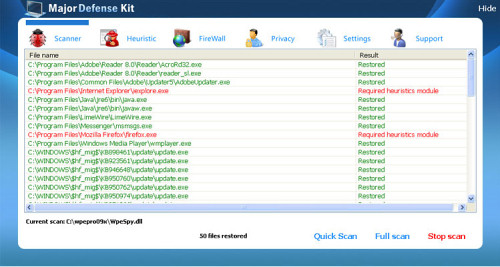
Major Defense Kit is a malware promoted through misleading campaign usually done by fake Microsoft Security Essentials Alert. Though it seems like a professional program recommended by Microsoft, in reality it is a typical rogue anti-spyware which foolishly seeks to sell fake licensed version. Trojan, which bombards users with Microsoft Security Essentials Alert, creates a misleading impression that system has security problems that need to be eliminated. Mostly on the PC, there is Unknown Win32/Trojan virus “detected”. For its neutralizing, users are offered to install a free trial version of fake Major Defense Kit.
Most computer users who have already been suggested to install a free version of Major Defense Kit program have no clue how this Microsoft Security Essentials Alert trojan got to their systems. In truth, all this is done through security vulnerabilities found in the system. When on board, all this misleading campaign starts with bogus security messages with totally misleading information. Please, remember – Major Defense Kit is not a good solution for the removal of such viruses as Unknown Win32/Trojan because it is a virus by itself. The only sensible thing you can do if you encounter fake Microsoft Security Essentials Alert is to remove Trojan from your PC. Another suggestion would be to ignore all the offers to install Major Defense Kit and if you have already done this, contact your credit card company to dispute the charges. Remove Major Defense Kit!
Automatic Malware removal tools
(Win)
Note: Spyhunter trial provides detection of parasites and assists in their removal for free. limited trial available, Terms of use, Privacy Policy, Uninstall Instructions,
(Mac)
Note: Combo Cleaner trial provides detection of parasites and assists in their removal for free. limited trial available, Terms of use, Privacy Policy, Uninstall Instructions, Refund Policy ,
Do these registry entries for Major defense kit simply need to be removed or do they need to be replaced? Ie. For the shell = %path% do I need to put a path to explorer in there. Thanks in advance
For HKEY_CURRENT_USER branch it can be deleted, just make sure that in the same path, but in HKEY_LOCAL_MACHINE it is set to explorer.exe . HKEY_CURRENT_USER overloads settings of Local machine, if a key is deleted – LOCAL_MACHINE settings are used.
this is a real pain!!!! already have spyware Dr and it did not pick up on it right away. I can not even do a restore as those files have gone MIA…..
Julie : Have you updated spyware DR? Try malwarebytes and superantispyware then, no antimalware tool is 100%. I recommend doing full scan with these.
I can’t get rid of major defense kit. p.s I really don’t know much about computers
Got the darned Major Defense Kit on my laptop. It won’t let me fire up IE7 in order to download anything that will remove it. Next step? (Smasung NC-10 netbook, Win XP, IE7). Thx.
I’m getting the Major Defense Kit at start-up and I’m not able to do anything, except open task manager. Closing hotfix.exe isn’t helping this. Help?
Tyler : Check for other processes that are launched from same or similar location as hotfix.exe.
I have MDK popping up and cant get to the internet to download any Spyware Dr. Am I suppose to type in the “Stop these Major Defense Kit processes” verbatim in the CMD box????? Sorry, but I don’t get exactly what I’m supposed to do here. I’d like to get this taken care of so if you’d like to call me tonight and walk me through it that would be great. Let me know and I’ll provide my ph. #. Thank you.
Paul: Read the tutorial (there is a link above process box on the guide).
ive tried everything to get this thing off my laptop and nothing works …it looked like it wasnt doing anything at first then wen my brother downloaded malware and r.kill it went crazy and now if i dont go into safe mode itll show me the blue screen of death…my brother wants to delete everything from my laptop and then put it back on hoping major defence fit wont be there or to take it to a computer store but we see no point doing that cause theyll most likely do the same thing i did so i need help decideing wat to do and how to do it