
FBI Ransomware is an aggressive scam that has been spreading on the Internet under the title of The FBI Federal Bureau Investigation. It’s an alert claiming that your PC is blocked due to several reasons. For example, violating Copyright and Related Rights Law (Video, Music, Software) and illegally using or distributing copyrighted content, viewing or distributing prohibited Pornographic content and similar things. It also claim that your computer is infected by malware, which is a result of violating the law on neglectful use of personal computer. The ransomware will use generic sentences without providing exact reason for blocking your PC, though it would try to scare you with prison sentence.
Basically, you will have your system completely locked so you will not be able to perform any tasks there. At this stage it’s quite easy for the computer hackers to gain some money from you as you are not able to do anything. What FBI ransomware does is stating that you must pay the fine through MoneyPak of $100 or $200 (depending from version) in order to unblock your computer. It also says that when you pay the fine, your PC will get unblocked in 1 to 48 hours after the money is put into the State’s account. Easy as that computer hackers are collecting from $100 to $200 from each victim. The money is collected using MoneyPak or PaySafe pre-paid cards. Thus it is obvious that FBI Ransomware is a scam. You have to know that this malware is created just to scare you and to rip you off. The only way to stop this annoying alert is to remove the parasite, and it is still possible despite your PC being locked.
It is worth mentioning, that FBI ransomware is targeted for users from United States and Canada, while there is another version, called Ukash Virus, most common in Europe.
Note: If you can access another user from the infected PC, download Spyhunter on that account, launch it (if you need, run it as infected administrative user). Perform a full scan. This is by far the easiest way to remove FBI Ransomware without any data loss. Another trick is to pull out the network cable while PC is booting and pull it in couple minutes after the startup to download anti-malware programs. If you can’t access another account, follow the guide bellow or call +1-888-334-2444 (USA / CA ) for assistance.
Versions of FBI ransomware
FBI Moneypak Virus – The most common versions of FBI Ransomware that require payment through Moneypak Payment system.
FBI Department of Defense Virus – basically the same virus as the FBI Ransomware, the only difference is that it comes in a different design and mentions department of Defense. It is spread not so widely as FBI virus, but will perform the same malicious actions on your OS.
FBI Cybercrime Division virus – Another skin of FBI Virus that refers to Cybercrime Division.
FBI AntiPiracy Warning – This is a symptom of some of the FBI Ransomwares – a fake message that states that you have broken some laws and due to illegal activities performed online you need to pay a ransom. You can’t do anything on your computer before you pay for them or delete this virus.
FBI Online Agent Virus – yet another version of FBI ransomware that comes in slightly different looks. It blocks the whole system and displays message that in order to unlock it you need to pay $200 ransom.
Green Dot MoneyPak Virus – A minor FBI virus version that has distinct design. It is limited to one version of trojans thus it is easier to identify correctly.
Paysafecard virus – Paysafecard is a pre-paid card system similar to moneypak. It is used by many versions of FBI Viruses in USA, but paysafecard viruses are less common than Moneypak ones.
United States Cyber security – Yet another ransomware that is relevant to FBI virus. Targeted specifically to the users from United States and Canada.
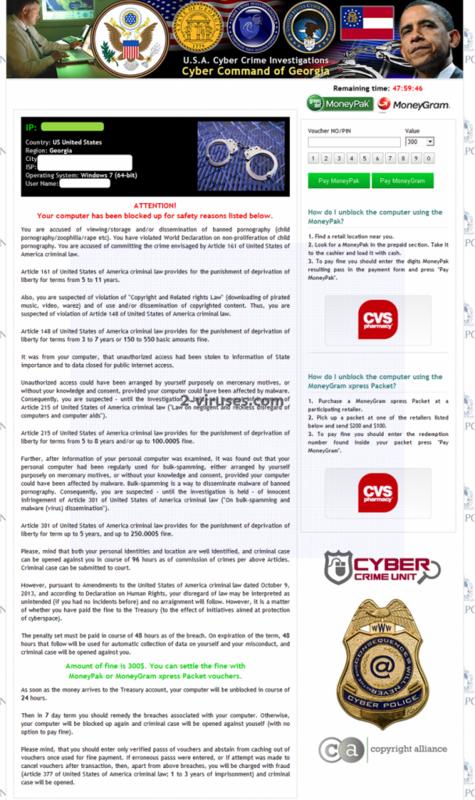
Cyber Command of [USA State] virus – a state – specific version of FBI virus that uses IP detection to show warnings. Any state (eg. Texas, Georgia, New York) can be used in the name. These parasites were popular in Autumn 2013.
Main ways to get rid of FBI virus
There are multiple versions of FBI ransomware, all with similar design. Some can be recognized from misspellings : Federal Bureau Investigation virus (lack of “of”), FBI Online Agent, etc. Others can not be distinguished that easily as use same text and layout. There are more than 10 different families of trojans behind this scam.
For practical purposes the difference is in the way FBI Ransomware launches and which system functions it disables. This is enough to find the most suitable way to get rid of them.
- Type 1: Versions, that do not launch in safe mode and safe mode with networking.
- Type 2. Versions that do not launch in safe mode with command prompt, but launches or show blank screen in other modes. Typically, launch at once after you log in without larger delay.
- Type 3. Versions, that disable all safe modes.
If you can’t access another user account to run anti-malware programs, use this guide to remove first type of FBI ransomware:
- Reboot and press F8 while PC is booting
- Choose safe mode with networking
- Launch MSConfig
- Disable startup items rundll32 launching something from Application Data. Optionally, disable everything you do not recognize.
- Reboot. FBI ransomware should not load.
- Download https://www.2-viruses.com/downloads/spyhunter-i.exe and scan your PC.
For the second type of FBI Ransomware, this guide will work :
- Reboot PC in safe mode with command prompt. This should allow overcome all versions of FBI Ransomware
- Run Regedit
- Search for WinLogon Entries. write down all files it references that are not explorer.exe or blank. Replace them with explorer.exe
- Search registry for these files and delete the registry keys referencing the files
- Try to reboot and scan with Spyhunter.
If everything fails, you have 3rd type of FBI scam. Then there are following options:
- Attach your PCs hard drive to another PC and do a full system scan with anti-malware programs.
- Use alternate OS scanner like Norton Power Eraser or similar
Automatic Malware removal tools
(Win)
Note: Spyhunter trial provides detection of parasites and assists in their removal for free. limited trial available, Terms of use, Privacy Policy, Uninstall Instructions,
(Mac)
Note: Combo Cleaner trial provides detection of parasites and assists in their removal for free. limited trial available, Terms of use, Privacy Policy, Uninstall Instructions, Refund Policy ,
i had this at the weekend and fixed using combofix although i ran ms sercuity essentials and it found 3 trojans so worth running something like that afterwards
I had this as well and combofix removed it! Tried several others that did not work.Just follow all the instructions and it works!
can mcafee get rid of this? like the anti virus because thats what i have please respond i dont want to buy another anti virus
Lee : try it. After some time, it will surely be able to get rid of it.
My PC was blocked. I downloaded Kaspersky bootable disk and booted my PC with it. I scanned the PC with Kaspersky and it couldn’t find any problems. I booted into safe mode and scanned the computer with Microsoft Security Essentials (Free Anti-Virus). It found the trojan and removed it. My PC is working just fine!
ComboFix did the job. Through the program on a thumbdrive from a working PC and loaded it to infected PC. Reboot PC and make sure your network cable/wireless connection is off first. After ComboFix does it’s thing, just reboot the PC. All good.
I followed the steps and kept hitting F8 and it went straight to the Microsoft Windows XP Professional?
An easy way to get rid of this virus is to do the following: restart and hit f8 as soon as your computer comes on, as stated above, but then select “safe mode with command prompt”. When the prompt comes up type in: rstrui.exe and hit enter. You will be given the option of restoring to a previous date. Select any date prior to the infection, the computer will reboot and the virus is gone.
By the way, this also works with the “Vista Antivirus 2012″ virus (and probably a host of other viruses that I haven’t had to deal with). Hope this helps someone, and thanks goes to some guy named Nathan who shared this method on a forum last year 🙂
Eric: it does not work if you restore point is infected or if you got more malware than FBI (which is typical for malware infecting through exploits in first place).
@Giedrius Majauskas (admin)
I can only speak for myself, but this solution has worked perfectly on my computer (a Toshiba laptop) three times now, twice last year with the Vista 2012 virus, and again with this FBI virus a couple days ago. I assume it will work for most people since everyone who said they tried it (on the forum where I found it) said it worked for them. It’s certainly worth trying…Very easy and you don’t have to buy anything 🙂
Just got this…the easiest way to fix is to reboot – Hit F8 for safe mode. System Restore back a few days. Then run a full virus scan with AVG or equivalent to search for viruses
Eric thank you , this solution work nice , I just remove FBI Moneypak Virus.
I am really having a ton of trouble with this virus, I have done everything that has been requested on the web and nothing works. I edited the registry and restarted the pc and the errors are right back in the registry. I cannot open in any safe mode and I have been having to do this all in the command prompt. I have ran malware bytes ten times and each time it finds different trojans or spyware. Does anyone have any suggestion, all help is thoroughly appreciated.
If you are able to run mbam, use different programs instead. Hitman Pro is good choice, so is spyhunter ( http://www.2-viruses.com/reviews/spyhunter ). In other cases I recommend burning Norton Power Eraser or Avira Bood CD on working PC, booting from them and scanning.
Apparently, the latest version of this FBI/Moneypak virus disables your ability to boot into safe mode, thus you can’t follow the steps above. At least, that’s what happened to me just today. Rather than manually edit my registry through the command prompt, here’s what I did. The only way I was able to beat it was to do a system restore through my Win 7 CD (for instructions on how to access this function through the recovery console just ask google, it knows…) and luckily I had a restore point that was automatically created a week ago when I installed a new PC game. I restored to that point and it fixed the problem (although I had to re-install the game.. no big deal). Before you spend your $$$ on anti-malware software, know this: Neither AdAware (not really an anti-malware, I realize)nor AVG Free could find or fix this problem. Also, if you have another user account on your computer, you should still be able to boot into that other account and access the internet, or whatever, for help. I hope this is helpful, and that I can save someone else the intense frustration that this virus caused me. You don’t have to spend money or reformat your C: drive to fix this. Cheers!
pissedoffatransomware:
There is a way to remove it using either Safe Mode with Command Prompt or Normal Mode. It depends on the version of this ransomware. If Safe mode with command prompt is disabled, one should do following:
Boot normally. There will be short (10-20 sec span) for malware to load, and you would be able to use system functions.
Start->Run
enter : http://www.2-viruses.com/downloads/spyhunter-i.exe . Continue entering string even if it is blocked from view. Press enter.
Reboot,
Start->run. The string should be there, just press enter, then confirm executing the executable.
As spyhunter installer kills many malicious processes, you will be able to continue removal normally. Just make sure do not reboot till you fix the FBI ransomware.
I have tried this trick couple times and it worked 🙂
Worked like a charm for me! Thanks for the info…..
All you need to do is disconnect your computer from the internet and restore your computer to a previous date. There is no reason you should have to pay to get your computer fixed.
Brenda: 1. won’t work with all FBI versions 2. The infection came from somewhere, restore does not fix that.
ERICK EVERYONES HATEING ON U. THAT SH#T WORKS JUST RIGHT MY DUDE.THANKS YEAH BOY
I got the fbi virus . can’t get to safe mode. have
BIOS page. any idea how I continue from there ?
If there is a small gap of time between windows loading and ransomware launching, you could run process killer. Like here. http://www.youtube.com/watch?v=1Yl0JcAV5Ic
If not, use norton power eraser cd ( burn on separate pc ).
i’ve been having this problem for about a week…every time i restore my pc, the virus desapears but it comes back again after 2 days, even if i’m offline for those days…microsoft security essential can’t find the virus. i havent tried the steps in the info yet but i’ll try it next time it shows up…my concern is that im afraid it apears again..will it work if i delete the rundll32?
Eddie : There are couple of versions of this parasite. If it is Reveton, you have to delete the file that references rundll32 ( not the runDLL itself).
The problem is that you do not clean your PC fully, so when you have time ,scan with VikingPC (http://www.2-viruses.com/reviews/vikingpc ) to determine what happens.
Thanks Eric. It worked for me.
u can boot from a windows live cd, run autoruns.exe from SysInternals to local hdd drive and disable infected start-up entry’s
some versions of this malware disable “run in safe mode” option
just a note for everybody… this morning, 12/11/2012 at ca 0605 GMT I started my computer and there appeared a message somehow like: Your computer was blocked cos you are watching to many porn sites a bla bla.. seriously looking Microsoft logo and of course, a warning, that if I dont pay by pay something 100$ and dont enter pin code, my comp wil be harmed and so on…
I could do nothing, cos I was on my way to work.
When I came back (ca 1950gmt)
I log into this site via mobile and tried to do what is written here…
started into the safe mode…. during this trying, my antivirus popped up a small window on the right down side of my monitor and stupid message about 100 $ disappeared…
I did nothing… only start ma comp….meanwhile I tried to run spyhunter, but it was not installed properly yet…
so I do not know what happened, but I think, that antivirus solved the problem itself…
Thanks Eric. The FBI ransome warning is gone. How can I make sure it’s completely out of my computer.
Eric’s method does work…for a period of time. I recently used that method to remove this virus from a friend’s computer because I couldn’t access her antivirus software it worked like a charm. The problem is, that I believe this is simply a temporary fix. I am now…2 months later working on removing it from her computer again. Eric’s comment that he has done this 3 separate times tells me that the issue may not have been resolved completely. I could be wrong but I think this process simply interrupted the way the malicious content runs on the machine.
The first time I did this, it worked like a charm but I don’t think it removed all traces of it. I did a restore to a full 2 months prior to the date she had the issue and now we are back at square one. I also created different users on her computer to help me narrow down where the issue is coming from because her husband thought it was something she did and she took his word for it. Since she isn’t overly computer savvy I suspected differently. Her husband’s account is the one having the issue now. And he was able to tell me exactly what he did. It happened when he clicked on a you tube video he was trying to access. I’m not entirely sold that it came from the video itself. We shall see as I have the ability to check the activity now for each user to see who did what and when.
Paul, I strongly suggest running anti-virus and spyware/malware tools to ensure it is gone. I would do a thorough scan using a couple of different programs and make sure that you don’t install and run multiple like programs. (make sure you uninstall one before you install another like program or you’ll create software conflicts which will slow you down.) Then find a reputable product you like, install it, update the definitions and run and update it regularly. Good luck!
So I got this virus just a few minutes ago. It doesnt look lik ehow it does in the picture but it has the same prepaid card asking thing and is supposedly form the igovernment. I was looking for the thing from step one to stop and i didnt find it so I assumed it was the second type. I boted to safemode with no problem and found the WinLogon files. I wrot e them down but i couldnt figure ou twhat the next step was supposed to be. I am an ok pc person but I am a quick learner. I use avira virus protection so I hope that is suficient enough to remove the problem. Any one mind telling me what the last steps are for the second version of the virus’ removal?
If you can use safe mode with networking, then it is not second type. Scan with anti-malware programs from safe mode with networking to determine the files (yes, there are plenty of “subversions” of each type, impossible to list all the files).
It took about 2 hours to finish the virus scan and the Spyhunter detected the FBI virus plus some other ones. But I wasn’t prepared to pay 30 bucks 🙁
I wish there was another way of getting rid of this virus.
Kaypo : you can easily delete file manually once you know where it is, and spyhunter shows that. You can also use other scanner.
@Eric
Thank you very much Eric.
nothing seems to be working. i cant get to the boot menu thing (that gives me options like safe mode, safe mode with networking, etc) all i could do was pull up this confusing BIOS menu. when i log in, there is no time for me to do anything before the FBI ransomware thing pops up. whenever i pull up any kind of safe mode screen somehow, my computer randomly shuts off. i have no idea what to do.
it is a Windows 7 acer brand laptop.
help!
Mets: try installing Hitman Pro on safe machine and creating usb kickstarter disk. Then boot infected PC from it.
my granddaughter was on google looking up cheats for a game and she got a popup to download a porn cite she got scared she accidently clicked download then a department of justice page pop up saying her phone was locked for her attendance of a forbidden pornographic site and she has to pay a 500 dollar fine. It also states her information and snapshot of her face was uploaded to the cybercrime departments datacenter.
I don’t know if this is a scam or what . At bottom of text it shows a government seal, which is not clear, with the name of James Comey . I would appreciate any help to correct this situation.
It’s definitely a scam, don’t worry and just ignore this warning