
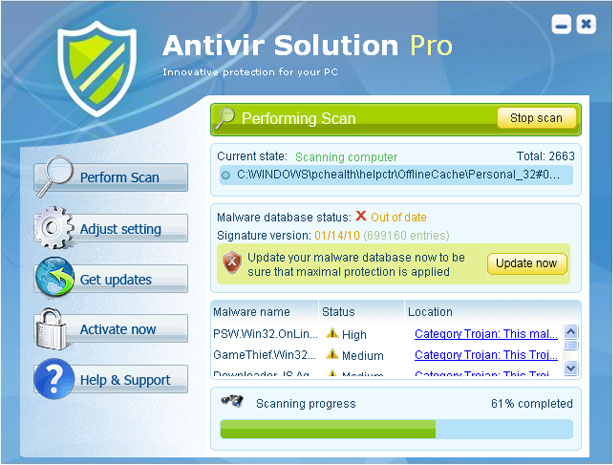
Antivir Solution Pro is the latest rogue antivirus program, a clone of infamous AV Security Suite and Antispyware Soft that have recently become the most wildly spread rogue infections. Antivir Solution Pro is advertised on malicious Internet sites and installed to computer systems via Trojan infections.
As soon as it lays in the system, Antivir Solution Pro, sometimes called Antivir Pro, bombards your desktop with fake pop up messages and warns your computer is badly infected. Some of the messages looks like this:
Antivirus software alert
Infiltration Alert
Your computer is being attacked by an internet virus. It could be a password-stealing attack, a trogan – dropper or similar.
Windows Security Alert.
Windows reports that computer is infected. Antivirus software helps to protect your computer against viruses and other security threats. Click here for the scan your computer. Your system might be at risk now.
These notifications lead to malicious websites where you are offered to purchase Antivir Solution Basic, Antivir Solution Pro or Antivir Solution Platinum in order to fix your system problems and ensure protection in future. All these versions are presented differently but are foolishly promissed to fix all the issues that you have.
Besides, Antivir Solution Pro configures computer to use proxy server and once you use Internet Explorer, it displays another fake warning which looks like this:
Internet Explorer warning – visiting this site may harm your computer!
Most likely causes:
- The website contains exploits that can launch a malicious code on your computer
- Suspicious network activity
- There might be an active spyware running on your computer
Moreover it blocks most of your legitimate programs and generates another security alert:
Application cannot be executed. The file notepad.exe is infected. Do you want to active your antivirus software now?
Antivir Solution Pro also makes some changes in Windows Registry so that it could run its scanner. Unfortunately, this scanner only imitates performing system scan so its results must be ignored. If you choose to fix threats detected by Antivir Solution Pro you will be again told to purchase its full version claiming that only this version is able to remove infections. The program will redirect straight to the website to make a payment for this dangerous application.
Please remove Antivir Solution as soon as possible by downloading a reputable antispyware program or manually. You can consult removal instructions of Antivir Solution Pro provided below this article.
Special notes on how to get rid of Antivir Solution Pro
1. Restart your computer and before it launches Windows, start tapping “F8” key. Highlight “Safe Mode with Networking” with arrow keys and press ENTER.
2. Press CTRL+SHIFT+ESC to start Task Manager. Check for the processes with names of random letters and stop them.
3.Open Internet Explorer, choose Tools menu and select Internet Options.
4. Click on the Connections tab and then on the LAN Settings button. Uncheck the checkbox labeled Use a proxy server for your LAN under the Proxy Server section and press OK.
5. Download spyhunterPCTools Spyware Doctor free scanner[/spdoc] and run a full system scan. Delete files identified as infected.
Automatic Malware removal tools
(Win)
Note: Spyhunter trial provides detection of parasites and assists in their removal for free. limited trial available, Terms of use, Privacy Policy, Uninstall Instructions,
(Mac)
Note: Combo Cleaner trial provides detection of parasites and assists in their removal for free. limited trial available, Terms of use, Privacy Policy, Uninstall Instructions, Refund Policy ,
I have this antivir solution pro demo en mi computer and I would like to know if I do the first 5 steps, I culd save my information? , all the information of my computer? , I could maintenant in safe this, because this virus don’t leave me work the applications of my computer, how I can doing for do that, safe my works . thanks for your attention. my information isn’t SAFE with this virus, when I use internet? … tell me please. and help me thank you so much
how I can doing a backup the virus don’t letme make that, i can open the file but don’t make any action. help me please.
Mari: You should not pay for Antivir Solution Pro. Typically, such parasites rely on fraud scheme, that is YOU pay to them, and only then they store your credit card details. It is unilikely that they would integrate spyware on their own as well. However, It is good idea to scan PC with Spyware Doctor or Spybot S&D to check for spywares in PC.
I do not want to pay for the anti spyware software. Is there a way to remove without paying to remove the virus? I am trying to do this in safe mode.
Antivir launched itself onto husband’s acct. Running free malwarebytes now, but unable to do anything else. So far no threats found, which I am told is because Antivir masquerades as legit program. Can’t get anything else to open as in add/remove programs etc. Have not attempted safe mode cause malware still running.
Every pop up from Antivir prompts porno sites to open (oh goody). Help please.
thanks
Jackie: Use full guide. Try to locate processes and files it launches, do a full scan with spyware doctor to help identify them.
What do I do after full scan is finished in safe mode? I all came back as before, so I guess I didn’t do it correctly
Thanks
Jeanne: Have you updated removers ?
Lauch MSConfig. See what entries are started from within your user folder ( C:\Documents and Settings\ …. or C:\Users\… ). Disable ones that you do not know.
So I scanned with the spyware doctor, but I have to pay to remove the infections, how do I remove it exactly without buying the spyware doctor?
After I run the full scan , do I reboot or what? Sorry , have no money for expert to fix this , so am asking from a different computer. Also before it restarts , I have to press F1 key ???
A mess , I know
John : expand each item Spyware Doctor finds. There is a location to object you need delete or modify.
Though I would recommend purchasing Spyware Doctor for avoiding such infections in the future.
I ran into this particular headache today. Its a nasty piece of malware, but I believe I’ll be able to chase it out. What I’d really like to know is how they make money. Its obvious fraud. Somebody has to be collecting the money. Why aren’t those people going to jail?
Had a heck oc a time getting this thing to let me stay on task manager to stop the program. Finally held down ctrl/shift/esc and then found the process with *tssd.exe and stopped it. Prior to that the virus would not let me run any virus program, crom the hard drive, CD, or thumb drive. Now that the process is stopped am able to run Malwarebytes – 75 infected objects so far. Am not totally there but at least the nasty part of this has stopped
I have this virus. I have web-root. The virus has been quarantined several times but it keeps replicating itself. I can’t do anything with my computer. I don’t mind purchasing this product I just need to be assured that it will work.
I have an aircard for my internet but the Antivir Solution Pro wont let me connect to the internet through my aircard. Not even when Im in safe mode. How can I download a Spyware if I have no access to the internet?
Coco: Try disabling its processes using task manager.
Have been working for 9 hours today trying to rid my eeePC of this sucker. HAve basically been in Safe Mode with Networking for HOURS. I’ve been through running RKill, then MalwareBytes AV, which has cleaned out over 20 items running about 5 times today. I’ve run Avast AV, which didn’t do much. Spyware Doctor I downloaded in Safe Mode (like the previous two applications) but it wont run (either there’s an error in the basic programming, or the sucker’s not letting it start). My computer wont even start up! I get to the LOGON screen, enter my password, it thinks about it, then I see a FLASH! of a blue screen & it starts rebooting again. Hence, I’ve been in Safe Mode all day. I can’t even log on to run RKill then MBAM in normal mode. Any hints? I’m at the point of a system restore, or just a re-installation.
caitlen : rightclick on Spyware Doctor executable and choose run as administrator.
Another option is trying to download process explorer ( http://technet.microsoft.com/en-us/sysinternals/bb896653.aspx ) , unzip, rename executable to p.scr . Launch it. Try to determine processes that should not be there: for example ones launched from your data folder (not program files sub folder). kill these, try launching spyware doctor again.