
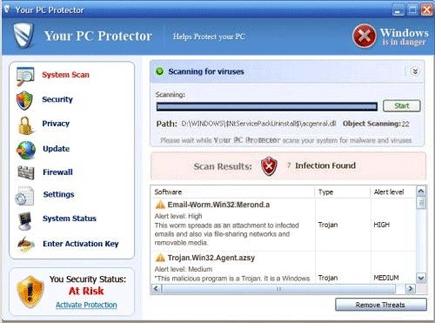
Your PC Protector is a rogue antispyware that can be characterized as extremely bad and dangerous application. It must be added that YourPCProtector was created after Windows Police Pro malware, so there should be no surprise that scammers have simply used the same aggressive tactics trying to rip people off. At first, program similarly imitates scanning the system for viruses and declares to detect hundreds of them. As the only option for saving the “infected” machine Your PC Protector “full” version is offered for the user. Keep in mind that money is asked for a possibility to install a total scam, so if you don’t want to loose your savings scan your computer with a reputable application before giving your money away. It can be almost guaranteed that only Your PC Protector will be detected as malware.
Your PC Protector uses several ways of distribution. Its trial version can be installed through spam e-mail attachments, fake video codecs and of course Trojan viruses that usually use security vulnerabilities to come unrecognized. When inside, in the first place Your PC Protector makes some changes in the OS and modifies System Registry.
Badware becomes capable to start once you begin your Internet session and appears on the continuous system security alerts that are false in reality. When loading typical scanners, alerts and notifications, Your PC Protector expects its victims to become scared. Don’t fall into pop-up ads announcing Email-Worm.Win32.Merond.a worm or Trojan.Win32.Agent.azsy infections detected because none of them are real.
The example of such alert looks like that:
Security Warning
There are critical system files on your computer that were modified by malicious program. It will cause unstable work of your system and permanent data loss. Click here to undo performed modifications and remove malicious software. (Highly Recommended)
Bear in mind that only Your PC Protector is the malware that needs to be removed from the system, so use a reputable anti-spyware to delete this scamware without wasting any time. Delete Your PC Protector and all its malicious files as soon as possible.
Automatic Malware removal tools
(Win)
Note: Spyhunter trial provides detection of parasites and assists in their removal for free. limited trial available, Terms of use, Privacy Policy, Uninstall Instructions,
(Mac)
Note: Combo Cleaner trial provides detection of parasites and assists in their removal for free. limited trial available, Terms of use, Privacy Policy, Uninstall Instructions, Refund Policy ,
I got this virus on my computer and was able to download “Malewarebytes Anti- Maleware” and it removed all of the infected files, but when I go to my C drive from My Computer, the “Your PC protector” still has a folder and a shortcut in there, but it doesn’t appear on the “add/Remove program” feature in the control panel. How do I go about removing that folder off my C Drive?
MySpace WebSite Has Viruses On IT
Thanks
Steven McDonald
Tina : Try to delete the folder manually. I would also scan with additional scanner to make sure everything is gone
i tried the malwarebytes to remove it but it wont let me open it once i downloaded it so im trying the spyware dr on this site to see if that works, although its taking forever to download because my computers so messed up now…any other suggestions? has anyone used the spyware dr and it worked?
Thanks,it worked for me.I couldn’t figure out how to get it off,it blocked everything I tried. I could have never got it off if not for you,Thanks again
Eddie
This was downloaded twice onto my computer in one day… first time I did system restore and it worked, but the second time I didn’t. Thanks for your tips! BTW — I got this spyware from lamebook.
When downloading Malwarebytes do a “save as” and save the file to the destop and rename it before saving it to something generic like Jen.exe. Reboot into safe mode by tapping the f8 key on boot and open Jen.exe and this will run the set up and allow install of Malwarebytes.@Jen
Oddly enough, I was blocked from downloading any spyware removals; YourPCProtector shut the sites down instantly saying that the sites contained malware and keylogging codes. Deleting the folders/files is blocked as well, even in safe mode. Once this thing runs its course, it seems improbable of removing. I’m having to wipe the drive. For what it’s worth mine came from Facebook, and there’s a similar one on Encyclopedia Dramatica.
My computer says that “Malwarebytes.exe could not be found”. Help?