
Home > Rogue Anti-Spyware > Windows Defender 2010

How to remove Windows Defender 2010?

What is Windows Defender 2010?

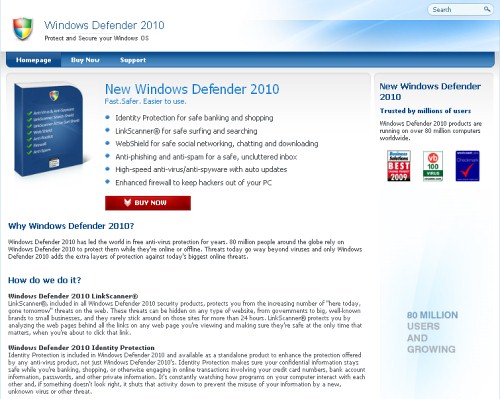
Windows Defender 2010 is a fraudulent application which is advertised as a reputable antivirus with a reason to rip people off. Many computer experts have announced that WindowsDefender2010 is a scam because it enters the system without being noticed and later uses misleading behavior trying to deceive its victims into purchasing so called “full” version. Don’t fall into its trap because Graphical User Interface (GUI) of this malware is very similar to the one that uses legitimate anti-spyware Windows Defender. Its creators “borrowed” from Microsoft its colors and shield logo, here you can take a closer look. Please, don’t confuse it with legitimate Microsoft products and use the reputable one to prevent such scams.

Windows Defender 2010 is a typical badware, which is infiltrated through Trojan related techniques, such as fake online scanners and insecure domains (win-def-2010.com, windowsdefender-10.com, windows-defender10.com). When inside, Windows Defender 2010 enables all the security programs found and also creates new registry keys with fake malware files to make the compromised machine completely taken over. Additionally fake security alerts and messages reach the user trying to fool him that his PC is under the great danger. Windows Defender 2010 also simulates a system scan and after that declares that hundreds of spyware is detected. As a solution, the “licensed” its version is offered for the user to be purchased. Moreover, this malware also uses browser hijacking to encourage the user to make a payment.

Don’t buy Windows Defender 2010 because it will never act like any of legitimate softwares. This scam must NOT be trusted because it reports only invented infections and sometimes even announces legitimate files as dangerous ones. Keep your eye on Windows Defender 2010 and use a reputable anti-spyware if you have already found it on your PC. Delete Windows Defender 2010 as soon as possible.


Windows Defender 2010 is Extremely dangerous

arrow Windows Defender 2010 is a corrupt Anti-Spyware program
arrow Windows Defender 2010 may spread via Trojans
arrow Windows Defender 2010 may display fake security messages
arrow Windows Defender 2010 may install additional spyware to your computer
arrow Windows Defender 2010 may repair its files, spread or update by itself
arrow Windows Defender 2010 violates your privacy and compromises your security

Windows Defender 2010 screenshots


Manual Windows Defender 2010 removal


Important Note: Although it is possible to manually remove Windows Defender 2010, such activity can permanently damage your system if any mistakes are made in the process, as advanced spyware parasites are able to automatically repair themselves if not completely removed. Thus, manual spyware removal is recommended for experienced users only, such as IT specialists or highly qualified system administrators. For other users, we recommend using automatic spyware removal applications found on 2-viruses.com.

Remove these Windows Defender 2010 Registry Entries:
Remove these Windows Defender 2010 files:

Windows Defender 2010 is classified as Rogue Anti-Spyware. After infecting a user’s system, it proceeds to scare its victim into buying the “product” by displaying fake security messages, stating that your computer is infected with spyware and only Windows Defender 2010 can help you to remove it after you download the trial version. As soon as the victim downloads Windows Defender 2010 trial version, it pretends to scan your computer and shows a grossly exaggerated amount of non-existent errors. Then, Windows Defender 2010 offers to buy the full version to fix these false errors. If the user agrees, Windows Defender 2010 does not only fix the errors, but it also takes the user’s money and may even install additional spyware into the victim’s computer.

Some Rogue Anti-Spyware, such as Windows Defender 2010, may offer users to buy it after the victim clicks on a banner or a pop-up while surfing the internet. Usually, a Trojan is installed to a victim’s computer after clicking on the advertisement. It then proceeds to download or even install Windows Defender 2010, which is another way for Rogue Anti-Spyware to spread itself.

Most of rogue Anti-Spyware, such as Windows Defender 2010, is nearly impossible to remove manually.


How to tell if your PC has been infected by a Rogue Anti-Spyware such as Windows Defender 2010?

Numerous undesirable and annoying pop-ups: A typical Rogue Anti-Spyware parasite keeps track of your internet browsing habits, sending your browsing history data to remote servers, owned by third party companies that use this information to advertise their products via numerous pop-ups, toolbars, hijacked homepages and spam letters. All these undesirable advertising methods are used on the victims of Rogue Anti-Spyware.
Changed or new icons: Sometimes, Rogue Anti-Spyware installs unwanted software to a victim’s PC without user’s knowledge and consent. This may lead to slower PC performance and stability, as well as more unwanted programs you can't remove.

Rogue Anti-Spyware

  1. No comments yet.
  1. No trackbacks yet.