
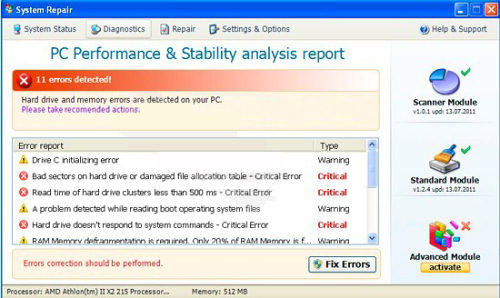
System Repair Virus is a dangerous PC optimization utility that will seek the only thing – to make its creators rich. The program is based on fake alerts that always report hard drive errors in order to make PC users scared. Though System Repair Virus has trustworthy-looking User Interface just like Windows XP Fix, Windows Vista Fix or Windows 7 Fix, its objectives are ultimately fraudulent, so you must remove System Repair Virus once you notice it on your machine. Instead of buying its licensed version, run Spyhunter, Malwarebytes Anti-Malware or other legitimate anti-spyware to eliminate this cyber threat from your machine.
System Repair Virus will be set to display its false positives and run deceptive malware scans once the PC is rebooted. This is done unnoticed for the user just like infiltration of the same malware. In most cases, System Repair gets inside with a help of trojans that are downloaded together with insecure downloads. Additionally, they first do some system distortion work and create new Registry keys that are dropped on the Program Files and System32 directories. Although these modifications pass by users’ attention, they cause clear activity of System Repair Virus. After PCs registry is modified, this fake PC optimization tool will start displaying:
System Repair Diagnostics
Windows detected a hard disk error.
A problem with the hard drive sectors has been detected. It is recommended to download the following certified software to fix the detected hard drive problems. Do you want to download recommended software?
Requested registry access is not allowed. Registry defragmentation required
Read time of hard drive clusters less than 500 ms
32% of HDD space is unreadable
Bad sectors on hard drive or damaged file allocation table
GPU RAM temperature is critically high. Urgent RAM memory optimization is required to prevent system crash
Drive C initializing error
Ram Temperature is 83 C. Optimization is required for normal operation.
Hard drive doesn’t respond to system commands
Data Safety Problem. System integrity is at risk.
Registry Error – Critical Error
Critical Error
Hard drive critical error. Run a system diagnostic utility to check your hard disk drive for errors. Windows can’t find hard disk space. Hard drive error.
Fix Disk
System Repair Diagnostics will scan the system to identify performance problems.
Start or Cancel
This scareware won’t stop flooding your desktop with its annoying popups reporting hard drive errors detected on your computer. Keep in mind that you must ignore those alerts because they are showed with the only reason – to swindle your money and credit card details as well. If ignored, System Repair will keep on redirecting you to other malicious websites. Don’t follow these recommendations to register the full version of System Repair Virus because it is malicious and detects only fake hard drive problems. Security experts highly recommend removing System Repair Virus once it was detected on your machine. Download Spyhunter, update it and run a full system scan to stop this scamware from running.
Automatic Malware removal tools
(Win)
Note: Spyhunter trial provides detection of parasites and assists in their removal for free. limited trial available, Terms of use, Privacy Policy, Uninstall Instructions,
(Mac)
Note: Combo Cleaner trial provides detection of parasites and assists in their removal for free. limited trial available, Terms of use, Privacy Policy, Uninstall Instructions, Refund Policy ,