
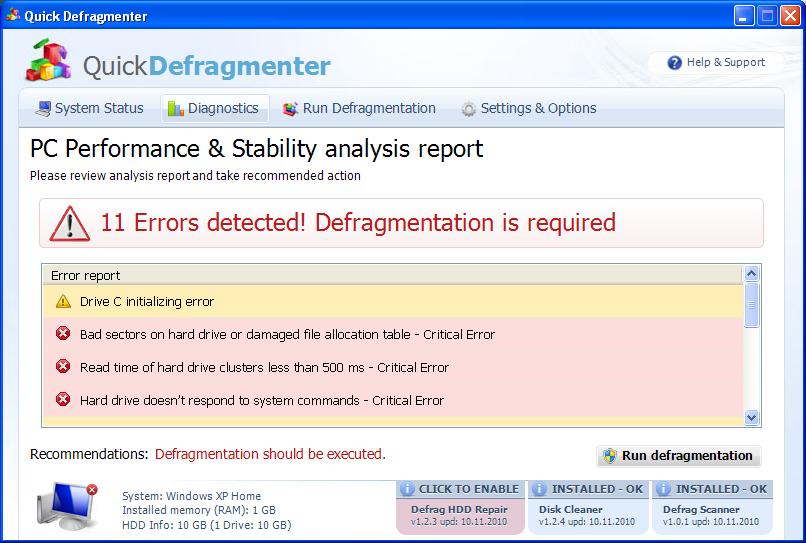
Quick Defragmenter is a fake computer optimization program from malicious family of malwares known to be connecting Smart Defragmenter, HDD Defragmenter and another threats. Quick Defragmenter infection is propagated throughout the Internet – phony online virus scanners and exaggerated popup ads offer to install its unregistered version or even simply let Trojans inside the unprotected systems. Once installed, Quick Defragmenter appears to have the same GUI just like the previously mentioned scarewares (thanks foro S!Ri for a screenshot). Besides, its misleading campaign is also typical to these scams, so just after you notice it on your machine, it will make you start wondering how to get rid of Quick Defragmenter.
Quick Defragmenter does not ask for user his approval while infiltrating the PC. This unexpected intrusion is led by some modifications made to the Registry so that the compromised OS starts running malware’s executable each time the PC starts. When launched, Quick Defragmenter will issue a great number of invented problems and infections detected:
Requested registry access is not allowed. Registry defragmentation required
Read time of hard drive clusters less than 500 ms
32% of HDD space is unreadable
Bad sectors on hard drive or damaged file allocation table
GPU RAM temperature is critically high. Urgent RAM memory optimization is required to prevent system crash
Drive C initializing error
Ram Temperature is 83 C. Optimization is required for normal operation.
Hard drive doesn’t respond to system commands
Data Safety Problem. System integrity is at risk.
Registry Error – Critical Error
System Error!
Exe file is corrupted and can’t be run. Hard drive scan required.
Scan Hard Drive
Safe Mode required
Boot into Windows Safe Mode required
Boot into Windows Safe Mode required to get into defragmentation module. The safe mode is needed for effective problems fixing. The process takes as little as 10 minutes. Once the process has been completed, the safe mode will be automatically turned off.
It will then advise you do install the ‘powerful’ software to solve this and that means that you will have to buy it at first. Additionally, Quick Defragmenter will make it difficult to run all your programs and instead of launching the application it will display various security notifications, for example:
Windows cannot find ‘winword’. Make sure you typed the name correctly, and then try again. To search for a file, click the Start button, and then click Search.
Windows detected a hard drive problem.
A hard drive error occurred while starting the application.
Some system alerts will appear from your Windows task bar reporting about more system errors:
Critical Error!
Damaged hard drive clusters detected. Private data is at risk.
Critical Error
Hard Drive not found. Missing hard drive.
Critical Error
RAM memory usage is critically high. RAM memory failure.
Critical Error
Windows can’t find hard disk space. Hard drive error
Critical Error!
Windows was unable to save all the data for the file \System32\496A8300. The data has been lost. This error may be caused by a failure of your computer hardware.
Critical Error
A critical error has occurred while indexing data stored on hard drive. System restart required.
System Restore
The system has been restored after a critical error. Data integrity and hard drive integrity verification required.
In other words, Quick Defragmenter will push you into paying the money for solving forged computer problems. It can also go as far as to ruin your system and make you lose your personal data, like credit card details or passwords. Please, never fall into installing and purchasing Quick Defragmenter and follow the removal instructions below if you have it already installed no your machine. Remove Quick Defragmenter which is a true cyber threat.
Automatic Malware removal tools
(Win)
Note: Spyhunter trial provides detection of parasites and assists in their removal for free. limited trial available, Terms of use, Privacy Policy, Uninstall Instructions,
(Mac)
Note: Combo Cleaner trial provides detection of parasites and assists in their removal for free. limited trial available, Terms of use, Privacy Policy, Uninstall Instructions, Refund Policy ,
I downloaded the malwarebytes program and scanned the computer. It found 22 infections. It removed them all, so it said and rebooted. The Quick Defrag thing isn’t coming up, but it’s still coming up with the error about disk drive restored. This happens every time I try to open a program. What should I do now?
That is because malwarebytes has not cleaned everything out. Scan with Spyware Doctor to see what you got, or try searching for the files manually. You can also try scanning with alternate tools, like superantispyware, Hitman pro, etc.
@Christie
I get same error
I did spyware doctor, but it really doesn’t do anything unless you buy it. Is there any free program out there that can fix it? It’s also saying something about not enough disk space or memory space, I can’t remember. This flashes up when the other warning flashes.
Christie : Expand threats SD finds and delete the files found.
You can also delete Quick defragmenter manually (instructions provided) but you might miss something like hidden trojan. Spyware Doctor is safer choice.
you can try other tools : MBAM, Hitman pro.