
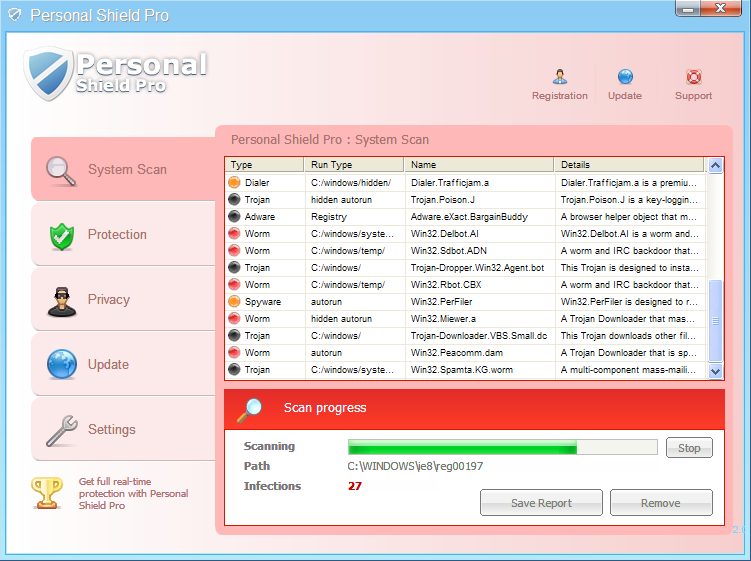
Personal Shield Pro is the latest member of an old malwares’ family where other its members are Antivirus Scan, Antivirus .NET, Antivirus Action and many other that have done numerous troubles for computer users. Seems like creators of Personal Shield Pro are still capable to infect targeted computers with a help of Trojans, that get inside without any user’s permission. They just use poorly protected, vulnerable systems for distributing their malicious software. However, while Personal Shield Pro in most cases stays unnoticed, you will definitely notice additional activity of Personal Shield Pro. To get rid of this scamware completely, make sure you run updated spyhunter. You can also try Malwarebytes Anti-Malware or Hitman Pro to this removal procedure.
When running inside your machine, PersonalShieldPro will create some Registry keys that will help this scamware to launch once the PC is rebooted. Besides, there are also some harmless files dropped that latter will be detected as malicious. Additionally, after being launched, Personal ShieldPro will play havoc with your computer what will result in annoying system scanners and alerts displayed once you turn on your computer. Malware will also begin to display unwanted popup alerts, telling the same as earlier mentioned alerts that your PC is dangerously infected and that you must purchase Personal Shield Pro. However, this scam must be removed instead of paying for it. If you have Personal Shield Pro on your computer, you will receive such alerts:
Harmful software detected!
Personal Shield Pro has detected malicious software that may cause PC crash. Click “Remove All” button below to remove them now.
KBDARME.DLL
KBDFR.DLL
KBDMON.DLL
Personal Shield Pro Firewall Alert
Personal Shield Pro Firewall has blocked a program from accessing the internet.
Internet Explorer Internet Browser is infected with worm Lsas.Blaster.Keylogger. This worm is trying to send your credit card details using Internet Explorer Internet Browser to connect to remote host.
Warning: Your computer is infected
Windows has detected spyware infection!
Click this message to install the last update of Windows security software…
Warning!
Application cannot be executed. The file taskmgr.exe is infected. Please activate your antivirus software.
By detecting those imaginary or harmless ‘cyber threats’, PersonalShield Pro hopes to make you register its full version. However, registering it means more problems to you and your computer. There is no chance this rogue anti-spyware helps keep your computer safe, so remove Personal Shield Pro ASAP. This rogue software may prevent you from running real antivirus software, so try rebooting your PC into Safe Mode with networking, staring Task Manager (Ctrl+Alt+Del) and stopping randomly processes of Personal Shield Pro.
UPDATE!!! Personal Shield Pro has renewed its malicious activity and seeks to swedle the money from trustful PC users once more. To disable Personal Shield Pro and help for its removal, you should ‘register’ this scam. Try entering this registration code, found by S!Ri: 8945315-6548431o. Additionally, update spyhunter anti-spyware and run a full system scan in order to find and remove infected files on your computer.
Automatic Malware removal tools
(Win)
Note: Spyhunter trial provides detection of parasites and assists in their removal for free. limited trial available, Terms of use, Privacy Policy, Uninstall Instructions,
(Mac)
Note: Combo Cleaner trial provides detection of parasites and assists in their removal for free. limited trial available, Terms of use, Privacy Policy, Uninstall Instructions, Refund Policy ,
Please send removal of this
what if it keeps you from opening up the programs such as spyware doctor or other similar programs ?
Christopher: Donwload process explorer : http://www.2-viruses.com/wp-content/uploads/PE/eXplorer.exe . Rename it to .com instead of exe. Launch. Stop processes from %TEMP%, %AppData% or similar. After that, if you are on vista, windows 7 try right clicking on anti-malware program and choose run as administrator. On XP (you can try on other oses) in process explorer menu choose run (or run as administrator) and enter full path to the executable you want to run.
please send removal of this
Hi I am having the same problem as above. Everytime i try to load anti malware program personal shield pro stops it from opening. I’ve tried doing this in safe mode and PPS still stops the programs from opening. I’ve removed PPS from processes and tried to delete the PPS files from application data etc, and it still blocks me opening any programs that offer a potential fix. Any help would be great.
Hi, I tried to install sysinternal with .com extention, but it is showing me error “unable to execute process: A device attached to the system is not functioning” ..My PC is also infected with personal shield and I dont have any anti virus installed in my Laptop..please suggest
I am unable to download and steart the spyware doctor. It instructed me to uninstall Spyware and Avast, which I did MNow I have no virus protection at all and cant’ get this blasted thing off my computer. I am all locked up and can’t do anything but send and receive e-mails.Looks like I’m not the only one have this kind of trouble.
Dean Wohlgemuth:
Have you tried scanning with AVAST prior SD? If you can’t launch sd, try scanning with Malwarebytes Or hitman pro (rename them to .com to launch).
i installed spyware doctor but personal pro shield is not allowing anything to open even the regedit for deleting the registry key pls tell what should i do???????????????????????????
divyanshu: run rkill or process explorer prior scanning with SD or other anti-malware program. Download Process explorer and rename it to .com (for example e.com) and laucnh. And start new task from process explorer.
PSP kills process explorer within seconds (same for taskmgr) and stops SD from executing (both progs were renamed to *.com). I’d greatly appreciate your assistance in “nuking” this awful menace!
I was infected and pay it for remove personal shield pro, but I know this scam will come back, what I have to do to prenvent this?
Martin: rename it to iexplore.exe or iexplore.com , launch it ONLY after scan is run. Such malwares have to leave browser process open to allow visiting their payment pages.
My computer is dead now because of this virus. It hooks up to programs that are connected to the internet and updates itself so every new method to kill it will fail. And at this moment my computer does not even turn on the operating system. I followed every instruction i found on the internet and it still didn’t work. Today im going to format my HD(If its still possible) and hope that it won’t happen to me again.
Well i downloaded the spyware doc and it found viruses but now it is asking me to pay to have them removed…. is it safe to do so.
Jon. Yes. Personal Shield Pro relies on its own websites to get cc data. Also, you can try deleting the files SD detects manually and get full version for protection when your system is clean.
can u tell me how to change .exe to .com pls
plz send me a softwere for removing personal shield pro
Tnx!
I tried everything recommended in article, but managed to remove spyware with simple system restore.
This is what I did and it seems to have worked… Go to add/remove programs and uninstall a program called “Access Help” After I did that, those irritating pop-ups stopped and the little blue shield disappeared from the task bar. I then removed the registry entries. If you can, find and install CCleaner. You can uninstall programs and remove reg entries with this usefull app and I did’nt have a problem installing it while my machine was infected.
I have been getting this psp pop up for a week now. Each time I do I delete the program files and registry entries that are a rpoblem but it keeps coming back. How do I find the program that is triggering the virus?
Jack: Get a decent internet security suite. There is no better answer than that. Also, scan with one of recommended anti-malware programs. There might be 2 issues: you are getting reinfected, or miss some kind of trojan.
we have tryed every thang and can’t get it to remove is there anythang else we can try ?
Leslie: have you performed scan from safe mode with networking ? Have you tried several tools (SD, MBAM, Emsisoft Anti-malware, hitman pro ? )
There are several other options left: Bootable CD with scanner software like http://www.pctools.com/aoss/ , Nortons, Aviras, etc. OR remote PC support ( crossloop.com, remotefixpc.com , comodo, etc).
Hi Kids! I’ve been dealing with this awful virus since July 2nd, when I identified it by the information on this page – thank you, did not fall for the “purchase” as some of the windows popping up had misspellings and bad grammar – and then tried Spyware Doctor. It would freeze near the end of each scan, showing me infections, but not allowing me to fix them. So I called service reps and have been on the phone with 7 of them for weeks, each suggesting a different solution: unload the AVG free that came with my computer (which PSP fought with “can’t do” windows until I finally got it off by flying to the unload tool at top speed before the PSP windows started popping), unload and re load, use their Proxy Clear Tool, threat removal tool – upgrade and buy Spyware Doctor with Anti-virus. Only on one occasion, after an unload and reload, did I get a full scan accomplished, and with Spyware Doc’s intelliguard real-time protection running I thought I was finished with this evil. NOT! I’d boot up next day and the intelliguard would be off and wouldn’t turn on. Somehow PSP must have been hiding in there and still reproducing, as it showed up again today…and my Spyware Doc Antivirus still won’t complete a full scan after that one successful one: keeps freezing when almost completed, with the countdown of remaining time going around in circles. Has anyone else had and beat this freezing problem?, as getting past it seems to be the only hope I have of killing this menace one and for all. (Stupid me, I did not perform a back up recently and don’t want to lose the contents of my computer)
Helen: In this case I would suggest contacting PC Tools support though – they will repair problem or provide custom fix. Sometimes malware mutates and not all files get removed with one of the tools, so you might want to scan with Malwarebytes or Emsisoft anti-malware.
Thank you Mr (or Ms) Administrator. Well, I have done that and we are now (for the 8th time) trying to fix it. You must be correct as far as the malware mutating, as as first it only attacked me in normal mode and I could work undisturbed in safe mode. Now, on Personal Shield Pro’s return, it is attacking me in safe mode as well. The only way I could get it to “shut up” in safe mode was to quickly race against it: delete all of the new icons it put on my desktop, and it’s presence in My Computer and Control Panel, and then run PC Tools Registry Mechanic and wipe out what I had deleted into the trash. (I’m sure it’s still in my computer, but if anyone is having this problem in safe mode, I wanted to mention that it can be overcome by doing that. I’ve been on for over an hour and a half now and a PSP window hasn’t popped up since I performed that action. In the meanwhile, PC Tools just told me they have just released a new version, 8.0.0.655, and we’ll see what happens next. Thanks again for this page, and good luck to all other “victims” out there. This thing is incredibly nasty!!!!
even i renamed the files i still cant open it
This has been made way too complicated. PSP is easy to remove. Just removed one last night ..
Windows 7:
1. Boot in Safe Mode
2. Go to C:\Program Data
3. You will see a folder that is not like the others. It will be a strange letter number combination — example: M35627839P
4. Open that folder. There will be a file with a shield icon and the same name as the folder with an .exe or .pspro ending. Make sure you have Show File Extensions turned on in Windows to see this. Voila. There is your virus with that little blue shield icon. Delete the whole folder.
5. Reboot normally.
6. Clean the registry with your favorite registry cleaner.
7. Run an up-to-date anti-virus.
Just want to say thank to you million times. I could not do it without your post.
Thanks so much Sorrow.
sorrow: i have xp….do you think it’s this one:
c:\documents and settings\all users\aplication data\eN01300IoAmB01300????
I’m sorry, but this is incorrect. System restore does NOT remove anything (I wish Microsoft had named it something else, because so many people think this). The infection is still there, and will pop up again. In fact, infected files are known to hide in system restore points.
geekchick: that depends on OS and on rootkits coming with infections. I always recommend to scan with anti-malware programs even if system restore looks successful. Sometimes it helps to win some time to fix the problem.
how do i remove perssonal shield pro from my PC.
after 1 week it shoved again, what to do?
Kmetek: Get a good internet security suite, or paid versions of malwarebytes or SD to protect from reinfections.
I have the same problem but more serious.my system is gets off within 45 secs.how should i solve my problem and to get any software to solve this problem.how i get it on my system as i am mot able to do anything..please tell me the solution.
I dont know when this artical was published but I just wanted to say that as of 9/15/11 that registration code was still good. I dont know if that helps anyone but I just had to use that and it worked fine. Good luck everyone.