
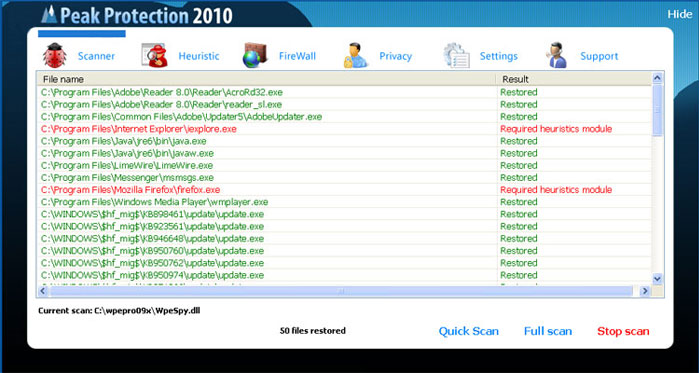
Peak Protection 2010 is another fraud application pushed to computer systems through fake Microsoft Security Essentials Alert Trojan. It’s one of the most dangerous infections at the moment as it was noticed spreading even on some reputable websites. Once you click on the ad that was created to promote Peak Protection 2010, you are either redirected to the official website o the program where you will be pushed into purchasing it, or the program runs a scanner and performs system scan by itself without your permission or will. In any case you will end up with a suggestion to purchase Peak Protection 2010 in order to ensure your system a better security.
In case Peak Protection 2010 performs system scan, once it finishes, a list of infected files is displayed. Unfortunately, it is not a list of real system threats. The same list will be provided after running system scan both on completely clear or infected system just because Peak Protection is not able to detect anything. Basically, the program displays some random files or files that do not exist, just to create an illusion the system is infected. Then it offers purchasing its full version by promising to remove the detected threats.
If the program redirects to a website promoting Peak Protection 2010 you will face the same pressure to purchase the program as it will be presented as the best security solution ever. There is probably no need to say that once inside this rogue causes tons of damage to your system and shows such alerts:
The application iexplore.exe was launched successfully but it was forced to shut down due to security reasons.
This happened because the application was infected by a malicious program which might pose a threat for the OS.
It is highly recommended to install the necessary heuristic module and perform a full scan of your computer to exterminate malicious programs from it.
It is highly recommended to get rid of Peak Protection 2010 as soon as you notice its very first traces on your computer. If it happened to you to purchase this fake program, do not hesitate to contact your credit card company and dispute the charges.
Automatic Malware removal tools
(Win)
Note: Spyhunter trial provides detection of parasites and assists in their removal for free. limited trial available, Terms of use, Privacy Policy, Uninstall Instructions,
(Mac)
Note: Combo Cleaner trial provides detection of parasites and assists in their removal for free. limited trial available, Terms of use, Privacy Policy, Uninstall Instructions, Refund Policy ,
help me! okay peak protection basically froze my entire main user account but luckyly i can still use another user account to access files, web, etc… i have tried to look for the files on both accounts (i am able to access the control panel in the infected account) but i cant find the files that belong to peak protection, i even went to walmart and purchased mcafee security but it seems like peak protection blocks it for some reason…. i tried to remove it manually but i dont understand where the files are and what to delete if i were to find them… i am wondering if i should just take my computer to a professional??? i dont know what to do
what should i do? the peak protection blocks the mozilla firefox? it won’t open.what are the ways to remove it if i’m not well known to these computer related details?
Ethelbert : rightclick on mozilla shortcut, run as administrator. You can try rebooting into safe mode with networking as well. Or try using IE.
how do I know that this is safe and will not lead me to another virus?????
peak protection is blocking me from everything accept for my start up. I don’t have access to internet or anything, accept on a seperate computer. what do i do?
Try rebooting in safe mode with networking and disabling proxy in your browser. This should allow running at least some of the programs.
please remove this peak protation
Hi!I’m not a IT specialist or highly qualified system administrator…but with my limited knowledge on computers i was able to remove Peak Protection 2010 manually. Do the following…
1.Go to C:\Documents and Settings\User\Application Data
2.You will find antispy.exe
3.Change the extension to .jpg
4.Close all windows and restart your system
5.After reboot you will not find Peak Protection 2010 on boot up like before.
6.Restore your computer to a date before this malware appeared for the first time.
And thats it!
Tried qwerty’s suggestion & worked like a charm. But…the exe file on my PC was named hotfix.exe
I just downloaded spyware Dr. I scanned my whole computer with it and when I restart I still get the peak protection scan.. I need my computer I’m a student.. help!
@qwerty The problem is what if I’m not able to access my desktop or any files? It directly sends me to the protection software, and I’m not able to do anything else. I can’t even reach any files.
im havinmg trouble finding the name that peak protection is under to remove it, i can no longer get on the net (only on my sis laptop) trying to do what qwerty sugested but no having much luck please help
@Zoe i cannot find it to.. i have a dutch laptop (im dutch to) but i can still visit the web.. Some one please help me!!!
@Jahoola
i am right where you are at. Have you found a way to get to qwerty’s fix?
thanks
CT
Thanks….qwerty it is charm…in my computer it was named by hotfix.exe
How do I know that spywaredoctor is not another spyware program?
I was not able to use any web browser. I logged in using a different user into the computer. That’s how I am able to communicate via the web. Try this. I still need to get rid of the Peak Protection though. Not sure which programs are real out there.
Reuben: In your case it is best to do couple of full system scans with different programs or delete old account completely (safe the documents, these are safe) .
If account is an administrator one, search for .exe files in hidden folders of infected user account and delete these.
We do not force users to download any programs, but personally, I think it is good idea to keep a decent anti-malware program with real time protection. That reduces infection risks many times, and speeds up cleaning process. Which program to choose it is up to you.
Qwerty, how do you change the extension ?
I was kind of confused, i am able to only find antispy.exe process but not the other two, help pleasee??
Lisa: Infection is not the same for everyone. Check other files in the same location as antispy.exe is launched.
My PC has Vista and this infection took it over. All I did was hit ALT+CTRL+Delete and in Task Manager end peak protection from running. You will have your computer back.
This thing took over my computer too. I freaked. When you turn your computer on and the peak performance logo comes up that says “start in safe mode” hit CTRL+ALT+Delete and open the task manager. Stop the program from running. At that point you can get into your computer and try to remove this thing. I downloaded the Malwarebytes program followed by a new anti-virus software, Avast. I’m still in the process, but it’s working right now.
I can’t access Documents and Settings. It won’t allow me to use search either.
James: Reboot into safe mode. It is advised to kill processes before deleting the files, as the deletion (or access) might be denied.
I hate how one thing can take over alot of systems in less then three weeks… ok i downloaded spyware doctor… can someone give me detailed (if they can) instructions on how to remove this thing. Thanks
I’m in safe mode and I’m trying to download the Spyware Doctor and a pop-up comes up telling me my security settings will not allow me to download this, how do I allow this to download?
Matt: Check security settings in internet explorer – trusted zones.
Note: This bastitch also infects the MBR of your Hard drive. At least the variant I found does.
Forgot to mention the variant I found also locks out your network connections (Says thay are firewalled)
did that and finally got it to work, but, i did the spyware doctor and fixed the threats but everytime i restart or shut down and turn my computer back on the peak protection still shows up. So what am I supposed to do now?
Help me please…
What should i do?? I cant reach my desktop and even i cant open task manager… Cant do anything. Peak protection asks me to run in safe startup..
Ronco: TDSS rootkit is the usual suspect. TDSS Killer should take care of it, probably fix network connection as well.
I got this problem and it forces me to run the application when I log in with my user and I’m unable to open other app. Then I restart my PC and changed to safe mode networking. After getting the login screen press ctrl+alt+del. Then the system prompts you to restore to a previous date. Then you will be good.
Naga: Do a scan after system restore. System Restore does not remove ALL parasites, and you might have a trojan downloader that will re-download parasites again.
the peak protection showed up on my computer and wouldnt let me cancel and qwerty i dont have any other users on my computer soooo……. ive tried everything but nothings worked and every time i restart it the computer screen goes black so i cant do anything but stuff still pops up i need a solution fast!
Press ctrl+shift+esc and then stop hotfix.exe. Then start a new task and choose explorer.exe . Read the guide.
@Lisa
Goto tools –> Folder Options… –> View (tab) –> Advanced Settings –>
UNSELECT ‘Hide extensions for known files types’ –> CLICK ‘Apply’ & then ‘OK’.
Right click on the file –> Rename.