
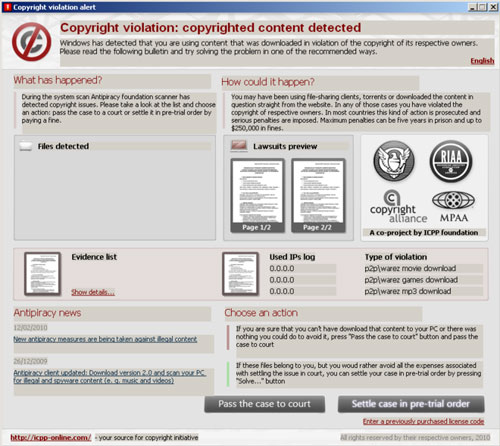
Copyright violation alert titled fake I-Q Manager or AP Manager (newer version) Antipiracy foundation scanner is a new misleading application which pretends to be a scanner dedicated for the copyright protection. I-Q Manager Antipiracy foundation scanner imitates searching computer for torrents or other copyrighted programs and then displays warnings that something illegal is detected. Trying to make people scared, Trojan responsible for all these tricky messages, also displays information that this material found has been sent to law agencies and copyright holders. Finally, information given by Copyright violation alert ends with requirement to pay $399.85 instead of going to court. Trojan also redirects its victims to icpp-online.com, malicious domain, and shows some “proof” about your illegal content detected.
Fake warnings, with invented information given, start running once the Trojan of I-Q Manager Antipiracy foundation scanner is installed. Copyright violation alert appears not only in English but uses various other languages like Czech, Danish, Dutch, French, German, Italian, Portuguese, Slovak and Spanish. Here’s what it reads:
Copyright violation alert
Copyright violation: copyrighted content detected
Windows has detected that you are using content that was downloaded in violation of the copyright of its respective owners. Please read the following bulletin and try solving the problem in one of the recommended ways.
Warning!
This computer is being used for illegal activity associated with copyright violation. Records about this computer’s owner are about to be sent to court. If you saw this message by accident, please report any information about a possible owner of this comp.
Ignore these alerts and don’t even think about giving your credit card details for hackers responsible for letting I-Q Manager or a newer version AP Manager Trojan into the wild. Trying to convince you about copyright problems you have, this ransomware seeks only to rip you off. Remove Copyright violation alert with its related data and save your personal information and money as well.
Automatic Malware removal tools
(Win)
Note: Spyhunter trial provides detection of parasites and assists in their removal for free. limited trial available, Terms of use, Privacy Policy, Uninstall Instructions,
(Mac)
Note: Combo Cleaner trial provides detection of parasites and assists in their removal for free. limited trial available, Terms of use, Privacy Policy, Uninstall Instructions, Refund Policy ,
Hi
Nice little article. Thanks :oD.. An update IQmanager could also be called APmanager, but is otherwise the same.
Cheers
Guys…I just got hit with this bug and I cannot even access my desktop, start menu, or task manager in Windows XP even when booting into safe mode. Is there any way around this pop-up? It can’t be manually closed, can’t be right-click closed, and moving it off the screen doesn’t even allow me to do anything. Any help is appreciated!
thanks.
Brent: try using task manager, ctrl+shift+esc right after boot.
If you can launch task manager, you should be able to kill the process that blocks desktop…
@admin
WHat if it wont let you task manager at all? is there another way?
Try creating another user. and log-in as that user. There is a chance that other windows account is not infected. Also, there are on-boot antivirus scanners, you can try your luck with these.
I removed the apmanager from the task manager but there Is a yellow screen right behind it.How do I remove the yellow screen to see my desktop.Any Ideas thanks
I discovered with a similar program, that I can run threatfire at startup, and that seems to kill enough processes on it’s own that I can remove things.
I have the same problem as brent, and its my admin account thats been infected, and there are no other uses, how do i create another user on the page where It asks me for password? And also How do you use on boot antivirus scanners if you are blocked from your task manager, desktop, start menu, and etc. This is also Windows Xp 2002 I think :S But it is Windows XP. I need help X(((
@Nicco
I can log on as another user, so I used search for APmanager.exe and found the file plus a prefech file. I renamed them both with an “x” as the first character and I can now log onto my own account again. Just booted twice and it looks OK. I’ve been through my other computers and created 3 “recovery” accounts on each with administrator rights. Why 3? Earlier today it took 2 accounts to find a virus free workspace, so 3 unused ones gives you a fighting chance.
John: Much better solution would be keeping backups of your PC with Acronis or similar tool. Also, a good anti-malware and anti-virus. There are some versions of parasites like this one that infect not user space but system directories. Then your recovery accounts will not help.
Actually, I just fixed this by booting to safe mode and logging into the administrator account. Then I was able to use system restore to restore the computer back 2 days before the problem started. Then rebooted back to Safe mode once more until I saw the System Restore Success notice and then rebooted into normal mode and ran malwarebyte scan and Spybot scan to remove anything left over. I agree, full image backups are the best way to go for those lucky enough to be thinking ahead.
researchers found working registration code: RFHM2-TPX47-YD6RT-H4KDM. Please note that this code is not a solution for this problem and your computer is still infected with malware. It only makes the removal procedure easier.