
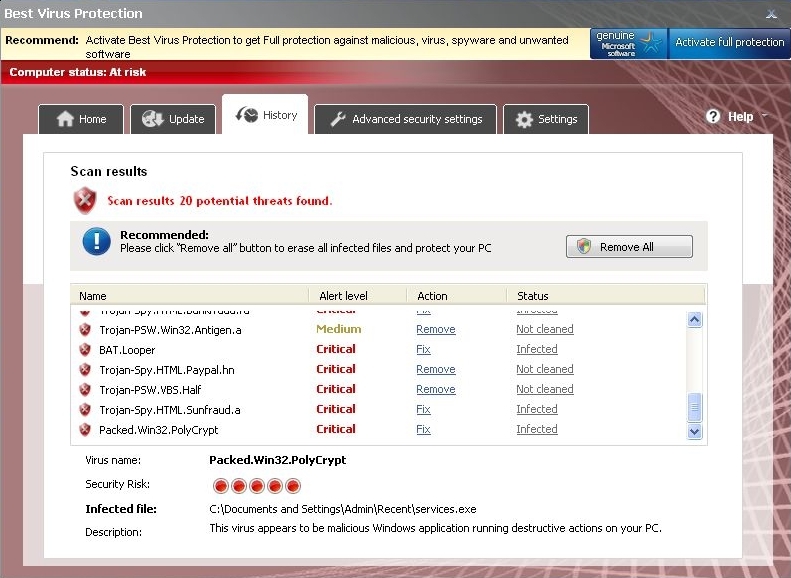
Best Virus Protection is a nasty piece of malware that hails from a dangerous family of rogue anti-spywares. Known for releasing such threats as Antimalware PC Safety, AV security Essentials and others, scammers seek to swindle the money from trustful PC users. In the beginning, they make victims believe that there are numerous viruses on their computers and additionally offer to purchase licensed Best Virus Protection version. Have no doubt about this fake anti-spyware and never fall for purchasing its license. Best Virus Protection goes beyond the regular activity of anti-spyware and tries to create a need of its licensed version. In order to fix your machine, run a full system scan with a reputable anti-spyware, such as 2012 year version of Spyware Doctor and remove Best Virus Protection without any delay.
Instead of being downloaded in a normal way, Best Virus Protection is distributed with a help of trojans. In most of the cases, that is done secretly for the victim and only reputable anti-virus and anti-spyware programs can help to prevent intrusion of this virus. In order to launch every time PC is rebooted and make the whole system fall under malicious influence of this malware, it additionally drops some entries into the Registry. So, Best Virus Protection starts running automatically every time Windows starts and displays its continuous system scanners and alerts in order to make user concerned about his PC. Typically, they report about such security issues:
Attention! xx infected files detected!
Scan Result: Your computer is infected!
Recommended: click “Remove All” button to erase all infected files and protect your PC
System Message
Your PC may still be infected with dangerous viruses. Malware Protection Center protection is needed to prevent data loss and avoid theft of your personal data and credit card details. Click here to activate protection.
Warning! Virus Detected
Threat Detected: Trojan-Spy.HTML.BankFraud.ra
Recommended: Please click “Remove All” button to erase all infected files and protect your PC.
Next to its alerts and scanners saying that Best Virus Protection has detected dangerous software (trojans, viruses, worms, spyware etc.) on your computer, malware tends to disable users from launching legitimate programs on their computers. Additionally, it may disconnect its victims from the Internet and let more viruses inside.
Of course, all those infections reported by Best Virus Protection are not there – this brainwashing campaign is used only to rip you off. If oy have also noticed Best Virus Protection on your computer, make sure you remove Best Virus Protection without any delay. Otherwise keep in mind that this program is potentially capable to make compromised computer vulnerable, drastically slow and hardly operable. In order to uninstall this threat, use a reputable anti-spyware and remove all infected files from your computer. If you find that all your anti-malware programs are disabled, try renaming Best Virus Protection executable file from xxx.exe to xxx.com. In addition, run a full system scan with 2012 year version of Spyware Doctor, spyhunter or Hitman Pro.
Video on how to remove Best Virus Protection
Automatic Malware removal tools
(Win)
Note: Spyhunter trial provides detection of parasites and assists in their removal for free. limited trial available, Terms of use, Privacy Policy, Uninstall Instructions,
(Mac)
Note: Combo Cleaner trial provides detection of parasites and assists in their removal for free. limited trial available, Terms of use, Privacy Policy, Uninstall Instructions, Refund Policy ,