
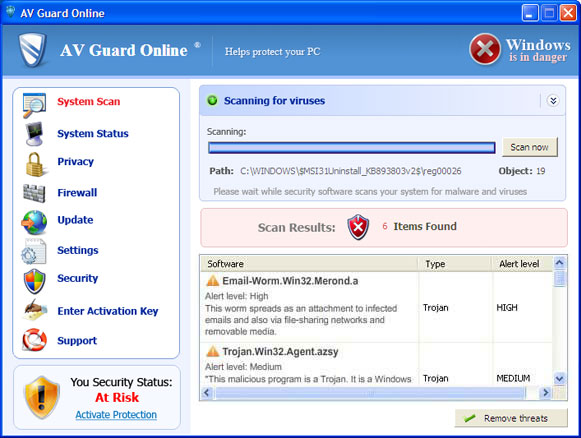
AV Guard Online is a misleading program which will present itself as anti-virus program and later will start asking you to pay of its license. No matter how trustworthy it looks, keep in mind that this scam relies on Trojans when it comes an infiltration moment and you can easily get it on your machine through a browser-based exploit, either flash or java. AV Guard Online is made by the same scammers as the latest Security Guard 2012 or OpenCloud Antivirus, so it will also become a real pain for its victims additionally. For trying to rip PC users off, it will start popping up and stopping whatever user will be trying to launch, so have no doubt you must uninstall AV Guard Online malware once it starts loading its fake popups and scanners on your computer.
As soon as trojan downloads the whole multitude of files of the rogueware, AV Guard Online creates some Registry entries and files of its own what allows it to launch once PC is rebooted. Just like any other fake antivirus, AV Guard Online will report numerous false threats detected on your computer and then will offer to remove them for you. This is the moment how AV Guard Online tries to get your money. Keep in mind, you must ignore any of its alerts! Security experts have reported that all its ‘viruses’ detected are legitimate system files that should never be deleted. In order to tricj you, it starts claiming:
Warning! Infection found
Unwanted software (malware) or tracking cookies have been found during last scan. It is highly recommended to remove it from your computer.
Keylogger Zeus was detected and put in quarantine.
Keylogger Zeus is a very dangerous software used by criminals to steal personal data such as credit card information, access to banking accounts, passwords to social networks and e-mails.
Security Warning
Your computer continues to be infected with harmful viruses. In order to prevent permanent loss of your information and credit card data theft please activate your antivirus software. Click here to enable protection.
Security Warning
Malicious programs that may steal your private information and prevent your system from working properly are detected on your computer.
Click here to clean your PC immediately.
Security Warning
There are critical system files on your computer that were modified by malicious software.
It may cause permanent data loss.
Click here to remove malicious software.
In a long run, AV Guard Online becomes really annoying as it starts showing startup malware scanners and continuously offers to update its license. According to its pop-up messages, only activating the licensed version will neutralize parasites. However, only legitimate anti-virus and anti-spyware programs can help you to stop this threat on your computer. To remove AV Guard Online completely, use these activation keys found by Xylitol. Just execute AV Guard Online and enter to disable majority of popups. Don’t forget to run TDSS Killer or anti-malware programs such as updated spyhunter or Malwarebytes Anti-Malware to remove AV Guard Online leftovers.
6526765122
6593439566
6613528235
6637321723
6641354156
6874821958
6899692327
7246526785
7414541691
7592174565
7614643697
7659421734
7715438456
7852676282
7885832169
8132856849
8135259195
8196345414
8196375436
8355259195
8355289195
8356392329
8367636975
8525752718
8558121691
8567493449
8593214778
8838996945
8861321723
8874598414
9217234169
9217457527
9221581871
9285678582
9376471437
9378969331
9691962564
9859198478
9882676258
9972439689
9972665267
Video guide on how to disable AV Guard Online manually
Automatic Malware removal tools
(Win)
Note: Spyhunter trial provides detection of parasites and assists in their removal for free. limited trial available, Terms of use, Privacy Policy, Uninstall Instructions,
(Mac)
Note: Combo Cleaner trial provides detection of parasites and assists in their removal for free. limited trial available, Terms of use, Privacy Policy, Uninstall Instructions, Refund Policy ,
Thank you so much for the tip, my friend! I was seriously freaking out. Thanks again
ComboFix to the rescue! I tried several anti-malware programs (Spybot, AVG 2011, Emsisoft Antimalware, and Malwarebytes to no avail. My computer was having so many problems and wasn’t wanting to boot, so I downloaded (from another computer) HDD Regenerator on a USB stick, plugged it into my computer, hit F9 while booting, changed my boot drive to USB KEY, and ran HDD Regenerator. When it was finished, I could boot into Safe Mode and run ComboFix (which I also downloaded to my USB stick). Had to have all anti-virus programs turned off so I could run ComboFix (even though I had uninstalled one of the anti-malware programs, ComboFix said it was running, but there was an option to go ahead anyway AT YOUR OWN RISK, which I did). When it was finished running, it restarted my computer and everything works great! Love you COMBOFIX!! You’re the best!
I cannot find the file that you type into the search bar when you enter “Xc” all I get is xcopy. How can I get around this? Can I just delete system 32 all together? Thanks!
Kayla: right-click on the shortcut on the desktop. The NAME changes each time.
Under no conditions delete whole system32 – it would make your PC unusable.
I right click on the desktop icon, go to properties and then go to the file location. From there I know in the video you search of Xc, so are you saying the name of the application that I am supposed to be renaming and then deleting changes? I don’t mean to be difficult, but just cannot locate the XcYH0… file that is in the video.
The location for the file is always the same. I looked up the name in the properties box (not the location), so I knew for which file to search. In your case it is different than Xc.
Got it. It was a Jcc code. Thanks!
I have been fighting the AV Guard virus for a few days now, and I keep having the same problem. Any spyware/malware/antivirus I download will install, but none of them will run. Spyware Doctor opens, but freezes. Malwarebytes runs for about 10 seconds, then just closes. It doesn’t matter if I’m in safe mode or normal mode. What am I missing? Dell Laptop 1545 Windows Vista 32 bit service pack 2. Thanks!
Run TDSS Killer or Alternate Os scanner (from bootable CD). After that, try running anti-malware programs again.
I didn’t try it yet from a bootable CD, but so far TDSS killer only found 2 infected items which were quarantined. It didn’t seem to make a difference, and now TDSS killer doesn’t work either. Doesn’t matter if I change file name of any of the .exe files, the programs still won’t work? Will try bootable CD shortly….
Dom: TDSS Killer is against a special set of malware, where there are only 1-2 infected items, but it messes with other stuff and stops anti-malware programs from launching. So if it deleted 2 items, great, there should not be more. Investigate which 2 items got fixed, sometimes it has to delete some malicious file, but it can’t replace it automatically.
Thank you. TDS killer got the anti-malware working for me. Great info. Thanks again.
unfortunately i paid $72.86 for this fake antivirus ..and my laptop get hanged …so any suggestions to get rid off from this antivirus
the spyware wont let me access the internet to download any antispyware
steve: disable proxy server, or move anti-spyware programs through usb disk