
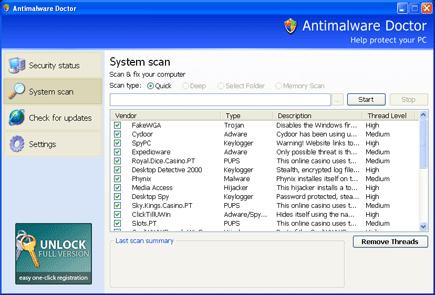
Antimalware Doctor is a rogue anti-spyware, a total scam that is distributed with a help of various malware like Trojans, spam e-mail attachments, fake online scanners and others. Just like its distributors, Antimalware Doctor must be deleted once it is detected, so make sure you find the right removal guide for doing that. Use the one written at the end of the article to get rid of AntimalwareDoctor immediately after it is spotted.
When inside the compromised machine, Antimalware Doctor modifies the system to start at once PC user logs in to Windows. It surprises its victim with fake system scanners which usually appear from nowhere and announce misleading information, such as:
Warning! Removed attack detected!
Antimalware Doctor has detected that somebody is trying to block your computer remotely via {Trojan Worm BX12.434.CardStoler}.
Transfer for Your private data via internet will start in: 7
We strongly recommend you to block attack immediately.
Once running, it reports hundreds of infections “detected” and additionally will claim that they will be removed only after people first purchase the “full” its version. You must know that the main aim of creating such scams is the commercial expectations, so don’t give your money for the “full” Antimalware Doctor’s version. This badware also displays continuous fake security alerts and warnings which look like that:
Antimalware Doctor has detected that somebody is trying to transfer your private data via internet. We strongly recommend you to block attack immediately.
Your computer is subjected to hacker attack. Antimalware Doctor has detected that somebody is trying to transfer your private data via internet. We strongly recommend you to block attack immediately.
Just like the scan results reporting imaginary threats, these messages are also invented by the same Trojans that distribute Antimalware Doctor. The main problem which must be eliminated is of course Antimalware Doctor. Please, do NOT purchase the program which is based on displaying fake security scanners and warnings on your desktop. Delete Antimalware Doctor without any doubt and use the removal guide to et rid of it as soon as possible.
UPDATE!
As Antimalware Doctor has been noticed to be one of the most dangerous rogue anti-spywares at the moment, when removing it you should be following these guidelines:
1. Restart your computer and before it launches Windows, start clicking continuously “F8” button. Choose the option named “Safe Mode with Networking” with the arrow keys and press ENTER.
2. Press CTRL+SHIFT+ESC to start Task Manager. Check for the processes written below and stop them.
3. Open Internet Explorer, choose Tools menu and select Internet Options.
4. Click on the Connections tab and then on the LAN Settings button. Uncheck the checkbox labeled Use a proxy server for your LAN under the Proxy Server section and press OK.
5. Download spyhunterPCTools Spyware Doctor [/spdoc] and run a full system scan. Delete files identified as infected.
Automatic Malware removal tools
(Win)
Note: Spyhunter trial provides detection of parasites and assists in their removal for free. limited trial available, Terms of use, Privacy Policy, Uninstall Instructions,
(Mac)
Note: Combo Cleaner trial provides detection of parasites and assists in their removal for free. limited trial available, Terms of use, Privacy Policy, Uninstall Instructions, Refund Policy ,
I cannot find any of the files you are telling me to remove. But i am sure that my computer is infected. i need to do this the manual way because i am not the administrator so i cannot install any anti malware programs. please help?
I could not find any of the files either. Though I did go into the registry and delete the keys described. ( The third key you refer to the end of it in “quotations” I assumed you meant Run is “Antimalware Doctor”. The process on my computer was under … getnewupdate000.exe … or something similar, I cant remember. No virusscanner revealed all you talk of in your article. only 3 out of 5 (2keys/1file) were ever found with. Went in manually to system 32 and sorted by date modified but no idea as to which were the corrupted ones so I did nothing. About to reboot now, will let know if works.
@IR
Ok. so i rebooted and all seems fine. There may be some residual effect on my computer but im prepared to live with that. The first thing i did was remove a process called getnewupdate000.exe or something like that … cant remember. As soon as i did the popup disapeared so i assumed it was the right one. next i went into my registery (Go to start. go to run. enter regedit ) let it load, and click on the heading HKCU\CURRENT_USER * note * im not a computer guy and all of this i am recalling from memory so the letters might not be exact but probly close enough so u get the picture. ** use the registery entries described on this page above to find what u are looking for. Then right click on it and hit delete. The third one they describe all i could get to was “Run” and i just assumed that where they have “antimalware doctor” in quotations like so, theyre just meaning that run —— means/is—— antimalware doctor.
After the registery keys were deleted i ran malwarebytes free software/ and my norton360. both on full scans. THIS IS THE ONLY WAY I FOUND TO REMOVE IT! I had tried all other methods available on the net. It must be an updated version of the virus cause others ideas just didnt work. I hope they find a way to delete old forums with outdated virus issues so people like me dont get the runnaround for a day and a half…. i dont have time to deal with shit like this!. … Good luck to all.
Sir, I have install Antimalware Doctor from Internet now I will like to removed but I could not removed from my computer.
thanks a lot dude…
Here is help on how to remove it! if you have windows defender, open it up and start a scan (full scan highly recommended). If it has 3 severe leveled viruses, remove them immediately! once i did this, the little antimailware doctor shield icons disapeered (a little while after the removal process was done, so you might have to wait)!
oh yeah, and if you check the task manager, the Antimalware Doctor.exe
and setupapp7070010000.exe things wont be there!!!
after I put in “regedit” in the run program box, it told me the adminstrator had disabled registry editing. guess the virus did that for me too huh? any one know what to do from here?
Avery The Helper : The problem is windows defender removes only basic trojans. In some cases it helps (with older parasites like the ones in antimalit completely.but you are never sure if it fixed it completely.
You can try creating another user account on the same PC, Micha, and install removal program in it. Do a full scan through
If i recall, there was a registery file that i created following a web sites guide and it removed the sucker. There are also different names to this type of MaleWare.
hi i got this problem too
i don’t get how to enter my
registry cuz the virus seem to be
blocking it.
how do i get pass it?
thanks alot
cheers
Guys im really struggling where to find ‘getnewupdate000.exe’ after i delete that im sure ill be ok! Help please!!
Avg got RId of getupdate0000.exe file
Stopzilla took it out right away….a permanent fix.
I downloaded and ran “malwarebytes” and it removed the unwanted program without much interface from me. it found it and selected the negative entries, all I had to do was instigate the “quick scan” and once they were found and selected I clicked to delete them. @micha
Hi guys, I’ve fallen victim to the antimalware doctor thing too. The problem with the fixes prescribed is that the virus wont let me use the internet to download anything to fix it, nor will it let me access task manager to stop processes. I have microsoft security essentials installed and I can’t run that either because the false pop warning comes up saying the file is infected and I should run antimalware scan now. Please help if anyone knows how I can work around this virus to get rid of it.
RM : You have several options.
First, this is how to fix internet connection : http://www.2-viruses.com/how-to-fix-google-results-hijacker-google-redirect-virus-problem
Second : Try finding MSE executable, and rightclick on it. Choose Run as administrator (if you are on Vista/Win 7).
Another option would be rebooting into safe mode (press F8 on reboot, choose safe mode with networking), downloading and scanning with Spyware Doctor or Malwarebytes,etc.
Third option would be using MSConfig to stopping all fishy processes from starting. You might need to use same trick as with MSE. Then you would just reboot and use antiviruses/Spyware Doctor to clean your PC
Also, you might try to kill Antimalware Doctor by launching task manager and stoping its processes. This might allow execution of security programs.
I just ran into this today, and I’m glad to hear that Malwarebytes’ Anti-Malware will track it down and kill it. I deleted all the files I could find (did a Search for “antimalware” and a few executables popped up to be deleted 😛 ) I also deleted any shortcuts I could find in the start menu and quicklaunch bar.
If the program is being annoying while you try to fix it, you can temporarily stop it: when a window pops up with a “remove threat” option, or whatever it is, Ctrl+Alt+Del for the taskbar and end the task from the Applications tab. So far it’s disabled it for me until I restart, but then it bombards me again.
Good luck to everyone! I’ll post whether or not Malwarebytes truly removed it when my full scan is completed.
thank u i funkin hate those dam assholes
yooo what should i do i cant find the getnewupdate000.exe to delete it so i can the pop ups will not come again please help !
The parasite file names might differ, as many parasites start using random file names. Start MSConfig and remove from startup all entries that start from under your user directory or look fishy in another way.
I would suggest using Spyware Doctors (or other anti-spyware) scanner to identify all malicious files.
MSConfig? lol my computer is in french where i go ?
démarrer (or the icon in the bottom left usually) , then type in msconfig in the search field… do not click enter if on vista/7. Rightclick on the name, choose second option (run as administration). On XP you can try launching program by searching for it and then executing as usual.
Hi I am a fallen victom of antimalware doctor to x.x, I have all the problems that FM did with vista (because I have it) but its not letting me start up my computer, here ever I get to the login screen it shows “start up repair” and when it finishes it says “could not repair start up” and it wont let me long in, everytime I try to reboot or start up my computer it keeps doing this, PLEASE HELP ME 🙁
One more thing – it might be wise to deactivate and reactivate the System restore after removing the malware. This removes stored restores of your system that may contain the malware. It’s done somewhat differently on different Windows versions, but it’s easy to google how to do it or see support.microsoft.com
I used Malwarebytes Anti-malware and it successfully removed Antimalware doctor. You need to kill the malware process first though. This can be done with the program rkill, found on http://www.technibble.com/rkill-repair-tool-of-the-week/ . Then use Malwarebytes , to rid yourself of Antimalware doctor.
microsoft MSE removed this no problemo.
Hey guys! Just got this myself, and fortunately seem to have cleaned it all in just under the ammount of time it took to read through the page.
Here’s how I did it… I was originally running a Malwarebytes Anti-Malware deep scan (I swear by this program myself!), and then cancelled it to run a quick scan as frankly I’m tired and want to go to bed.
The quick scan pulled up nothing, but then as it was running, there was yet another pop-up stating that my computer was infected with these dangerous files named like ‘c:\users\(my user name)\AppData\Local\Temp\mxwlldgewns.exe’ or something like that (the blah-blah.exe may be different, but u catch my drift).
What I then did was go into the folder specified and looked for the files… low and behold there they were! i selected all four of them (which made the pop-up warning list them all again another 2 times?), right-clicked on them, and selected the option to scan with AVG Free edition. Scanning them proved them to be harmful, so I removed and healed them, and now all seems to be gravy! I’m now running a deep scan with both AVG Free, and IObits security 360 to verify, and if any problems persist I’ll let you all know, though it’ll likely be tomorrow as I’m tired now. Currently though, all looking good! Night all!
oh and the little antimalware doctor shields have gone! yay!
i have installed spywaredoctor and have scanned my computer.but when i pressed the button of fixed checked items of viruses. i have to purchase online to fix it. but when i clicked on purchase online nothing happened. i cant fixed the problem. although now my internet explorer is working… what should i do? at first i used malwarebytes,it cleared some viruses but not all. so i tried spybot after it. it scanned and when i tried clicking fix problem it says (cannot create file “C:/windows/wininit.ini”.Access is denied..what do i have to do.? pls help!
one more thing internet explore is working now but safari is NOT..
Dave: Try Spyware Doctor as well – it has bigger database than Malwarebytes and Spybot. Iobit has serious problems – it copies other software program databases, and thus it is unreliable. I would avoid it.
It is quite typical that these files reside in c:\users\(my user name)\AppData\Local\Temp\… I would enable hidden/system folder view there and just delete every subdir there too, especially with similar random names.
Ada : reboot into safe mode with networking. Try scanning from there.
ada: Safari for windows is one of the most insecure pieces of software (like everything Apple provides for Microsoft users). I would recommend using chrome. Firefox is targeted by some exploits as well, thus I recommend using it with caution.
Well as I sit here mad as hell and read all these posts I am frustrated as Im afraid to use my computer to do any kind of banking or bill paying. Yesterday I was popped by antimalware doctor because my teenager was galavanting all over the net. I had the popup with the “your being compromised” warning and to activate antimalware doctor. I immediately opened my AVG and ran a full scan it found 6 problems and removed them. The popup thing went away yet the antimalware doctor was still in my program files. I have run about 7 more scans and about half has found yet more threats. I have had no more popups from antimalware doctor and I have no problems running my comp or doing things but my AVG keeps finding threats which tells me that it is still here somewhere. I was thinking of dumping my comp and reinstalling but I wanted to backup my large music files, but Im afraid to plug in my externel HD for fear of spreading it to it. Does anyone know if this virus thing can access my saved personal info, i.e. credit card log ins or bank log ins?
Jenispissed : Antimalware doctor do not spreads through network shares usually, however, the trojans that installed it, can. I would advice scanning with Spyware doctor, and seeing which files are infected. If there are no rootkit present, you can remove infections manually by hand.
AVG free is quite poor antivirus nowdays, if you do not want to spend money for antivirus, install at least AVAST or Avira.
I got hit with Antimalware Doctor, and I have run Malwarebytes 3 times in Safemode, the last time I ran it my computer said that the program was gone, so I rebooted and logged in normally. When I logged on, I checked and the program was back on my computer. Since I can’t access the internet to download other programs to help with the removal, my father had to download the malwarebytes onto a disk and mail it to me. Is there anything else I can do to try to get rid of it without an intenet connection?
BJV: have you tried disabling proxy server in your internet options? This is quite often the way internet connection is blocked and quite possible to remove it, especially in safe mode with networking.
@BJV
Did you kill the Malwarebytes process first? Otherwise maybe that’s why it comes back. Check my earlier post on how to kill the process.
MM, BJV Actually, you have to kill Anti-malware doctor process for malwarebytes to work. If it does not find infection (especially in safe mode), this means either rootkit, or something else. In any case, something that Malwarebytes can not handle at the moment (have you updated?). Do a full scan with Spyware Doctor or superantispyware.
Sorry – I meant kill the Antimalware doctor process. I have never tried Spyware doctor. All I know is that Malwarebytes removed Antimalware doctor for me.
I downloaded Spyware Doctor or whatever it’s called, but it won’t open now. I’ve tried to download malwarebytes but that won’t even download. I can’t find any of these processes to delete and now i’m just extremely frustrated. What can I do?
mcsquared : If you are on vista/7 you can try right-clicking on spyware Doctor exacutable and choose “Run as administrator”. Also, you can try rebooting, press F8 during boot. Choose safe mode with networking.
mcsquared: try to use rkill to kill the process. See my earlier post on this.
Hi i tried doing everything but it doesnt work. My task Manager doesnt even pop up. Wat do i do? Please help
Hi, awhile ago I caught the Antimalware Doctor bug and it annoyed me so much that I went out and bought Spyware Doctor and it removed the bug clear from my system. I was good for about three weeks when the bug stuck again and infected my system-again. I used spyware doctor again and it scanned my computer finding the bug. I then proceeded to click fix and it told me it removed the bug from my computer. After that I was bombarded by phony virus scans. The scan did nothing to get rid of the bug. The bug is still on my computer and it is far mor malicious than the first time I got it. What should I do?
Unknown: download and run process explorer instead of task manager. You might want to rename it to processxp.com before launching. Process explorer can be downloaded from here: http://download.sysinternals.com/Files/ProcessExplorer.zip
Suzanne: in your case I would contact PCTools support – they should help to finish cleaning for free, and provide an updated definitions. Appears that a new version of Antimalware Doctor is in the wild.
So, using Malwarebytes, I was able to get rid of the problem, or atleast I think. I went through all my files, processes, and regestry entries, and I cant find any of the files you’ve mentioned, and the popup and shields are gone, but now, I’m unable to get to the internet. I checked my proxy settings, and it appears to be fine. For some reason, Xfire is the only thing that will connect. I can not access anything via IE8 nor FireFox. None of my programs will update. When I try the windows diagnosis tool, it says something like “this website has not been added to the World Wide Web (HTTP) list” or something like that. I can ping Google.com just fine, and like I said, XFire will connect, but nothing else internet related works. I show that i’m connected to my network, as well as the internet, but I cant even access my router’s http control panel on the machine in question. Also, my hard drive is spinning constently as if something is still running. Any thoughts? (running Windows Vista)
I have downloaded spyware doctor and cannot get it to run in normal or safe mode. I cannot connect to the internet in safe mode even though I request that it start with networking. The malware doctor blocks everything from running indicating that it has found a virus. It blocked mcafee from running and downlaoding. What can I do to remove to bug??
Tired: Download process explorer from here: http://download.sysinternals.com/Files/ProcessExplorer.zip . Rename executable to .com from .exe. Launch it. Make sure you see file path visible. Then stop processes that are listed here or A) are started from your user folder (C:\Users… or C:\Documents and Settings ) B) are started from C:\ProgramData C) are started from root directory of C:\Program Files\ . Then you should be able to run malware removal programs.
Kazzar: you haven’t cleaned everything. Scan with Spyware Doctor scanner, also try running Tdss killer from kaspersky. Also, check if settings are not affected by infection: http://www.2-viruses.com/how-to-fix-google-results-hijacker-google-redirect-virus-problem
I caught this yesterday, been trying to remove it since. I’ve done the rkill to stop the process and I’ve swept the system with SUPERantispyware free and Ad-Aware. After SUPERantispyware was done I rebooted and on startup the ads came back!!! I’m on to Avast now and thats going to be followed by Malwarebytes. I’ve done the regedit delete but they too came back after the reboots? Doesn’t look like any of the popular fixes are going to get the job done. Any “outside the box” tips?
I couldn’t find enemies-names.txt or Antimalware Doctor.exe in the search box to manually delete them but after some web searching someone posted this:
“They were located in C:\Users\”username”\AppData\Roaming\15589DB1FAF8B8E60EFD3CAAD022F7E3
they don’t show up in a search though, not sure why.”
I found them there but the series of numbers in the path may or may not have been different. Either way I clicked on the folder and those two files were in there as well as two others. Avast is still running but hopefully this deletion makes all the difference! Will keep you posted.
Ya, I founder another guide somewhere that had me download a program called ComboFix. When I ran it, it found the file you mentioned above, only they were not in the same place. It was in My Document / Roaming / 797329850342958297 (a double hidden folder named a bunch of random numbers). It found the enemies-names.txt and other files you mentioned in there. Even after that though, I was still unable to connect to the net. I got Spyware Doctor, and I used Tdss killer and also Rkill, which Tdss did remove a rootkit, but Spyware Doctor found nothing. I also followed the “how to fix google results” guide that you linked to, and all of my settings were still correct, even the host file was the same. In the end, I did a system restore to the night before this started happening, and re-ran every test. Nothing was found, but now my internet was working. I’m confident I cleaned it all…I bet there was some setting it changed that I never found, but, oh well. Ever since the system restore, havent had any residual problems.
WTF: Do a full scan with Spyware Doctor and run TDSS cleaner. You are likely to have a rootkit that block removal.
plz help me i hav an antimalware doctor in my pc how can i remove this program? I will like to removed but I could not removed from my computer.
scratch that…it came back…
ok, wait a min…spyware doctor found it this time, but it wants me to buy the full version before it will remove anything…
Okay. So I have been searching the internet for hours to try to fix my computer. Before you reply, here’s some important information to consider.
I can not run ANY programs outside of safe mode, not even Task Manager.
In safe mode, I can not run the internet regardless of whether or not I am in safe mode with Networking. So I am screwed over as far as downloading any sort of software to assist in removing said malware.
I went into rededit and deleted the files for it in the user part.
I do not understand much computer lingo, so please try to be thorough if you can help me. I would really appreciate any sort of help. I need this computer to last me through college, and I’ve still got 4 years to go.
Also, the computer has Windows 7.
Thank you so much.
-Med
Kazzar: Spyware Doctor shows location of files it detects. Though I recommend having full version to prevent reinfections and having full real-time protection.
MedNightmare: Check proxy settings in your browser. Disable it. Tools->Internet Options->Connection->lan settings. This should reenable internet in safe mode with networking.
If it fails, you could try system restore, and scanning your PC afterwards.
Also, some programs can be renamed to .com instead of .exe. They can pass Antimalware Doctor’s process and be launched.
I noticed that…so I went in and manually deleted the files and registry entries. Of course, while I was in there, I saw some other awkward looking registry entries in the same place as the Antimalware Doc ones, and they looked similar, so I removed them too. Of course, I made a back up of my registry before I did this, but it didnt help. Somehow, I royally screwed up my registry to the point of the machine BSODing when it booted into windows…but I could boot into safe mode just fine. I tried restoring my registry back up 3 times, but still got the BSOD on boot. So, I backed up everything, and i’m reloading my machine now. Just hoping the Antimalware Doctor trojan didnt get into any of my external drives.
I got the Antimalware Doctor, on Windows Server 2003. Happened right after started FireFox, got the 3.6 self-install screen. Immediately did a restart, entered Safe Mode and got a GREEN screen and failure restart/reboot.
Using “Disable automatic restart on system failure” I was able to see the green screen: “A problem has been detected and Windows has been shut down to prevent damage to your computer.” … STOP: 0x0000007F (0x00000000,0x00000000,0x00000000,0x00000000).
None of the boot menu choices allow Windows to start, each time there’s a blue flash, or this above green screen for a second and then an automatic reboot. Power cycling doesn’t help. Removed all USB devices, same thing.
Is there anything I can do, or am I well and truly hosed? Thanks!
MarkC: this is kernel stack overflow error. In this case it would be a sign, that you likely have a rootkit or some significant system change. That is quite bad news. You might want to try “repairing” windows install, but overall I would recommend reinstalling
Kazzar: Some of registry keys might need to be modified, not deleted. You might have deleted a bad file, but havent changed registry to point to good one. That is why I recommend using automatic tools.
I just got the virus. I have McAffe, it’s in the process of a scan now… will it remove it or do i need to purchase a different one? I just installed McAffe less then 6 months ago…
B: Try Mcafee, if it fails, try something else. I am not a big fan of Mcafee myself, though.
Hey! Just in case this is any help to someone – I tried removing Antimalware Doctor, but it didn’t seem to work with either McAfee or Malwarebytes – the latter one did detect some harmful files during a quick scan, some of which I recognized from the “manual removal”-guide above, but after deleting these and restarting the computer, the little shields popped up again. Anyway, this is what finally helped remove it:
-I deleted all files on my computer associated with Antimalware Doctor that I could find. The ones Malwarebytes found, but everything in my Start menu as well.
– Then I opened “FileASSASSIN” in Malwarebytes, and this is very important: made it remove the following file; “newsecureapp70700”. It was in user/appdata/roaming/078971672867191 (or some other random numbers) – i found it by doing a search. It did not want to delete (because it was running a process), but thankfully Malwarebytes is brilliant, so after restarting the computer, it was gone!
I’m sorry for any English mistakes, I’m not a native speaker. And I really hope this helps for someone, as it did for me!
I have this exact same problem. Does anyone know how to fix it?
Grey: Some registry keys have to be modified instead of deletion. Antimalware doctor replaces some legitimate keys to pass some system functions through its processes (for example file execution). The registry key is required for system to function, but it will not work unmodified if the virus file is deleted.
What I did was go through all of the registry key folders in /Microsoft (because that was where the virus originally was) and looked for similarly named files e.g. {34938-343534-435345} (random numbers) and deleted them.
Now when I load my PC the user login screen won’t show and in its place is just a black screen with the mouse arrow able to move. However, I can log in normally in Safe Mode.
What registry keys do I need to modify and how do I do that?
Obviously, you have messed with the key referencing winlogon . Have you made the backup?
I didn’t make a backup, which I only realised I had to do after visiting this site. I tried a number of other methods from different sites to remove the virus and none mentioned making one, so it didn’t occur to me. Is there still a way to fix it?
Do you have at least a list of keys you have modified? As far as I understood, you have deleted some keys that are not on this guide…
Windows repair might be an option in your case.
No, I don’t have a list, I went through all that were in the Microsoft section and deleted ones with similar names to the virus – there were quite a few that I deleted.
Get another PC with the same OS and open The section you have deleted the keys from. You might have to export registry keys from there.
Thank you soooo much. I got this the other day and could not open anything. Got my laptop and looked at your site for help.
This is what I did.
Restarted in safe mode. Right clicked on the shortcut for the Antimalware Doctor program to see where that was. Went to that location and moved the program and all files to the recycling bin. We to regedit and removed ONLY the FILES LISTED ABOVE!!!!!! Restarted in normal mode and I still got popups and could not do anything.
Restarted in safemode and went to msconfig. Unchecked all suspicious startup programs. There were 3 and they all had weird names. Retarted regular and bang! I was good. Then I went to download Malwarebytes but could not get the internet to open. I had to go to internet options and in the LAN setting unclick “use proxy server for your LAN” and BANG! Good to go. Ran Malwarebytes and in found other things wrong.
I hope this description helps those not computer savvy. Please do not change things in the registry except for what is listed!!!!
Thank you 2-Viruses.com!
Okay, that’s no problem, I can use my laptop. How do I export registry keys? I’m a computer novice.
Grey:
Open Registry Editor.
Select the branch you have deleted all the keys from, and rightclick on the selection
Choose export.
Click Save.
Then you will have to edit it down to the registry keys you have deleted. You do not want to mess up system any more.
Overall, pc novices should not do heavy registry editions or deletion 😉
May help some other people who cant find these files: C:\Windows\System32\enemies-names.txt … C:\Documents and Settings\[Username]\My Documents\New Folder\setupapp7070010000.exe
I downloaded the rkill.exe, launched it, and deleted the processes it identified. Much easier than going on a manhunt through my computer =)
Ex.:
C:\Users\(…)\AppData\Roaming\6E79C3B127801505996EA7BFE741BFC6\enemies-names.txt
How do I edit it down to the keys I’ve deleted and add it to the PC that I’ve messed up?
Bella : rkill identifies lots of harmless processes as well (e.g. ones that are launched from ones user account). They are rare, but there are some : google chrome (by default), dropbox, lots of adobe air applications, etc. That could cripple user account.
Grey: Save as .reg file, use text editor to delete unnecessary entries, then import on infected PC. Use care 🙂
I’m currntly trying to import it to the infected PC via my memory stick, but I keep getting the message ‘Cannot import E:\Other\Windows.reg: Error accessing the registry.’
Try starting regedit and imporing from it.
I’ve tried that and it’s still not working. I forgot to add that I’m in Safe Mode with Networking since I can’t access normal mode.
You have to close all windows prior doing so. You can not modify registry keys that are used by programs currently running.
The only window I have running is the Registry Editor. I’m on this website on my laptop and my PC is the one that was infected and the one I’m trying to import to.
I don’t see another way around this. Is there a way I can do a System Restore to the day before I got the virus and deleted registry keys, and would that solve the problem?
Hi, Thanks All for previous contribution. Really helped.
I had a whopper version of AntiMalwate Doctor. Couldn’t open Task Manager, Regedit or Rdkill. Couldn’t remove the Programm from the control panel. Numerous popups, persistent popups. Think I have it sorted now. Had to leave for work. I tried a few things in various orders some times repeating steps but I think below should fix.
You will need Malwarebyrs and also seperately file assasin from Malwarebytes.
I ran Malwarebytes Full Scan, removed files and restarted. No joy.
Started in Safe Mode.
Typed MSconfig in “Run”. Under Start Menu in System Config. I disabled the AntiMalre Doctor related applications. Ran another Scan and Restarted.. No joy. I was however now able to remove the AntiMalware Doctor software from the control panel, and delete a second isass.exe found in C:/ (dunno how relavent, but I couldn’t delete it preivously as it was running, it was dated the day the issue started, and a another older one was also running in the C:\windows\System32 folder)
I deleted New Folder in..
C:\Documents and Settings\[Username]\My Documents\New Folder
I also deleted
C:\Documents and Settings\[Username]\Apllication Data\840658372764767573774
(There’s an application called mediafix7070010000.exe that you will need to drag into File Assasin).
Using File Assasin I deleted ohydo.exe & Antispy.exe in
C:\Documents and Settings\[Username]\Apllication Data.
I now have full functionality of the task Manager, regedit, rdkill etc.
Currently running a final scan (not in safe mode this time) but it’s definately much better than it was.
P.S I’m a novice on PCs. I know a bit, but wouldn’t know much about registries and scripts and such. Just applications and searches on the web etc.
Hope it helps someone somewhat. I was very grateful to contributions here
AOB:
Typically, either malwarebytes (or other remover) recognizes infections after update, or it will not work against the infection till the next update. If Malwarebytes had not detected Antimalware doctor while it was active, you have to check for updates or rely on other removal methods.
I too got infected with the Antimalware-Doctor. I downloaded and ran the Spyware Doctor. It removed the virus but now I cannot get to Microsoft Windows Update and Microsoft Support. I get the “IE” cannot diplay the page. Please tell me how to fix this. I have done all I know to do and I am at an impass and going CRAZY!!!
Thanks,
Sharon
Sharon: Disable proxy in your browser. This is causing the pages not load. Try running microsoft update manually.
@admin
Thanks admin.
I had updated the malwarebites. It was still missing some things but got me some functionality which was crucial at that stage for me. Continuing on from what I posted earlier,as it still wasn’t sorted. There was something running in the background even though the pop ups had stopped and funtionality had returned. (the hour glass was constantly on the cursor)
Application 758389.exe was operating from start up in the Processes. It Was still in the registry. It wouldn’t let me delete the entry via regedit, and it appeared only sporadically in the Task Manager so couldn’t “End Process”. Also Isass.exe had returned to the C:\.
I downloaded Avast anti virus and it also highlighted trojan issues based on these two. I deleted the 758389.exe in DOS (as the folders didn’t appear in the windows GUI something like c:\domume~1\anton\locals~1 or something to that effect). The location was cited in MSconfig so I typed in the path in DOS and deleted it from there. Avast would have found it and deleted it anyway though as the scan that was running highlighted it also. I had to use file assasin to delete C:\Isass.exe again.
It is working grand now. Thanks again. Scans, Sheilds and functionality all good. I have 2 questions though. In MSConfig under Startup tab there’s still two roots for applications related to the issue. One for the afformentioned 758389.exe, and another for the AntiMalware Doctor (They’re both gone though so there’s nothing to activate). Is this significant??
Secondly I can’t seem to create a system restore point.
AOB : I would say you are clean. IF the files are deleted, then virus can not launch them on startup, but you might see some errors. It is good idea to delete these entries
To make sure that you are fully cleaned, we recommend doing scans with several tools. Avast is ok, though we recommend Spyware Doctor as more specialized tool (if you used malwarebytes for removal).
Can we put a contract hit on the people who made this software? People have to know they can’t get away with this.
oKay.. i need Help! I’ve read through about half of the posts, but i cant seem to get this working
I tried to do the regedit thing, i tried deleting files, uninstalling programs and other stuff, i tried accessing teh internet.. but I get some warning that comes up which basically says that whatever site im trying to view is harmful and i can only view it by registering for the full software. I got really happy when i saw that I could use safemode, but when I tried all i get is a black screen with the major defence kit screen on and an only option to select running a full scan option, i tried going into task manager but i couldnt find the getnewupdate.exe process…
so, i need help!
btw, my laptop has windows vista on it. I was thinking reformatting, but thats out of teh picture now too, because when i try and boot up in normal mode, the same thing that is happening in safety mode is happening now =/
oh and plus i didnt really want to lose all my files as theyre really important
Alicia
I am sorry I have to ask but how do I disable prxy in my browser? Internet Options, then under HTTP, uncheck “Use HTTP 1.1 through proxy? Is this correct. I have tried to manually to get to Windows Updates but no such luck.
Thanks,
Sharon
Sharon: No. Try this guide : http://www.2-viruses.com/how-to-fix-google-results-hijacker-google-redirect-virus-problem .
Sharon: The next possible cultprit is a rootkit. Try running TDSS Killer http://support.kaspersky.com/downloads/utils/tdsskiller.zip
Thanks admin! it was the rootkit. The TDSS Killer did the trick. Thanks you for your help and saving my sanity!
Sharon
Good to hear, Sharon! Do not forget to install some antivirus, or, even better, internet security to keep protected in the future!
I have Norton Antivirus and have used it for years. I don’t know why Norton did not catch it. I also now have PC Tools Spyware Doctor. Thanks again.
I guess now is my turn to be stuck with this NASTY thing.
I read ALL post and nothing helps.
The “pest’ appears to multiply, I cannot access anything, everything comes a message saying it’s infected.
I CANNOT boot into SAFE MODE.
I CANNOT open the registry.
I CANNOT install any other to tool to remove it.
MALWARE BYTES does not open. It opened when I first could go into Safe Mode, it seemed to have caught all, but after log in, ALL the SHIT continue, nothing got cleaned.
I try using “rkill” and it’s other 2 versions and it does not kill the processes.
I CANNOT create another user account.
I put the XP cd to use the Recovery Console to fix safe mode and still did not work.
So, I’m helpeless .
HELP PLEASE!
I forgot to mentioned that I also got a Fake BLUE SCREEN.
I know it’s fake because I had BLUE SCREENS before.
Jason You could download rkill. Try this.
to try: TDSS Killer (here http://support.kaspersky.com/downloads/utils/tdsskiller.zip ) or TDSS remover ( http://www.2-viruses.com/resources/specialized-tools-and-resources#antirootkit )
If .exe does not launch, rename to .com
Another approach would be launching process explorer, you can download it from here : http://technet.microsoft.com/en-us/sysinternals/bb896653.aspx . This can be used instead task manager .
Thanks admin.
TDSS killer did not work, even after renamed.
I was able to get the task manager to run as soon as my computer came on, so the “pest” did not have enough time to block.
I used Spybot, Ad-aware, Anti Malware Bytes, AVG, Panda Security, HijackThis and all helped a little, and I also installed Symantec Endpoint Protection that apparently fixed what the others did not, but it took me more than 10 hours.
I got all fixed so far.
Thanks
Jason: Nods – Symantec is usually underrated nowdays. Personally, I have bad experience with Spybot – it is usually the last one to add rogues to its database (in my opinion). Hijackthis is ok, though it no longer tracks all startup points (for newer OS). You could try superantispyware as well – it is quite ok against some threats.
I always recommend people get some sort of antimalware tool with real time protection to reduce the risk of infections, be it malwarebytes, or spyware doctor. Personally, I think one would see far less infections happening if people would not stick to standalone antivirus.
So I believe I’m having the same problems as Jason.
I have win 7 and I cannot connect to the Internet to download anything and I cannot to ANYTHING in safe mode so what can I do?
Helpme:
You should try alternate OS Scanner. For example, http://www.pctools.com/aoss/ . There are tools from symantec, avira as well.
None of this stuff seems to be working
http://www.2-viruses.com/spdoc.exe seems to run but will not restart in safe mode
Ron Durham: try alternate download location : http://www.2-viruses.com/downloads/spyware-remover.exe It is freshier version, however it is more often blocked during downloads as new one. Check also MBAM as well.
Hi,
I had this horrible virus too. It’s sounding like a broken record at this stage but Malwarebytes worked for me. I did a full system scan (it took 11 hours! Left running overnight.) and I also used Spyware doctor (an old version so I don’t think it is updated). Before I ran the scan I deleted all the files I could find that this site tell you too remove but I could only locate a few of them; Malwarebytes found the rest. It worked great. Once I restarted the computer the icon visible on the bottom right was gone and (so far) everything seems to be working fine.
Best of luck.
Hi, I got this last night and am still trying to get rid of animalware doctor. Nothing works at all, internet explorer does not work, task manager, regedit all the programs that I would potentially need do not work. This is so frustrating. I have no idea what im doing with computers so al these comments are useless to me. Could someone pleae refer me to a call centre in the UK who may send someone out to fix my computer. Or could someone tell me what to do in the simplest terms possible. The people who create these things are such c****.
Jonny: You can try http://www.remotefixpc.com or something else from here : http://www.2-viruses.com/resources/antivirus-tools-and-resources#remote if all other approaches fail.
Hi,
I got this virus last night, and installed Malwarebytes anti malware. It removed ‘some’ of it, and by some, I mean the pop up that wouldn’t close is now gone but some other pop-ups from antimalware doctor still appear. At the moment, I am doing another scan and it’s not finding any infections. Everything appears to be working again (I can access the Internet again) yet these popups still show AND when I go into ‘Set Program access and defaults’ the ‘antimalware doctor’ program is still listed and cannot be removed. PLEASE HELP ME!
The process was called aerosetup70700.exe for me. I couldn’t find the files to delete, but it seems to have gone away so far.
is it still in my computer system even if i did not purchase it?
IR: If you havent cleaned it and it was not popup on some website, then yes, you are still infected.
Hi.
I tried to reboot the PC, but it wont start. I’m getting an error “McAfee endpoint encryption fatal error 0xEE020006 Getting disk info”. I can only acess the boot menu typing F12 (My PC is a Dell Latitude E6400). I can not acess the options to start windows in safe mode. Need Help please.
IR : time to do system restore I guess or scan from alternate OS scanners. One is offered by Kaspersky, Avira, Pctools (http://pctools.com/aoss )
cant open task manager to kill the stupid process. everytime i try the antimalware doctor comes up telling me its a virus. how am i suppose to kill the process???? not to mention i can no longer connect to the internet and it reverted my comp to classic windows. now what?
Reboot into safe mode with networking, or try launching task manager prior Antimalware doctor executes.
Hi. Everyone needs to run rkill (see post 29) to hopefully kill the process ID, and then remove AMD with some program like Antimalwarebytes. Then remove all files in Windows\Prefetch (on XP) and deactivate and reactivate your System restore, to be found in Start/Accessories/System Tools (on XP).
For some of you who’s removed AMD but it comes back; you should be aware that you need to kill the process before you remove it. Otherwise it wont be gone.
MM: I would not stick to Malwarebytes only. In my experience, it has poor results with TDSS rootkit, that is often a companion of Anti-Malware doctor. This rootkit is not always killed by rkill. Personally, I would now bet on multiple scans by Spyware Doctor + Hitman Pro if parasite comes back.
admin: Thanks for the info. Could you tell us more about what a rootkit is?
Regarding the AMD process I’d like to add that one should be able to course kill it using the Process Manager (ctrl+shift+esc), if you can find the process that is. Some people here report it being named “something7070….” with the digits 7070 being reoccurring in the various names. If I remember correctly, my own AMD process was called WUAUCLT.EXE (capital letters) – masquerading as the WIndows Autoupdate client wuauclt.exe.
MM: Rootkit is a process designed to hide itself from OS and various scanners. First rootkit is attributed for Sony, and was used for DRM. However, scam makers use similar tools to design parasites that might hide itself from the regular scanning techniques. This, and morphing code makes them hard to detect. Theoretically, one could write a rootkit that would be undetectable from withing the infected system. Practically, it is nearly impossible.
Many of fake anti-viruses today come with rootkits to protect and re-download parts of the code. Thus it is good idea to scan with several tools to make sure everything is gone.
@admin
>Thanks for the info.
FYI – for those who had the lovely behaviour of blue screen on startup after trying to remove (or just live with) the virus: I had that problem, fired up Acronis True image thinking i would have to roll back to my last OS image (sadly 6 months old but better then nothing).
Acronis Image of my OS drive has the data partition and the Master Boot Record (MBR) as 2 seperate choices when restoring.
I restored just the OS image, but still got the blue screen on startup.
Crossing my fingers, i restored just the MBR record and presto, system came up.
So looks like the virus can mess with your MBR.
For those of you without an image to roll back to, possibly look into MBR correction tools, or i think reinstalling the OS over the current would also fix it …
evbrew: good idea is to run TDSS Killer once MBR is infected. This is a sign of Alureon/TDSS infection, which affects mbr too (but not only that).
After reading the articles I have noticed that the virus can mutate and each of these fixes may or may not work. I originally went as far as HP system recovery (a drastic move) and the system meerly rebooted, going straight to the Antimalware Doctor screen. As I read earlier my attack came directly after trying to upgrade to Firefox Foxfire, whatever. I know this is repairable, but what I want to know is why the Feds haven’t stepped in an arrested the idiot who is collecting the money from those poor saps who will pay it.
Dennis: These guys work in countries where law is not so strict. They rarely infect PCs in their own countries to avoid the problems.
Reboot into safe mode and do a scan with TDSS killer, Spyware Doctor, Mbam – see what is detected. Removers work in majority of cases.
can you help me get rid of these awful pop ups. they have alarmed my son and myself!
Hi I have the same sort of problem viruswise, however in my case whilst I saw it, you know its doing the scanning etc my machine just frozen, so I had to press the reboot button, and since then I cant log into safe mode, nothing when I press that I want to go to safe mode black screen appears… Anyone would like to try and help me somehow? I’m hopeless…
Hi there, I’ve downloaded and installed the spyware doctor, did a scan, appeared that there are 4 threats on my laptop but i can’t see how I can delete them, there are no buttons or options like that. Do I have to purchase this software in order to do so?
Lokiii : if you choose not to purchase, expand each threat and delete the affected file manually. Or rename it.
@Karol
The same tjing hapenned to my work computer 2 days ago. It completely crashed it and I had to send it off to IT to do a clone and data recovery.. Not cool!
When this attacks a machine, is the network compromised? Will other machines that use this same internet lan get affected or will the lan itself get affected?
AJ: It depends on the way it infected PC. Typically, user download a trojan disguised as something useful, and more than single kind of trojans are used. Some might scan network for known vulnerabilities, some will not.
It is advisable to keep other PC’s protected: Decent firewall+antivirus or internet security should be enough in most cases
I just want to share this i experienced it awhile ago. First I did the windows defender on my laptop and then I did the System Restore thing. It works!
this antimalware doctor should be taken to cort or something as i didnt even accept it to download and since it poped onto my pc i have bin unable to get rid of it and it has sevirly fd up my pc. all softwear should be removable but even when i uninstaled it it was still there and controle panal, add and remove softwear wouldnt even remove it so this thould be baned and the creator fined atleast
i just want it removed i have macfee dont need anything els
Mar 2011 – Antimalware Doctor removal using Lavasoft`s free anti-virus:
I deleted any “antimalware” registry entires and this:
C:\Users\joeuser\AppData\Roaming\62893492EA3AE5D679F3AC30BDD0E600\asp70vdviss.exe
Lavasoft removed:
================================================================================
Boot Cleaner
================================================================================
[~] Cleaning started at 2011-03-23 01:13
[~] Preparing to execute queued commands
[~] Deleting file: C:\Users\joeuser\AppData\Roaming\Adobe\plugs\kb27526329.exe
[~] Deleting file: C:\Users\joeuser\AppData\Roaming\Adobe\plugs\kb27526345.exe
[~] Deleting file: C:\Users\joeuser\AppData\Local\Temp\setup2174083024.exe
[~] Deleting file: C:\Users\joeuser\AppData\Local\Temp\setup3726984092.exe
[~] Deleting file: C:\Users\joeuser\AppData\Local\Temp\mracxsonwe.exe
[~] Finished processing queued commands
================================================================================
Boot Cleaner
================================================================================
[~] Cleaning started at 2011-03-23 01:22
[~] Preparing to execute queued commands
[~] Deleting file: c:\users\joeuser\appdata\local\atujagedeyo.dll
[~] Deleting file: C:\Users\joeuser\AppData\Local\Temp\rcwoesnaxm.exe
[~] Deleting file: C:\Users\joeuser\AppData\Local\Temp\setup1193769784.exe
[~] Deleting file: C:\Users\joeuser\AppData\Local\Temp\setup1271658020.exe
[~] Deleting file: C:\Users\joeuser\AppData\Local\Temp\setup1996658024.exe
[~] Deleting file: C:\Users\joeuser\AppData\Local\Temp\setup2021207680.exe
[~] Deleting file: C:\Users\joeuser\AppData\Local\Temp\setup2418498448.exe
[~] Deleting file: C:\Users\joeuser\AppData\Local\Temp\setup2458618168.exe
[~] Deleting file: C:\Users\joeuser\AppData\Local\Temp\setup2617610136.exe
[~] Deleting file: C:\Users\joeuser\AppData\Local\Temp\setup2841854848.exe
[~] Deleting file: C:\Users\joeuser\AppData\Local\Temp\setup316791756.exe
[~] Deleting file: C:\Users\joeuser\AppData\Local\Temp\setup420759260.exe
[~] Deleting file: C:\Users\joeuser\AppData\Local\Temp\setup4234530132.exe
[~] Finished processing queued commands
–end–
also its good to get the autoruns.exe and tcpview.exe from sysinternals.com or the micorsoft website to help you see what is running at startup and what is connecting to the internet from your pc.
Tried all the tricks published here to remove Antimalware Doctor from my laptop. Deleted tons of Registry Keys and files, but nothing worked. It had already propagated into various areas of my system, so many that I probably missed them all. Since I didn’t have any files of consequence on it, I finally decided to insert the product recovery CD and do a complete recovery.
The CD prompted me to connect to the internet and leave it on throughout the process. Part of the process was to update files. During the process, McAfee kicked in and notified me it has discovered, not one but two trojans, the latter was hiding by disguising itself as a Yahoo file. McAfee scanned the system clean and all evidence of the trojans have disappeared. (Yeah)
Bottom line, it looks like I got hit by a toolkit that diverted my attention from the previously unknown worm by making me focus on the one displayed on the screen.
Recommendation: Test by trying to delete all Yahoo files (or similar program), which can easily be re-installed. If you run into one that prompts you that you do not have the authority to remove the file from your own machine, then you have a toolkit in your computer, capable of providing outsiders with your personal data. Given the risk of have your personal data compromised, doing a complete system recovery dwarfs the loss of data that could occur in the process.
can anyone help me? i’ve done everything its said to do and the antiwalwar doctor is gone but my computer still turns off and takes me to a blue screen when im on it too long, and then there are random pop ups and my google search is messed up… does anyone have an answer?
I had it pop up on my son’s computer today. Went to the control panel to uninstall it and it would not let me…kept popping up the screen to “activate now” Closed all the windows and started Avg free “Deep scan” It found it and killed it no ptob after it finished it was even gone from the add/remove programs list. Now the only problem I seem to have is the computer hangs up all the time. Any hints?