
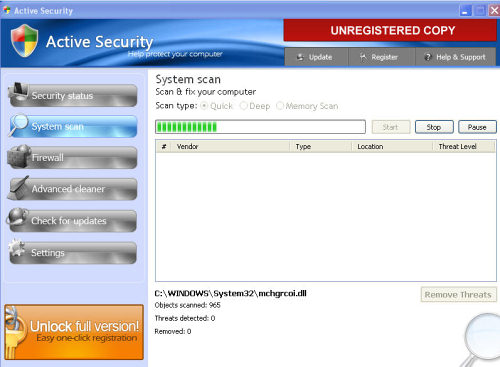
Active Security is a rogue anti-spyware program. This parasite has all the arsenal demonstrated by most modern rogues, included a sophisticated self-defense mechanism. Active Security typically enters the system by using downloader trojans or drive-by downloads, but it can also be downloaded manually. Like most rogues, Active Security relies on misleading advertising to trick users into purchasing it’s so-called “licensed version”.
Once inside and active, Active Security will perform numerous actions, including, but not limited to blocking security programs, disabling Task Manager, Safe Mode and Registry Editor. It is also known to alter browser settings – this manifests in redirections to various websites of dubious nature, as well as a block on on some websites, particularly those dealing with computer security.
Active Security displays popups and fake system notifications, supposedly to inform the user on the presence of an infection or multiple infections on the system. The rogue backs-up this claim by performing fake system scans, which produce falsified results by marking harmless files as threats. The plan here is to create the illusion that the user’s system is infected so Active Security can then urge him to purchase the “licensed version” of the program to dispose of these “threats”. The reality, however, is far different, and the real threat to remove here is Active Security.
This program is malware and should be treated as such: do NOT download or buy it and remove Active Security immediatelly upon detection.
Let me tell you how to get rid from Active Security. There are 3 main ways:Using antispyware, manual removal or system restore.
Automatic removal using antispyware is recommended way to remove Active security, as it is safest, however it might block antivirus from download. We recommend 3 ways to overcome this problem : disabling Active Security processes first using task manager or process explorer, using system restore before scanning for remaining threats or renaming antispyware download to some common name like iexplorer.exe.
No matter which mode you use, it is a good idea to scan your system with couple good antiviruses and antispyware afterwards to make sure that Active Security removal was successful.
Automatic Malware removal tools
(Win)
Note: Spyhunter trial provides detection of parasites and assists in their removal for free. limited trial available, Terms of use, Privacy Policy, Uninstall Instructions,
(Mac)
Note: Combo Cleaner trial provides detection of parasites and assists in their removal for free. limited trial available, Terms of use, Privacy Policy, Uninstall Instructions, Refund Policy ,
It happened EXACTLY as described above !!!
Monstrously annoying utter (and not to forget dangerous) crap !!!
It also created icons of pornsites on my desktop.
An extremely annoying nag-window popped up every minute to “warn” me that there was some dangerous virus on my PC.
Booting up didn’t help at all because Active Security was already embedded in the booting up procedure and the nag-screens started again and again and again.
At first I was fooled to think it was Windows Security (it looks so identical !).
Finally I decided to purchase because I really became scared.
After the purchase the nag-popup-windows were gone, and about 32 “threats” were removed but ……..
My own genuine anti-virus program Trend Micro had not detected any of them !!!!
Anyway, I tried to do a normal copy and paste within Windows Explorer which ultimately totally failed !
Then I knew my whole system was wrecked by these dreadful clowns !!
Remedy ??
I went to Harvey Norman, who totally formatted (and thus wiped out my HD) and re-installed Windows-XP !
Plus ……..
TO MY BANK AND HAVING MY CREDITCARD IMMEDIATELY DISABLED.
Thanks to that action the only charge on my was my purchase of the “licenced” version of Active Security.
I was so lucky to have all my data backed up (including my Outlook Express emails) just before my laptop became infected however I still had truckloads of work to re-install everything back to where it was.
And I still have a transaction dispute of course with my bank (purchase of utter crap instead of a genuine anti-virus program).
Hopefully I get the $85 (AUS) back via my a charge-back on my Credit-card.
Beware for these very professional criminals who are able to fool most anti-virus programs !
Without a proper back-up of all of my data and emails (Outlook) my damage would have been gigantic !!!
Jan : do not post uris to dangerous websites – some users might not read and click.
My apologies, I certainly agree with you and I knew immediately why you had removed my last comment.
I just realized it a bit too late.
It was most definetely NOT my intention that people would click on it and having to go through the same ordeal as I went through.
But there are always people who cannot resist their curiosity and click on it anyway. And I think it is not so difficult to imagine what scenario would have taken place if they did !
Have a great day,
How I can get ready of this program when I cannot even instal any software due to I’m not logged in as an administrator ?
How I get ready of this problem & don’t get kicked me out of instalation due to administrador rights everytime that I try to install a anti-malware or anti-spyware software ?
Luis C. : Start a task manager ( press ctrl alt del as fast after you log in into your windows account as you can, as later it might get disabled).
Look for Active security processes and disable them.
Then download a good antispyware program or proceed with manual instructions.