
Home > Adware > Yontoo Layers Client

How to remove Yontoo Layers Client?

September 10th, 2012

What is Yontoo Layers Client?

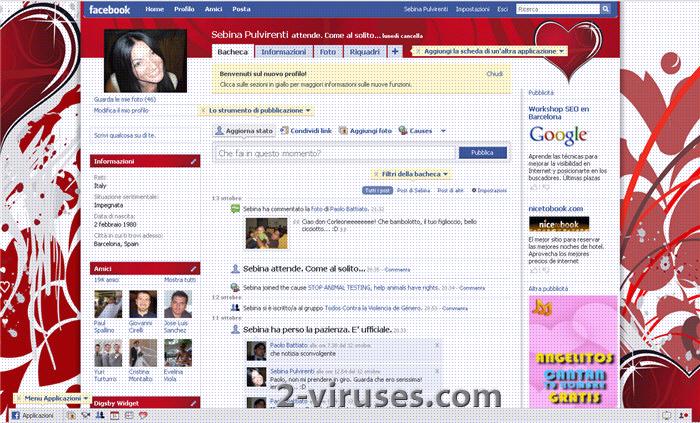
Yontoo Layers Client (aka Yontoo) is a platform for building applications that modifies the way specific webpages look. The application is distributed as browser extension and might display advertisements served through Yontoo and not original page. Thus we classify this application as adware and potentially unwanted program. One of the “famous” applications using Yontoo platform is Pagerage, which modifies Facebook.

Yontoo installs a browser extension. It can affect any Internet browser, whether you use Internet Explorer, Chrome or Firefox. Some users do not know how they get this program installed, although it is downloaded and executed to the system manually usually. In the most cases it came inside bundled with other software (Video converters, MP3 players, etc.) that computer users can download from third-party websites. The application might have been installed by kids too.

On itself, Yontoo Layers Client is not dangerous. However, the applications, made using this platform, range from useless to annoying. At the best, you will see some pages differently than intended by their creators. At the worst, you will get more advertisements and loose some privacy because of content served from other sources. Yontoo is a tool to build advertisement programs.

We recommend uninstalling any application modifying the way pages look that was installed without your consent. This includes all of Yontoo applications. Anti-malware programs like Spybot S&D and Spyhunter detect and remove such browser modifying applications if they can not be uninstalled normally. Many of these programs can be removed with Adwcleaner as well, though you might wish to scan with broader anti-malware tools to confirm that Yontoo infection is not a by-product of trojan attack.


Yontoo Layers Client is Dangerous

arrow Yontoo Layers Client is Adware that can present itself as a toolbar
arrow Yontoo Layers Client logs your internet browsing history
arrow Yontoo Layers Client displays lots of annoying advertisements
arrow Yontoo Layers Client may infect your system via spyware or freeware
arrow Yontoo Layers Client may repair its files, spread or update by itself
arrow Yontoo Layers Client may prove difficult or impossible to remove
arrow Yontoo Layers Client violates your privacy and compromises your security
Download Spyhunter
for Yontoo Layers Client detection

Note: Spyhunter trial provides detection of parasite like Yontoo Layers Client and assists in its removal for free. You can remove detected files, processes and registry entries yourself or purchase a full version.


Yontoo Layers Client screenshots


Yontoo Layers Client screenshot

Manual Yontoo Layers Client removal


Important Note: Although it is possible to manually remove Yontoo Layers Client, such activity can permanently damage your system if any mistakes are made in the process, as advanced spyware parasites are able to automatically repair themselves if not completely removed. Thus, manual spyware removal is recommended for experienced users only, such as IT specialists or highly qualified system administrators. For other users, we recommend using Spyhunter or other malware and spyware removal applications found on 2-viruses.com.
Disable these Yontoo Layers Client DLL files::
Remove these Yontoo Layers Client Registry Entries:
Remove these Yontoo Layers Client files:
It is impossible to list all file names and locations of modern parasites. You can identify remaining parasites, other Yontoo Layers Client infected files and get help in Yontoo Layers Client removal by using free Spyhunter scanner. It comes with free real-time protection module that helps preventing Yontoo Layers Client and similar threats.

Yontoo Layers Client is Adware, which means that it plays, displays, or downloads advertising material to a system after being installed. Yontoo Layers Client is known to display numerous annoying pop-ups while running.

Such Adware as Yontoo Layers Client often hijacks your homepage and replaces it with third party commercial and marketing site. Then Yontoo Layers Client proceeds to alter your browser code to prevent you from changing vital browser options.

However, the most dangerous threat Yontoo Layers Client poses is that such Adware may steal your private information and browsing history and pass it to third parties without your knowledge and consent.


How to tell if your PC has been infected by a Adware such as Yontoo Layers Client?

Slow PC Performance: Most of Adware is not optimized and coded very poorly, which causes your system to become unstable, slow and unreliable, as such Adware is constantly running in the background.
Numerous undesirable and annoying pop-ups: A typical Adware parasite keeps track of your internet browsing habits, sending your browsing history data to remote servers, owned by third party companies that use this information to advertise their products via numerous pop-ups, toolbars, hijacked homepages and spam letters. All these undesirable advertising methods are used on the victims of Adware.
Slow internet connection: Adware is constantly using your internet connection to send your private information to remote servers, as well as receive ads and pop-ups from third party servers, which causes much slower internet connection speed and stability.

Adware

  1. Eddie
    October 19th, 2012 at 00:46 | #1

    what if a person does not feel comfortable changing things in their registry? is there another program to use to uninstall yontoo, please?

  2. Steve
    December 18th, 2012 at 20:10 | #3

    I try to uninstall yontoo and all I get in an error messange. How to I get rid of it? I’m not computer savy so I need to be held by the hand and explain what each thing is and what to do step by step. Reply fast please because my computer is going slower and slower. Someone on another site said to run what’s called a CC Cleaner and I don’t know what that is or how to run one probably even after I see instructions on how to use it.

    Thanks

    Emails me:

    • December 18th, 2012 at 21:33 | #4

      Steve:
      Use one of adware/PUP cleaners :
      Spybot S&D
      Spyhunter
      Malwarebytes
      Superantispyware
      Launch scan, and delete all pups they find.
      I doubt ccleaner will fix yontoo.

  1. No trackbacks yet.