
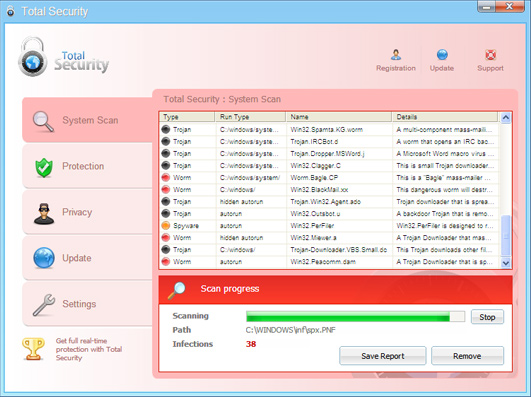
Total Security is a fake spyware remover, rogue anti-spyware application that uses misleading methods to convince you that your computer is seriously infected. It’s a replica of another notorious and fake anti-spyware application called System Security. TotalSecurity enters the system without user’s permission using trojan viruses that display fake security notifications about various security related problems and other similar infections. Be aware of the follwing fake security warnings:
Security Monitor: WARNING!
Attention! System detected a potential hazard (TrojanSPM/LX) on your computer that may infect executable files.Your private information and PC safety is at risk. To get rid of unwanted spyware and keep your computer safe you need to update your current security software. Click Yes to download official intrusion detection system (IDS software)
New database update is available
WARNING Total Security Alert! Automatic updating is necessary to get you system protected in real time against new and emerging viruses, worms, and troyans. Regular updating is needed to prevent your PC from latest virus threats that can lead to system slowdown, freezes, crashes, and data loss.
Privacy Violation alert!
WARNING Total Security Alert! Privacy Violation alert! Total Security detected a Privacy Violation. A program is secretly sending yoru private data to an untrusted internet host. Click here to block this activity by removing the threat.
Once installed and active, Total Security will supposedly scan your computer and report false scan results. Reported infections do not really exist, so you may safely ignore them. Further, the rogue program will block anti-spyware applications when you try to scan the system. So, the removal of this parasite might be complicated. What is more, Total Security constantly displays the Total Security Protection Center notification which is very similar to legitimate Windows Security Center window. Total Security is a scam and should be treated as such. Don’t buy this scam software and remove it from your PC as soon as possible after first appearance.
Automatic Malware removal tools
(Win)
Note: Spyhunter trial provides detection of parasites and assists in their removal for free. limited trial available, Terms of use, Privacy Policy, Uninstall Instructions,
(Mac)
Note: Combo Cleaner trial provides detection of parasites and assists in their removal for free. limited trial available, Terms of use, Privacy Policy, Uninstall Instructions, Refund Policy ,
A friend of mine has gotten this annoying thing on his PC.
Seems that as awesome as the help given on this and other websites are, they are simply not working, the files given here certainly do not excist on his machine, and the Registry entries arent correct either.
While some people may be lucky that this helps them, it does seem like there is either some randomness to the rogue’s filenaming, or there ecxist multiple versions of it with the same name and Graphic user interface….
Storytellar: Some trojans name themselves randomly, that is the case there. I would use automatic scanner and see what files are infected.
How can I remove the total security software if I cant get on my computer.
I would recommend removing it with automatic software.
I have this horrible virus and I can’t get rid of it. I have tried the using bleepingcomputers and followed those instructions but it want let it download. How is this one going to work will I have the same trouble?
Try it. You should be able to download it without problems.
Iv run updated maelwarebytes anti maleware, smit fraud spybot multiple times and they all have failed ro remove this, the manual instructions i have found tell me to remove files but none of the ones it lists are on my computer. Need more help
Nathan Have you run an updated Spyware Doctor?
Might be a new version of trojans started distributing this malware. Thus file names might change. First look at processes that run under your user (start task manager, and look under all processes). List down all processes that do not belong to known program and are run from your user space. Try to terminate them. google their process names if unsure. Then look where executables of these processes are located. there should be no executables located in C:\ (typical location for some malware) or somewhere under your document directory (C:\Documents and Settings\… ). If it is, it is malware most of the cases.
However, you will need a spyware remover for followup scan, as there are executables, dlls and drivers where it is hard to decide if it is good or infected file.
Malwarebytes worked for me, whereas following the manual removal instructions I found elsewhere did not… however I also managed to stop one of the processes from running by opening the Windows Task Master as soon as my desktop showed on the screen, sorting the processes by Image Name then selecting the file _ex-08.exe and clicking on End Process. Hope that may be of help to someone else.
On my computer Malwarebytes found two executables in the c:\windows\temp folder, the _ex-08.exe I mentioned before, and another one wpv831250826839.exe (no doubt that one will change it’s name!) There were also a couple of Registry entries, neither with any distinguishable connection to the processes mentioned, but my computer has restarted several times now and finally appears free of the cursed thing.
before reading this, i tried several scans on my PC (i’m on my laptop now) using norton 360 and everytime i tried it would restart the system when it got pretty near the end. but last time i tried it decided to simply start back up and when it got to the windows loading page it would turn itself off and then start back up, again crashing at the loading window. i turned it off at the back because it did this for about 30 minutes and now whenever i turn it on i am greeted with the choice of proceeding in ‘safe mode’, ‘most recent successful settings’ or to simply ‘start windows normally’. whatever i choose it would get to that loading page and then crash, turn itself back on, and then give me those options again. please help, i’m getting sick of letting my sister go on my laptop!
Jordan : Rootkit might block Norton 360 if it is not up to date or does not have that particular rootkit/trojan in database. They update all the time. These parasites protect other parasites from removal. Continuous reboots on file access might corrupted a driver or some setting went awkward.
As your computer cant start, your single hope is “repairing” install with installation CD. There are very few things one can do till computer loads. If it wont help, you will have to backup your data (it is possible to load your PC from Ubuntu CD or similar) And then reinstall.
I have the total security virus on my computer and now my computer only runs in safe mode. it will not get online or run a disk. it also uninstalled my virus scanner. what do i do?
Try launching your computer into safe mode with networking support. Cant you use an CD or USB key ?
I tried your product with GREAT results!!I am very pleased with Spy Doctor. I looked in the registry for the files mentioned for mannual removal and it was clean. Your product removed everything! Thank you.
Well, i got this problem one day when turning on the computer. firstly, my desktop wallpaper had changed,replaced with a picture with words saying my computer was infected by spyware and so on. It then proceeded to have the total security popups, in which i knew immediately was bogus. my mozilla firefox was disabled, so as many other programs such as paint, windows media player, etc.
However, i managed somehow to stop the total security program, which gave me the opportunity to find the total security file. Upon finding it, i managed to delete it. Ever since that deletion, my computer worked normally. However i still have that file, it located in my local disk, document and settings, all users, application data folder. its called ‘10563594’. Inside the folder there is a program with the total security icon, its 812 kbs. i can easily delete it, but it will reappear again everytime i restart my computer. why is that?
Henry : Total security is gone, but Your PC is still infected with some trojan. Scan your PC with anti-spyware programs. It is likely they will re-download full total security in the future if you wont clean your PC now.
i got this annoying trojan it makes my pc horrible i can’t run any program or install doctor spyware what can i do?
and how can i remove those files manually?by searching?
Yes, you have to search for them. Sometimes they reside in system folders, sometimes they are hidden in middle of temporary files.
ok non of thee above work for me download it but total securitt wont let it run and cant find its files task thingy wont show up
ok my pc is back 2 normal but still cant find them total security files 2 delete download doctor tools but need rigestry key cant buy online pls share pls pls
Sophia: Try to rename download to something else.
I have the total security virus on my computer. I have tried downloading the spyware removal programs but after they download they will not open. What to do?
Debby : Rename it , or try downloading it from alternate location and rename it again.
ok help pleaseeee
ive tried everything to remove total security im getting so mad and fustrated feel like just breaking my computer with a hammer
so it does the scan and finds 38 viruses i thought it was real so i was going to pay then i looked information on my laptop found its a virus or idk
ive tried everything i mean everything 2 days working on this cant find a solution been on bleeping computers everywhere
i cant acces nothing but explorer cant start safemode cant start firefox cant open files it like took over my computer yeah ive tried changing the taskmanager name and no it doesnt work cant download anything
someone please help
Aremy : Use flash drive or CD. Also, you could try running computer in safe mode with networking support or create a different windows user and log in from that account.
ok
im going to try the safemode with networking..
if i use a flash drive or cd how would i have to do that process??
I keep trying to download the pc doctor to get rid of total security but it keeps saying that the “application cannot be executed”…what can i do. I dont know how to to run my computer on safe mode..
Yahaira : reboot Pc and press F8 while booting. then choose safe mode with networking.
Admin, have Total Security virus, and cannot get task manager to stop process, the computer announces that Task Manager has been disabled. I am also not able to operate in Safe Mode, I get a sinister wallpaper announcing that all my data is at risk and that I must activate TS. Then I get the BSOD, which I am certain is also fake.
Downloaded files are not allowed to run, command prompt is not allowed to run, nor can I get to services through Sys Admin pages in the Control Panel. As typical, the computer will run a small set of programs, but I am loathe to connect to the Internet with this virus still running.
I have backed up all the files I want on the computer and tried to re-install windows, but the windows install tells me that there is no hard drive!
Any ideas? I am thinking my only recourse is to get a new HD, which is not cost prohibitive, but I hate admitting defeat.
Ken
First, about reinstalling. you need to boot from install cd (not trying to launch it), and it is pretty much impossible for virus to block access to hard drive then. IF booting from install cd shows that there is no hard drive, maybe your windows install has no drivers for that HDD? Though that would be unlikely case. In no case you should install over existing windows version, because there might be trojans in your user application data directory and they might be launched again.
Second, check what file names are allowed to run, and rename the downloaded files to that. They have to allow total security executable to run – that is no question. So it will not be blocked.
I’m having a nightmare of a time with Total Security. I’m writing this from a gracious friend’s laptop in an effort to remove this program. Total Security has COMPLETELY disabled my computer. I cannot run the Task Manager, my Recycle Bin has disappeared, I’ve downloaded Malwarebytes (which I already had) and a few other anti-spyware programs and even though they download I cannot run them (have tried renamed the .exe files as well). Rebooting in SafeMode and “Last Known Good Configuration” is no help either. I’m at a complete loss as to how to salvage my laptop at this point. Any help would be GREATLY (x INFINITY) appreciated. I’ve looked into as many options on as many websites as possible and have followed the steps people have taken to remove Total Security with success and am utterly unable to replicate them as my issues seem to be semi-unique. Thank you…………..
Lando,
Have you tried to renaming malwarebytes or spyware doctor to the name total security trial uses? Also, you might try canceling all unwanted processes by leaving a single edited document open and shutdowning the computer (and later canceling the shutdown). Then scan with antiviruses.
@admin
Admin,
I don’t have a shortcut or .exe file for Total Security that I can rename…I have no idea where the Total Security “trial” file is, I’ve definitely attempted to “Search” for it and it does not come up. As for leaving an “edited document” open and shutting down the computer; I tried leaving an unsent email open and shutting down but the laptop just completely shuts down. No “ending process” screen appears that gives me a window of time to cancel the shutdown etc. This is ridiculous. Thank you so much for your prompt response and help. Any further help is VERY MUCH APPRECIATED.
Lando:
There is a download link somewhere. Do not click on it, just note a file name.
this “total security” is very suspicious, first it suddenly pop-out of nowhere, and then it offers istallation saying that if you click continue means you agree with all the rules and regulation.
I click cancel!!!
But it still installed on my notebook. how annoing….
What if I “fell” victim to the ploy and “purchased” the Total Security program, do I just cancel the transaction ASAP! Call my credit card company??? I usually never go for stuff like this but it was very convincing…what do I do now???
Yes, contact your credit card companies. Usually they can get money back, not always though.
@Greta
Greta I was dooped also, I was woundering did it try to keep taking money out? My bank said that cancelling my card might not be enough.
no way to get spydoctor on machine! can’t run anything with TOTAL SECURITY on.
It will not let spydoctor to even install. can’t run any executables can’t
run the task manager even if you restart the machine and try and get in first.
doesn’t work. can’t run regedit or anything else. So how are you expecting to have spydoctor fix Total Security. I really need help!
Russ : try renaming it to iexplorer.exe . This name will not be blocked by Total Security
OK…so, I am reading all of this stuff about Total Security, and my mind is blown!
At first, I was suspicious about installing anything, but it said it worked with McAfee (an anti-virus that I do pay for), so…I ordered it on my credit card. I still haven’t had any problems since doing this, two days ago.
Should I be scared?
Eeeek!! I need advice!!
@Tree
Total Security is definantly malicious software. Heopfully you can dispute the charge on your credit card and stop payment.
This procedure worked for me today (10/05/06):
Renamed taskmgr.exe to iexplore.exe
Launched iexplore (taskmanager)
find a process has a series of numbers (18142034.exe in my case)
end that process. Pop up warnings should stop
start the registry editor (regedit)
search for that process name in the registry (I found about 5)
delete all of them.
Search the hard drive for a file with that name ( I found 1, 18142034.pf)
delete it.
Rebbot the computer.
You should be able to download and run malwarbytes which will clean the rest of the garbage.
Run your AV software with a deep scan.
Reboot
Repaet malware and AV.
Reboot.
It should be clean now.
Thank-you for the advice. I did indeed check with my credit card company, to see if I can have the charge voided…they’ll get back to me. *fingers crossed*
I used my McAfee security to restore the computer back to it’s previous state. (Aprox. 3 weeks before.)
I didn’t have to delete anything, once the process was finished. (Because, I didn’t notice anything unusual.)
Everything seems to be back to normal. Hmmmmmm?????
Do you think my laptop is going to be ok?
Also, my laptop is wireless, but, do I need to be worried about my other pc?
The restore has one problem : you havent fixed the security hole that allowed virus to be installed. That means it can happen again. I would do occasional scans with some anti-spware (updated). Just in case.
@admin
i cant even open my cmd or scan my com help
iv trid safe mode no good help
TOTAL SECURITY IS A BIG SCAM-WITH REALLY BAD PEOPLE!!! I had no knowledge of ordering this product or service and somehow they tapped my credit card for almost 100.00!
Not only that, they agreed to refund my money on 2 occasions and did not follow through, and when I spoke with a SUPERVISOR I was told since I’m an individual that nothing can be done because I have no clout like a bigger company would have… they also said that the charge never went through and even after I checked with my bank and PAYMENT did go through, they basically denied it. All I asked of this supervisor was for them to also check their records, but of course, THEY TOOK MY MONEY AND RAN LIKE THIEVES AND COWARDS!!!