
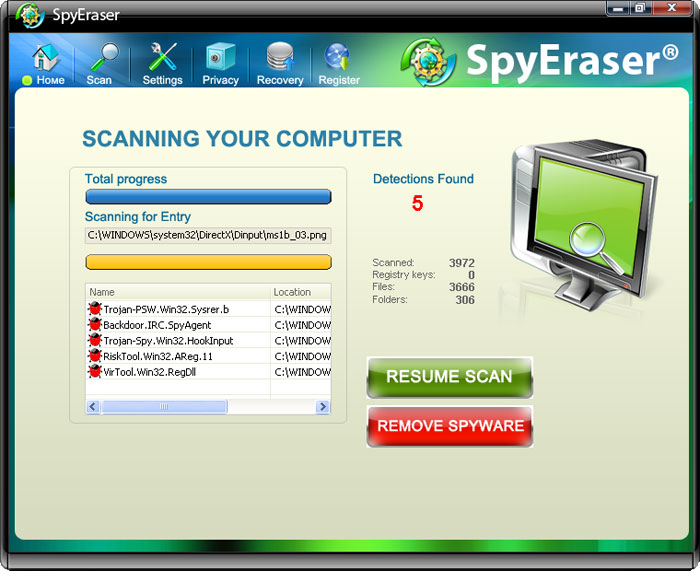
SpyEraser is a rogue anti-spyware application, fake scanner that tries to trick the user of the compromised computer by showing fake security alerts and fake infections into believing that his computer is badly infected. This fraud tool then asks to pay for a full version of the program to remove the infections which of course don’t even exist. This is nothing more but a scam. Please get rid of SpyEraser from your computer as soon as possible. Otherwise, it may cause even more damage to the system.
There are at least two websites that promote this malware, but of course there are many more fake online scanners and various other misleading websites that promote Spy Eraser. Don’t install any flash player updates or other software from suspicious websites as you may end up with malware on your PC, such as SpyEraser. Once installed, this parasite will simulate a system scan and display several supposed infections that can be removed only with a full version of the program. Everything would be great except that this software asks to pay for removal of infections that don’t exist. It’s a typical scareware and nothing more. Furthermore, this infection will constantly display fake security alerts statijg that your computer has many serious security and privacy problems. That’s a lie too.
If your computer is infected with this parasite, please use the removal guide below to remove SpyEraser from the system manually or download Spyware Doctor and run system scan. If you can’t delete malicious files listed below then end the main processes of this infection: msctrl32.exe and SpyEraser.exe.
Automatic Malware removal tools
(Win)
Note: Spyhunter trial provides detection of parasites and assists in their removal for free. limited trial available, Terms of use, Privacy Policy, Uninstall Instructions,
(Mac)
Note: Combo Cleaner trial provides detection of parasites and assists in their removal for free. limited trial available, Terms of use, Privacy Policy, Uninstall Instructions, Refund Policy ,