
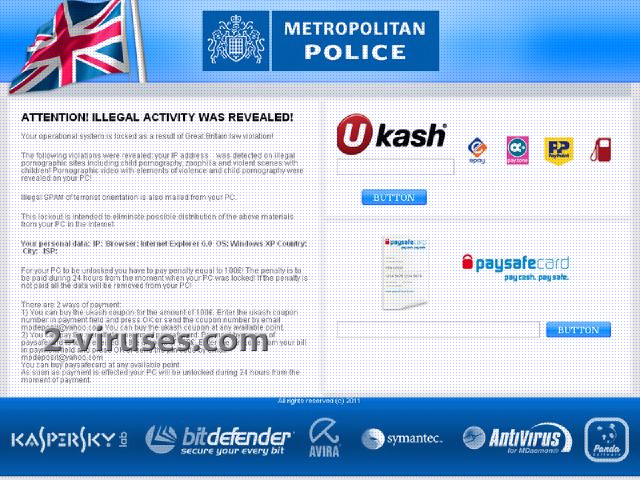
PaySafeCard virus is another program that blocks access to computers and gives you false information why that was done. The program displays a message on the infected computer that your computer has been locked because of violations in using copyrighted content. Usually, it mentions that you have been using and distributing pornographic pictures and videos. The message also claims that you will not be able to use your machine until you pay a fine. The fines vary from 100 to 200 dollars or euros depending which version of the program is infecting.
PaySafeCard virus always uses a name of some well-known Police institutions which makes computer users really fall for this scam. The message looks really convincing and it makes you worry even more as it comes from somebody who enforces the law. Here are some names that PaySafeCard virus is using once got inside a system: Metropolitan Police virus, International Police Association virus, Unites States Cyber Security virus, Australian Federal Police virus, West Yorkshire Police virus and others. Not to mention that this badware has spreaded so wide that it even comes in different languages and infects computers located in different countries. For example, Cuerpo National de Policia virus, Policia de Seguranca Publica Portugues virus, El Equipo ha Sido Bloqueado por Violar la Leyes de Espana virus and others.
All fines are asked to pay using PaySafeCard payment system. This is one of the signs that something is wrong with those warnings as fines are never collected using such payment systems. You should never trust any of these programs and remove PaySafeCard virus as soon as possible. Since the virus blocks your computer and you cannot run your security tools that easily, you should either scan your computer from a different account or do it in Safe Mode with Networking.
All such ransomware removal instructions are covered in our Ukash Virus guide.
Automatic Malware removal tools
(Win)
Note: Spyhunter trial provides detection of parasites and assists in their removal for free. limited trial available, Terms of use, Privacy Policy, Uninstall Instructions,
(Mac)
Note: Combo Cleaner trial provides detection of parasites and assists in their removal for free. limited trial available, Terms of use, Privacy Policy, Uninstall Instructions, Refund Policy ,
Hi,
my external hard drive just got infected with Win32:Bamital-T [Drp].
This happened when i installed avast antivirus software.
all my files now have the extension .exe and show as application. i can open anything. Images, text, doc, music, or video files.
Please help me. Advice me what i should to cure my infected files.
thanks a lot in advance.