
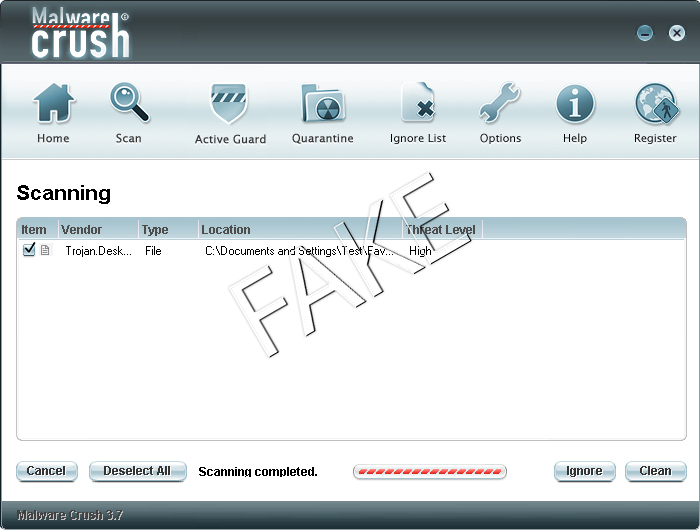
MalwareCrush is a rogue anti-spyware application designed for displaying false threats and tricking you into purchasing the full version of the program, which supposedly will remove all the security threats. Malware Crush gets on your system via Trojans and other malware, such as fake video codecs (that usually come from adult websites). It is a clone of infamous VirusBurst, SpywareQuake, SpyAxe etc. It even shares the same shortcut icon with its predecessors. You should remove MalwareCrush as soon as possible.
As the slogan of MalwareCrush goes “MalwareCrush Leaves The Malware Absolutely No Chance!”. Of course it does not, as it brings all the so-called “threats” along to the installation already. After the installation you will be presented with a fake report of threats and offered to buy a full version of the application in order to remove them. That is, business as usual – do not fall for this scam. If you find MalwareCrush in your system, it is recommended to remove it as soon as possible. MalwareCrush may present itself as Malware Crush 3.7, but both of these applications are equally fraudulent.
The payments for Malware Crusher are processed on domain fantazybill.com – a domain without any frontpage which is VERY strange for legitimate payment business, so obviously its part of the scam isoftpay.com was. Your credit card info might get recorded in the process and more money will be stolen from you than the cost of this fake tool. One more reason not to trust them!
Do not ever download or buy Malware Crush and MalwareCrush 3.7, and to ensure your security, you should block malwarecrush.com (207.226.175.54) using your HOSTS file.
Automatic Malware removal tools
(Win)
Note: Spyhunter trial provides detection of parasites and assists in their removal for free. limited trial available, Terms of use, Privacy Policy, Uninstall Instructions,
(Mac)
Note: Combo Cleaner trial provides detection of parasites and assists in their removal for free. limited trial available, Terms of use, Privacy Policy, Uninstall Instructions, Refund Policy ,
These MalWare Crush bastards should be PROSECUTED! Their product came bundled with AdAware 2007 from a legitimate site called BetaNews.com. These thieves dump their dirt on your like like a vacuum cleaner salesman. They demand money to clean up their own damned mess…
I am one more person who tricked, have bought three legit softwares—none get rid of that stupid icon in the bottom right by the clock—with the green circle and the red exclamation point! I HATE THIS SOFTWARE I may have to SYSTEM RESTORE to last year, 2006!
To malware crush you Idiots you absolute morons you put a virus on my computer. I hope that I will never need to deal with you again. This is going to take me forever to rid you from my computer.
stupid malware crush!!!!!!
damn it…
give me lots of troubles!!!!
I was shopping for waterbed sheets and not even sure how this creepy program worked so fast on my computer- Malware crusher flashed on my computer while I was on the site, I x’d it out and the next thing I know, it is literally all over my computer and I can’t get it off……..I ran adaware etc and they track it – I delete it and it is still there!! I agree with TR- they should be prosecuted for crap like this!!! Total bunch of creeps!!
umm i was looking for sim city 200 downloads when the malwarecrusher pop up well,poped up and i x’d it out and it scanned my computer saying,”you have nine threats” after that norton told me it had found and deleted malwarecrush off my computer,but an hour later it looks like somethings going on cause i was looking at music and the norton this said it has removed the virus”downloader”. i would just like to know,is malwarecrush somewhere hidden on my computer?
It might be the case that you still have some version of trojans, responsible for downloading malwarecrush. It is best to scan with both anti-virus (which usually provide best protection albeit it do not react to all fast updating spyware threats in time) and some free reputable spyware scanners. These are updated faster, and might find the parasites Norton still miss. We recommend SpywareDoctor (download link here) free scanner, or completely free SuperAntiSpyware.
Don’t fall into this trap like I did, I was looking for a good anti-virus and now I’m stuck with something I can’t remove. HELP.!!
to the muppets at malware crush :- did i bully you at school? i’ve been to jail many times,and i’ve seen what happens to saps like you when you are caught and locked up,so think on,cos i promise you’ll be screaming out after lock up,and even the screws have pc’s,they’ll ignore your cries for help!