
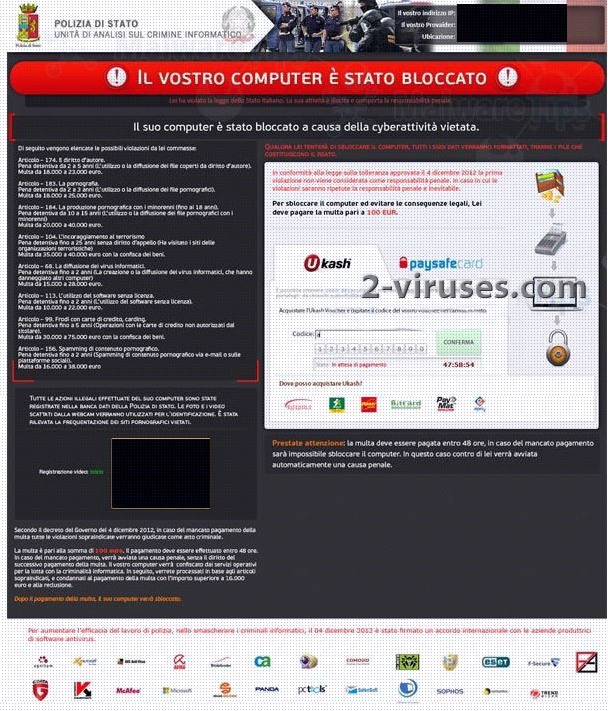
The “Il vostro computer è stato bloccato” virus is adapted for Italian computers mainly. It has all the information written in Italian language and is supposed to act in the name of a local police – Polizia di Stato – Unità di analisi sul crimine informatico. As many other ransomware, the “Il vostro computer è stato bloccato” virus accuses an infected computer user with a list of crimes:
POLIZIA DI STATO – UNITÀ DI ANALISI SUL CRIMINE INFORMATICO
ll suo computer è stato bloccato a causa della cyberattività vietata.
Di seguito vengono elencate le possibili violazioni da lei commesse:
Articolo – 174. Il diritto d’autore.
Pena detentiva da 2 a 5 anni (L’utilizzo o la diffusione dei file coperti da diritto d’autore). Multa da 18.000 a 23.000 euro.
…………….
Articolo – 104. L’incoraggiamento al terrorismo.
Pena detentiva fino a 25 anni senza diritto d’appello (Ha visitato i siti delle organizzazioni terroristiche). Multa da 35.000 a 40.000 euro con la confisca dei beni. Articolo – 68. La diffusione dei virus informatici.
As you may see from the text, crimes listed are from sending spam e-mails to illegal usage and distribution of child pornography material or even participation in terrorism activities. For the message to seem legitimate, scammers use local police name and logo, extract from existing laws and even your computer’s webcam. If it is installed to your PC, the “Il vostro computer è stato bloccato” virus is programmed to turn it on and show the current view, e.g. a person’s that is in front of a computer face. The text near this image informs that any video or photo information is sent to a remote server and will be used for your identification. No wonder that many victims get scared and pay the fine which is not that small. Cyber criminals demand for 100 EURO.
The “Il vostro computer è stato bloccato” virus uses pre paid payment system such as Ukash or PaySafeCard to collect money. A person needs to purchase a card and enter PIN number on the blocking screen. This way scammers get the PIN which is later turned into cash by selling such PINs in online forums. It is particularly difficult or even impossible to trace the criminals after this money.
One can get infected with the “Il vostro computer è stato bloccato” virus after browsing through corrupted websites or clicking on fake advertisements that lead to malicious web pages. Note that even those sites that you visit every day might get compromised and become the source of infection. Ransomware developers tend to target such sites like job search or similar, which would have enough visitors to be infected before the malicious code is noticed.
If your computer is blocked by the “Il vostro computer è stato bloccato” virus, follow the instructions below to fix it:
Removal guide using Safe Mode or Safe Mode with Networking
- Press F8 while restarting your PC;
- Choose Safe Mode or Safe Mode with Networking (if the “Il vostro computer è stato bloccato” virus blocks it, go to the next removal method)
- Launch MSConfig;
- Disable startup items rundll32 turning on any application from Application Data.
- Restart your computer for the second time.
- Scan with https://www.2-viruses.com/downloads/spyhunter-i.exe to identify the “Il vostro computer è stato bloccato” virus files and delete it. Watch a video showing how to do every step:
Removal guide using Safe Mode with Command Prompt
- Restart your computer choosing Safe Mode with Command Prompt (if you cannot complete this step, go to the next method).
- Run Regedit
- Find WinLogon Entries and write down all files it references that are not explorer.exe or blank. Replace them with explorer.exe
- Search registry for the “Il vostro computer è stato bloccato” virus files and delete the registry keys referencing the files
- Try to restart and scan with spyhunter.
- If this fails, try doing system restore from safe mode with command prompt (rstrui.exe). Below is a video of this method:
Removal guide when a virus blocks Safe Modes
Depending on the version of the “Il vostro computer è stato bloccato” virus, it mgiht disable all safe modes. In such a case use a short gap before a blocking screen is displayed to run anti-malware programs. After that, follow these instructions:
- Restart your computer normally.
- Start->Run.
- Enter : http://2-viruses.com/downloads/spyhunter-i.exe . If malware is loaded, just press alt+tab once and keep entering the string blindly. Press Enter.
- Press Alt+tab and then R couple times. The “Il vostro computer è stato bloccato” virus should be eliminated. Below is a video for this removal guide:
If none of the above worked for removing the “Il vostro computer è stato bloccato” virus
Install the antimalware tool spyhunter to a bootable USB or DVD disk. You will have to do it on another computer. After that put the USB or DVD disk to the infected computer. The program will start automatically and remove the “Il vostro computer è stato bloccato” virus. If you can not remove it even using this, leave a comment and our stuff will assist you with eliminating the blocking.
Automatic Malware removal tools
(Win)
Note: Spyhunter trial provides detection of parasites and assists in their removal for free. limited trial available, Terms of use, Privacy Policy, Uninstall Instructions,
(Mac)
Note: Combo Cleaner trial provides detection of parasites and assists in their removal for free. limited trial available, Terms of use, Privacy Policy, Uninstall Instructions, Refund Policy ,