
Home > Rogue Anti-Spyware > GreatDefender

How to remove GreatDefender?

December 30th, 2009

What is GreatDefender?

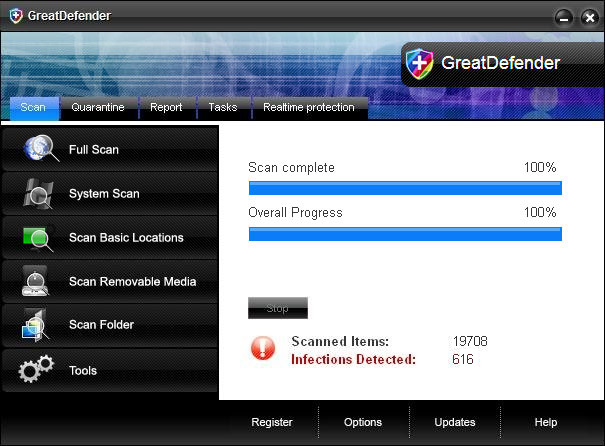
GreatDefender is a rogue anti-spyware application, fake spyware remove tool that has only one goal – to rip people off. If you have seen at least couple of  rogue programs from the WiniSoft family then you will easily recognize that this one is just a rename of the previous programs from that family: SysDefence, TheDefend, GuardPcs and so on (the list is big). There is absolutely nothing new about GreatDefender. Just like the others, it simulates a system scan and displays false scan results and then asks to buy a full version of the program to remove the infections or system security threats. Don’t do that, this is a scam. Uninstall GreatDefender from your computer upon detection using the removal guide shown below.

Great Defender will also display pop-ups or alerts stating that your computer has many security problems and privacy issues. It hijacks Internet Explorer and may even block certain program, usually security related like anti-virus or anti-spyware. Windows OS system tools can be also disabled. In such case, you have to end the main processes of GreatDefender which are: GreatDefender.exe and [RANDOM CHARACTRERS].exe. Then remove malicious files manually or download Spyware Doctor and run a system scan. But don’t forget to update it first. Furthermore, if you have already purchased it, please contact your credit card company and dispute the charges.


GreatDefender is Extremely dangerous

arrow GreatDefender is a corrupt Anti-Spyware program
arrow GreatDefender may spread via Trojans
arrow GreatDefender may display fake security messages
arrow GreatDefender may install additional spyware to your computer
arrow GreatDefender may repair its files, spread or update by itself
arrow GreatDefender violates your privacy and compromises your security
Download Spyware Doctor
for GreatDefender detection

Note: Spyware Doctor trial provides detection of parasite like GreatDefender and assists in its removal for free. You can remove detected files, processes and registry entries yourself or purchase a full version.


GreatDefender screenshots


GreatDefender screenshot

Manual GreatDefender removal


Important Note: Although it is possible to manually remove GreatDefender, such activity can permanently damage your system if any mistakes are made in the process, as advanced spyware parasites are able to automatically repair themselves if not completely removed. Thus, manual spyware removal is recommended for experienced users only, such as IT specialists or highly qualified system administrators. For other users, we recommend using Spyware Doctor or other malware and spyware removal applications found on 2-viruses.com.
Stop these GreatDefender processes:
Remove these GreatDefender Registry Entries:
Remove these GreatDefender files:
It is impossible to list all file names and locations of modern parasites. You can identify remaining parasites, other GreatDefender infected files and get help in GreatDefender removal by using free Spyware Doctor scanner. It comes with free real-time protection module that helps preventing GreatDefender and similar threats.

GreatDefender is classified as Rogue Anti-Spyware. After infecting a user’s system, it proceeds to scare its victim into buying the “product” by displaying fake security messages, stating that your computer is infected with spyware and only GreatDefender can help you to remove it after you download the trial version. As soon as the victim downloads GreatDefender trial version, it pretends to scan your computer and shows a grossly exaggerated amount of non-existent errors. Then, GreatDefender offers to buy the full version to fix these false errors. If the user agrees, GreatDefender does not only fix the errors, but it also takes the user’s money and may even install additional spyware into the victim’s computer.

Some Rogue Anti-Spyware, such as GreatDefender, may offer users to buy it after the victim clicks on a banner or a pop-up while surfing the internet. Usually, a Trojan is installed to a victim’s computer after clicking on the advertisement. It then proceeds to download or even install GreatDefender, which is another way for Rogue Anti-Spyware to spread itself.

Most of rogue Anti-Spyware, such as GreatDefender, is nearly impossible to remove manually.


How to tell if your PC has been infected by a Rogue Anti-Spyware such as GreatDefender?

Numerous undesirable and annoying pop-ups: A typical Rogue Anti-Spyware parasite keeps track of your internet browsing habits, sending your browsing history data to remote servers, owned by third party companies that use this information to advertise their products via numerous pop-ups, toolbars, hijacked homepages and spam letters. All these undesirable advertising methods are used on the victims of Rogue Anti-Spyware.
Changed or new icons: Sometimes, Rogue Anti-Spyware installs unwanted software to a victim’s PC without user’s knowledge and consent. This may lead to slower PC performance and stability, as well as more unwanted programs you can't remove.

Rogue Anti-Spyware

  1. No comments yet.
  1. No trackbacks yet.