
The “Windows Security Alert” popup is a misleading piece of information, displayed by some fake online system scanners, most recently Allinonesecurityv.com, which has made it it’s job to sell the rogue anti-spyware program Personal Antivirus.
About “Windows Security Alert” popup
We can clearly see that Internet was never a safe place to completely relax and forget even the basic knowledge. Even in 2009 we described technical scams that urged users to buy/download questionable security applications. Such frightening notifications might have been a novelty in 2009 or earlier, when Internet was still a unexplored territory full of mysteries and buttons. However, now, as information is reachable by almost anyone who seeks it, users have to be very neglectful to never take an interest in their browsing security. “Windows Security Alert” popup and similar are circulating all around Internet users. The popup reads:
Windows Security Alert
To help protect your computer, Windows Web Security has detected trojans and ready to remove them.
Spyware is Software, which can gather information from user’s computer through Internet Connection and send them to its creator. Gathered information can be passwords, e-mail addresses and all that information, which is important to you.
This popup allows you to choose to ignored it, or “remove all”, which redirects you straight to the purchase page of Personal Antivirus.
However, there are a lot of different variants of such technical scams. One of them is “Warning: virus w32.vrbat has been detected” pop-up which is also triggered by a Trojan. Its content looks something like this:
“This site says…
Warning! Virus w32.vrbat has been detected in your operating system.
Please call our technical support team right now to remove this virus.
Toll Free 1-888-556-9967.”
In this case, people are urging viewers to call the provided number to fix problems. Security researchers have already recognized that these scams are hoaxes that manage to lure money out of people. You should never call the provided contacts and get in touch with the creators of such shady scamming. They will only offer you to purchase a some sort of life-saving program as a solution to your problems.
Another type of such scamming can be done with longer pop-ups that should convince people to engage in a conversation with shady individuals.
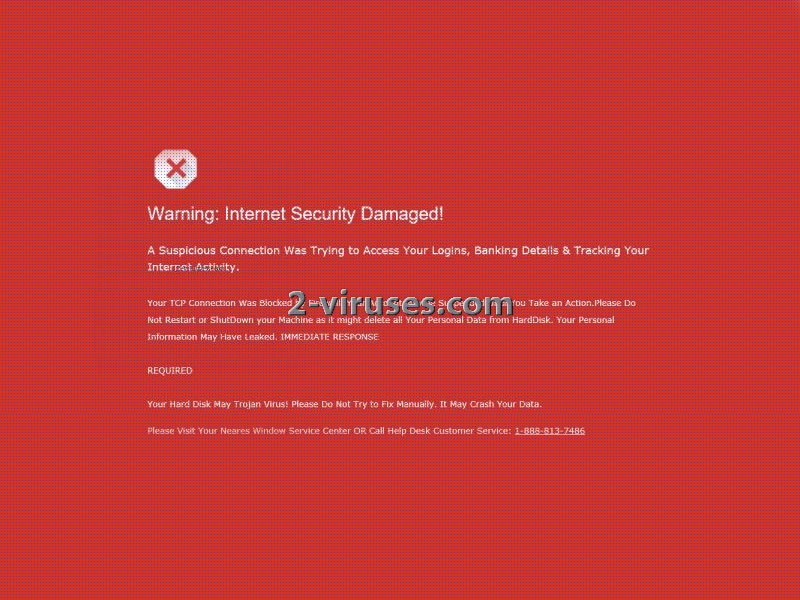
“Warning: Internet Security Damaged !!!
A Suspicious Connection Was Trying to Access Your Logins, Banking Details & Tracking Your Internet Activity.
Your TCP Connection Was Blocked by Your Firewall. Your Accounts May be Suspended Until You Take an Action.
Your Personal Information May Have Leaked. IMMEDIATE RESPONSE REQUIRED
Your Hard Disk May Have Trojan Virus! Please Do Not Try to Fix Manually, It May Crash Your Data.
Consequently, we are performing additional security checks to verify system security.
Please Visit Your Nearest Windows Service Center OR Call Help DeskCustomer Service: +1-888-306-5168 (TOLL-FREE)”
“Warning: Internet Security Damaged” pop-up goes into more detail about the ostensible viruses and offers a hand at the elimination of such unwanted infections. In fact, all of these pop-ups are triggered by a Trojan which is opting to cause problems for your device in more ways than one. Infiltration of such parasites is a matter yet to be discusses. First, get acquainted with a couple forms in which these pop-ups can be brought to you. You can read more about this variant of technical scams here.
“Harmful software detected” popup is a misleading pop-up, crafted for the sake of getting people to click “Remove All” button. Actually, no stated spyware or other viruses have been detected but the idea that these viruses might be in your device is sometimes enough to purchase or download software. System Security provides numerous fake security threats, for example: Spyware.IEMonster.d, Spyware.KnownBadSites and others. The main goal of this parasite to make you think that your computer is infeccted and that you should purcahse System Security in order to protect yourslelf. However, if you are finding these types of alerts on your computer, please use the remove guide below to remove System Security and related malware. The actual content of the pop-up is like this:
“System Security
Harmful software detected
System Security has detected harmful software that can lead to your PC crash. Remove them now by clicking Remove All button below.”
“Important Security Message” is a quite recently discovered pop-up and its appearance seems to be the most convincing. A proper English and seemingly believable tone should not be enough for you to call the provided number. Usually, security tools that are distributed via pop-ups are not highly recommended or useful. In fact, you might actually download additional Trojans or other types of viruses. You can read more about this here.
Important security message: Please call the number provided as soon as possible. You will be guided for the removal of any adware, spyware, or virus that is found on your computer. Seeing these messages means that you possibly have it installed on your computer which puts the security of your personal data at a serious risk. It’s strongly advised that you call the phone number provided and get your computer scanned before you continue using your internet.
Distribution Methods of “Windows Security Alert” popup
“Windows Security Alert” popup and all of the analyzed variants have been concluded to be triggered by a Trojan. Such two-faced viruses have a tendency to present themselves as reliable programs or other files that are going to enhance users’ online experience. However, by downloading executables from untrustworthy sources you might be sentencing yourself to a burden: Trojan. At some cases, websites or already-existing adware infections offer users to install material that is actually going to be brought into your device as a Trojan. The following viruses and so many more unmentioned ones can be responsible for the distribution of such technical scams: Trojan.FakeAV, Trojan.RogueAntivirus or Trojan.FakeAlert Trojan FakeAValert. As soon as you run a full security scan with an anti-malware tool, it will detect the responsible Trojan. You can try out Spyhunter or Hitman for this purpose.
Automatic Malware removal tools
(Win)
Note: Spyhunter trial provides detection of parasites and assists in their removal for free. limited trial available, Terms of use, Privacy Policy, Uninstall Instructions,
(Mac)
Note: Combo Cleaner trial provides detection of parasites and assists in their removal for free. limited trial available, Terms of use, Privacy Policy, Uninstall Instructions, Refund Policy ,
i found the the adware you said but it want let me remove it. i have spyware docter and it is worthless
kenneth jones: Then try hitman pro or malwarebytes. No anti-malware tool is 100% proof.
some of this stuff is system
The probelm s on another computer. I cannot even access anything w/o getting Potential Threat Details. It ssays detected items are Unknown Win/32/Trojan
just great itstops your download any other ideas
Rename executable to .com , then try again.