
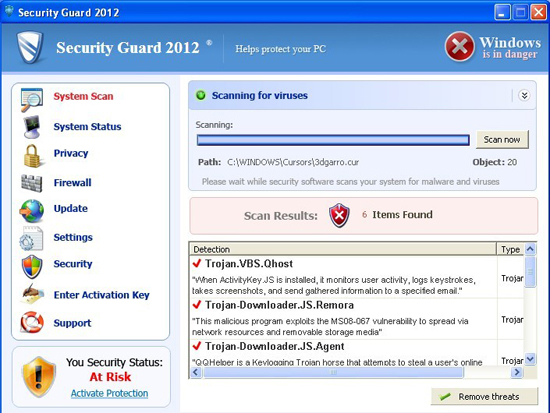
Security Guard 2012 is a con by fake application makers to force one paying for unnecessary software. This software pretends to help remove various malwares and viruses, however it is spread by trojans and security vulnerabilities itself. Typically, Security Guard 2012 is a result of a visit to infected website. This can happen either voluntary by clicking on malicious website in search results, or because of malicious advertisement in infected website. Additionally, such malware can be downloaded by trojans disguised as ad-ons, updates, codecs even images in spam emails. No matter what way Security Guard 2012 landed on your System, it should not be trusted.
The alerts look like this :
svchost.exe
svchost.exe was replaced with unauthorized program.
It has encountered a problem and needs to close.
If you were in the middle of something, the information you were working on might be lost.
Please tell Microsoft about this problem.
We have created an error report that you can send to us. We will treat this report as confidential and anonymous.
Windows Security Alert
To help protect your computer, Windows Firewall has blocked some features of this program.
Do you want to keep blocking this program?
Name: Zeus Trojan
Publisher: Unauthorized
Warning! Infection found
Unauthorized sending E-MAIL with subject “RE:” to [email protected] was CANCELLED.
Warning: Infection is Detected
Windows has found spyware infection on your computer!
Click here to update your Windows antivirus software
Warning: Spyware Detected
Windows has found spy programs running on your computer!
Click here to update your Windows antivirus software
Windows Security Center
Serious security vulnerabilities were detected on this computer. Your privacy and personal data may be unsafe. Do you want to protect your PC?
Warning! Infection found
Unwanted software (malware) or tracking cookies have been found during last scan. It is highly recommended to remove it from your computer.
Keylogger Zeus was detected and put in quarantine.
Keylogger Zeus is a very dangerous software used by criminals to steal personal data such as credit card information, access to banking accounts, passwords to social networks and e-mails.
Security Warning
Your computer continues to be infected with harmful viruses. In order to prevent permanent loss of your information and credit card data theft please activate your antivirus software. Click here to enable protection.
Security Warning
Malicious programs that may steal your private information and prevent your system from working properly are detected on your computer.
Click here to clean your PC immediately.
Security Warning
There are critical system files on your computer that were modified by malicious software.
It may cause permanent data loss.
Click here to remove malicious software.
All of Security Guard 2012 alerts are shared with other fake antiviruses of this malware family generation, thus they are not really new. If you click of any of them, the main fake antivirus window will launch, and you will be asked either to scan your PC or to pay for full version.
Security Guard 2012 will try to convince you that your PC is heavily infected with various parasites. While partly it is true due SecurityGuards’ 2012 presence itself, the files detected by this rogue are harmless, non-existing and should not be deleted under any condition. If this malware shows alerts about hacker attacks, you can safely discard them as well. It will not delete any detected infections without payment. Under any condition you should not pay for Security Guard 2012 as this both funds malware makers, is unnecessary and might result in credit card detail theft.
To prevent removal, Security Guard 2012 will try to block execution of legitimate programs by claiming they are infected. The best way to launch programs is to rename them to .com/.pif versions, killing Security Guard 2012 processes using other tricks or using Alternate OS scanners like Avira’s Rescue disk.
Special Security Guard 2012 removal instructions
Security Guard 2012 can be disabled using fake registration codes, reverse-engineered by security researcher Xylitol. Some of the codes are listed below:
4261328365
4261996943
4268761565
4281328365
4414895278
4439154958
4655834325
4723274453
5267873675
5268174898
5379885698
5688289871
5898714538
5919825316
5932169186
5956636198
Entering these codes disable Security Guard 2012 partially, however this will not remove full infection and you will have to scan with TDSS killer and anti-malware programs of your choice.
There are couple ways to disable Security Guard 2012 alerts and remove it from the system. The biggest problem is disabling this malware, as it might block legitimate anti-malware programs like spyhunter or Malwarebytes Anti-Malware execution.
First, try killing Security Guard 2012 processes (long numerical name with .exe in the end) using task manager. Task manager can be launched by pressing CTRL+shift+ESC.
- If task manager is blocked, try using process explorer for this. It can be downloaded from sysinternals website or from backup location here : https://www.2-viruses.com/wp-content/uploads/PE/eXplorer.exe . Look for numerical process names in C:\Windows or any process launched from AppData or TEMP. Kill these processes as they are likely to be related to Security Guard 2012.
- If this fails, launch MSCOnfig, and disable malicious entries from startup using this tool. Reboot at once. If done successfully, you will not see Security Guard 2012 after reboot.
- Lastly, delete Security Guard 2012 files and scan your PC with spyhunter, Hitman Pro, Malwarebytes Anti-Malware and your regular antivirus. This is done to ensure that your system is trojan free and Security Guard 2012 infection will not return
If you wonder why your Antivirus let Security Guard 2012 infection through, consider changing it to Kaspersky or Eset (my favorites), adding anti-malware programs with real time protection (Malwarebytes Anti-Malware) and a decent firewall.
Automatic Malware removal tools
(Win)
Note: Spyhunter trial provides detection of parasites and assists in their removal for free. limited trial available, Terms of use, Privacy Policy, Uninstall Instructions,
(Mac)
Note: Combo Cleaner trial provides detection of parasites and assists in their removal for free. limited trial available, Terms of use, Privacy Policy, Uninstall Instructions, Refund Policy ,