
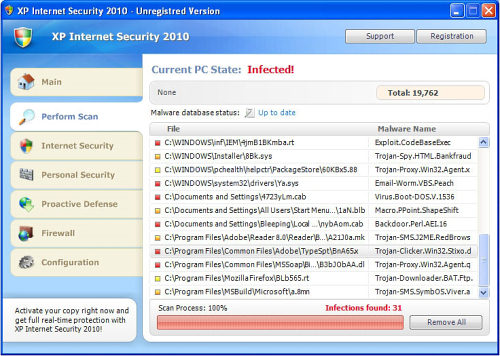
XP Internet Security 2010 (or XPInternetSecurity2010) looks like a really good and reputable anti-spyware that without any request starts surprisingly scanning your computer. However, after some research XPInternetSecurity2010 turned out to be worthless and even dangerous program that seeks to rip people off. It imitates scanning the system for viruses and foolishly informs about active malware detected. Classically, as a solution only the full version of XP Internet Security 2011 is offered for a user and a current sum of money is asked for the possibility to download it. Bear in mind, that XP Internet Security 2010 is known to use the same malware code which is named after the Operating System of the compromised machine. This variant of rogue anti-spyware becomes active only when installed on Windows XP, just like its initial Win 7 Antispyware 2010 which attacks only Windows 7 systems.
When inside the computer, XP Internet Security 2010 starts aggressively running there and firstly blocks all the processes that are expected to launch. Instead of them, this badware interrupts its own malicious code to start its activity once the computer boots up. XP Internet Security 2010 appears with fake system scanners reporting that dangerous parasites such as Trojan-BNK.Win32.Keylogger.gen are detected and also produces fake security messages. What is more, this information is followed by fake alerts telling for the PC user that his computer is at the huge risk and advertisements offering to purchase XP Internet Security 2010 for fixing everything.Don’t follow any of them because the information about various malware detected is invented and should be ignored.
It’s really important to pay your attention to this rogue anti-spyware called XP Internet Security 2010 and its twin XP Internet Security 2011. Do not take any of its fake system scanners and notifications serious and delete this malware if it is spotted on your PC. It’s removal instructions are written below, so use them and delete XP Internet Security 2010 as soon as possible.
Automatic Malware removal tools
(Win)
Note: Spyhunter trial provides detection of parasites and assists in their removal for free. limited trial available, Terms of use, Privacy Policy, Uninstall Instructions,
(Mac)
Note: Combo Cleaner trial provides detection of parasites and assists in their removal for free. limited trial available, Terms of use, Privacy Policy, Uninstall Instructions, Refund Policy ,
good
I have this on my desktop computer. I cannot get on the internet because of this. Is there a program I can purchase to get this off my desktop without re-formating my computer.
I was forced to follow the manual removal instructions and it worked. Thank you very much!
I also got infected with this…. found a program on my computer to restore setting to a previous date – did this and am now not affected by this program…. Thanks for the information!
I Got This On My User Called Madisyn Wiliams. Also One Of My Fav Program Windows Defender Is Telling Me To Restart my computer to remove spyware and unwanted programs like
XP Internet Security.
I stopped with Removing XP Internet Security 2010 files. Where they are? How to fing them? Advice please.
I saw this “XP Internet Security” program come up and run a scan. I thought it was very suspicious since I never remembered installing it. I found this webpage. The only program that I installed was Mozilla’s Thunderbird 3 so I most likely became infected by visiting a malicious website.
Look for “ave.exe” (like I did) if you can’t find “av.exe”.
I’m sorry to say I fell for this scam and purchased a two year plan. What can I do to correct it?
Richard – I would recommend cancelling whichever credit card you used to ‘purchase’ it!
I downloaded the Recomended XP Internet Security 2010 remover download from above. It is asking for $30 to register the PC Tools Spyware doctor and remove the viurus. Now since I downloaded that it has made my computer worse – will not allow me to open any programs – it blocks access to everything. With the initial virus it only blocked the internet. Thanks – guess it wants to force me to spend the $30.
Patrick : If you want, modify registry using regedit : Spyware Doctor is blocking parasite process for free, however the parasite is trying to re-launch itself on each execution of .exe files. Modify keys associated to launching .exe files like is shown in removal instructions.
I would still recommend using spyware doctor to clean up the PC and avoid such infection in the future.
XP Security has completely shut down access to the internet or add/remove programs or ANYTHING. I purchased Spy Doctor but can’t get to it on that system because the scam program has disabled all activity except that which connects to itself….what are my options?
Lynne : try to stop processes first and check proxy settings in your browser (disable them). Contact PCTools support for future asistance.
if you pay for the xp rogue spyware will it allow you to use your computer
the xp will not allow me to purchase/download any anti-virus,what are my options
Stan : Use usb stick to move spyware doctor executable to your PC or disable XP Internet Security 2010 using task manager. Do not pay for this rogue – they will sell your credit card details further and in most cases you will not be able to use your PC.
Thank you so much for this post! I cannot tell you how much it means to me, I was so nervous about my computer. Question- when I was desperately trying to get the pop ups gone, I entered my email and my credit card number. I have not recieved any emails and I do not believe the information was taken (every time I entered the information and submitted it in order to “buy the new version” it said there was an error). Have peoples credit card information been stolen from this scam? Should I be concerned about that?
I was using frostwire and this the Trojan downloaded can somebody give me manual, step by step instructions on how to get rid of this thing. It will not let me get on the Internet on the computer I am in desperate need please help.