
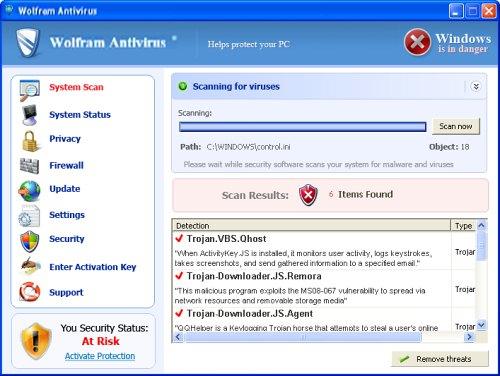
WolfRam Antivirus is a freshly released cyber threat that will give you nothing helpful, just continuous malware reports, tons of alerts and notifications. However, any virus reported by this program, presenting itself as anti-virus, should be ignored because it is invented or harmless. WolfRam Antivirus hails from the same family as BlueFlare Antivirus scam that was found in the middle of July. Similarly to earlier released malware, WolfRam AntiVirus tries to scam you out of your money, so, as soon as it ‘finds’ tons of malware, it asks to purchase the licensed version which should help you remove everything what’s malicious. However, you should do your best to stay away from it and immediately uninstall WolfRam Antivirus if it attacks your PC. Launch updated anti-spyware program or antivirus program once you notice suspicious alerts or malware reports like these:
Security Warning
There are critical system files on your computer that were modified by malicious software.
It may cause permanent data loss.
Click here to remove malicious software.
Windows Security Alert
To help protect your computer, Windows Firewall has blocked some features of this program.
Do you want to keep blocking this program?
Zeus Trojan
Warning! Infection found
Unauthorized sending E-MAIL with subject “RE:” to was CANCELLED.
Warning: Spyware Detected
Windows has found spy programs running on your computer!
Click here to update your Windows antivirus software
Warning! Infection found
Unwanted software (malware) or tracking cookies have been found during last scan. It is highly recommended to remove it from your computer.
Keylogger Zeus was detected and put in quarantine.
Keylogger Zeus is a very dangerous software used by criminals to steal personal data such as credit card information, access to banking accounts, passwords to social networks and e-mails.
Security Warning
Your computer continues to be infected with harmful viruses. In order to prevent permanent loss of your information and credit card data theft please activate your antivirus software. Click here to enable protection.
Security Warning
Malicious programs that may steal your private information and prevent your system from working properly are detected on your computer.
Click here to clean your PC immediately.
Warning: Infection is Detected
Windows has found spyware infection on your computer!
Click here to update your Windows antivirus software
All these alerts above and program/website blocking are fake as Wolfram Antivirus does not have working virus detection database.
This scareware usually infiltrates into the system without being noticed by the user. This becomes quite easily achieved thing when the system is not protected properly. So, if there is no updated anti-virus and anti-spyware programs installed on your computer, WolfRam Antivirus may come inside without any yours permission asked. Once the executable of WolfRam Antivirus gets launched, you will start suffering from its activity. It will be displaying loads of popup warnings that tell you about malware which was found every time your PC is rebooted. Don’t believe these ads! They are trying to persuade you that your machine is infected. Only a licensed anti-spyware (spyhunter is recommended) will save your machine from viruses.
WolfRam Antivirus will try to do its dirty job and will run misleading system scanners that are not trusty as well. These scanners display results claiming that your PC has numerous malware inside and can be fixed only with a help of its license. If you happen to fall into this trick, you may find yourself without your money because scammers will get your credit card details together with your payment. Make sure you remove WolfRam Antivirus and contact your credit card details to dispute the charges.
Here is a serial number if WolfRam Antivirus is blocking performance of your legitimate cleaner: DB038748-B4659586-4A1071AF-32E768CD-36005B1B-F4520642-3000BF2A-04FC910B.
Automatic Malware removal tools
(Win)
Note: Spyhunter trial provides detection of parasites and assists in their removal for free. limited trial available, Terms of use, Privacy Policy, Uninstall Instructions,
(Mac)
Note: Combo Cleaner trial provides detection of parasites and assists in their removal for free. limited trial available, Terms of use, Privacy Policy, Uninstall Instructions, Refund Policy ,
To help protect your computer, Windows Firewall has blocked some features of this program.
Do you want to keep blocking this program?