
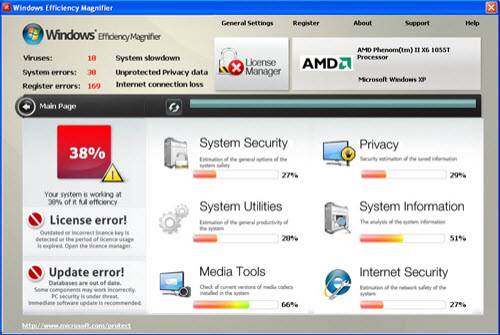
Windows Efficiency Magnifier is scam software, looking the same as earlier released Windows Threats Removing, Windows Remedy or Windows Troubles Remover. Though it tries to make you think that it’s a reputable anti-spyware, keep in mind that you must remove Windows Efficiency Magnifier just after you start seeing its misleading notifications. This activity based on triggering falsified system scanners that report multiple infections is normal for rogue anti-spywares but be aware that you must ignore them and never remove. That’s because the files alerted on WindowsEfficiency Magnifier warnings may be legitimate your system files important for a normal computer’s functionality.
In addition to its scans, Windows Efficiency Magnifier tends to display system tray notifications such as the ‘Critical System Warning!’. However, though it claims that your PC is infected with key-logger or other virus, all this information is useless. Windows Efficiency Magnifier virus may also hijack your IE and start redirecting it to its malicious websites and even imitate some perfectly legitimate programs, like Microsoft Security Essentials. Earlier mentioned alerts of Windows Efficiency Magnifier virus mostly reports:
Microsoft Security Essentials Alert
Potential Threat Details
Microsoft Security Essentials detected potential threats that might compromise your private or damage your computer. Your access to these items may be suspended until you take an action. Click ‘show details’ to learn more.
Threat prevention solution found
Security system analysis has revealed critical file system vulnerability caused by severe malware attacks.
Risk of system files infection:
The detected vulnerability may result in unauthorized access to private information and hard drive data with a seriuos possibility of irreversible data loss and unstable PC performance. To remove the malware please run a full system scan. Press ‘OK’ to install the software necessary to initiate system files check. To complete the installation process please reboot your computer.
System Security Warning
Attempt to modify register key entries is detected. Register entries analysis is recommended.Warning!
Name: firefox.exe
Name: c:\program files\firefox\firefox.exe
Application that seems to be a key-logger is detected. System information security is at risk. It is recommended to enable the security mode and run total System scanning.
As you can see, Windows Efficiency Magnifier is based on fake warnings that try to sell its ‘licensed’ version which has no common with computer’s protection. It goes without saying that Windows Efficiency Magnifier must be uninstalled before it starts playing havoc on the infected computer. If left, it will only display fake warning notifications and run absolutely fabricated scanners that slow down your system and make it weak for other cyber threats. Note that this rogue might prevent your antivirus software from working correctly, so try launching Safe Mode with networking first. Then launch task manager, kill its randomly named processes and run full system scan with spyhunter or Malwarebytes Anti-Malware anti-spywares.
Automatic Malware removal tools
(Win)
Note: Spyhunter trial provides detection of parasites and assists in their removal for free. limited trial available, Terms of use, Privacy Policy, Uninstall Instructions,
(Mac)
Note: Combo Cleaner trial provides detection of parasites and assists in their removal for free. limited trial available, Terms of use, Privacy Policy, Uninstall Instructions, Refund Policy ,