
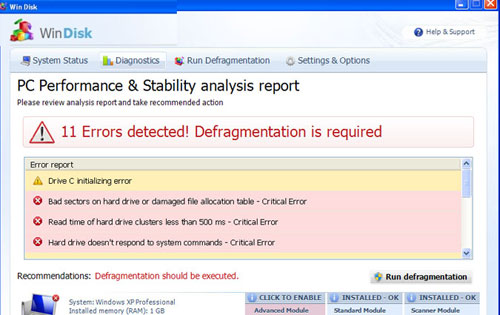
WinDisk is typical malware which will stop its misleading commercial campaign only when you remove it from your computer. Don’t fall into its tricky alerts telling about hard disk problems detected. This optimizer is nothing but useless application that invents these issues in order to sell so called ‘licensed’ version of Win Disk. So, as you should have already realized, WinDisk is a fake PC optimization program that MUST be removed.
Being created for the main objective to trick people into paying and installing its licensed version, WinDisk virus starts displaying various alerts and system scanners just after its infiltration. Malware begins to claim that your hard disk has numerous problems and that you need its help for fixing these detections. The first thing you must remember is that WinDisk has no powers to find problems connected to your hard disk. All its alerts and scans are invented and the biggest thing you need to handle is the same Win Disk scam. If simply ignored and not removed from the system, malware won’t stop interrupting you when browsing and will also let more viruses inside the system. Besides, if you pay for Win Disk, you may lose your credit card details and find yourself completely scammed by cybercrooks. To push you into purchasing WinDisk, you will receive such alerts:
Windows detected a hard drive problem.
A hard drive error occurred while starting the application.
Windows cannot find notepad. Make sure you typed the name correctly, and then try again. To search for a file, click the Start button, and then click Search.
Windows detected a hard drive problem.
Scanning for hard drive errors…
Hard drive scan helps to detect and resolve hard drive problems and system performance issues.
Fix Disk
Win Disk Diagnostics will scan the system to identify performance problems.
Start or Cancel
Win Disk Diagnostics
Windows detected a hard disk error.
A problem with the hard drive sectors has been detected. It is recommended to download the following sertified <sic> software to fix the detected hard drive problems. Do you want to download recommended software?
For the infiltration, WinDisk employs trojans that enter poorly protected systems without authorization. Besides, this fake defragmenter is known to be applying browser-hijacking tactics to redirect the victims to its fraudulent websites that also distribute virus. These Trojans also help for WinDisk to start as soon as you reboot your machine and then exaggerate these popup system warnings and system tray alerts reporting cyber issues and problems of hard disk. Never believe these reports of this scam and treat it as you should have treated Windows Scan, Memory Optimizer, Disk Helper or Disk Optimizer – remove Win Disk. You should rely only on a reputable anti-spyware to clean your machine fully, so try spyhunter or Malwarebytes Anti-Malware anti-spywares. Besides, to disable Win Disk, try this registration code that has worked with other fake defragmenters: 0973467457475070215340537432225 .
Automatic Malware removal tools
(Win)
Note: Spyhunter trial provides detection of parasites and assists in their removal for free. limited trial available, Terms of use, Privacy Policy, Uninstall Instructions,
(Mac)
Note: Combo Cleaner trial provides detection of parasites and assists in their removal for free. limited trial available, Terms of use, Privacy Policy, Uninstall Instructions, Refund Policy ,