
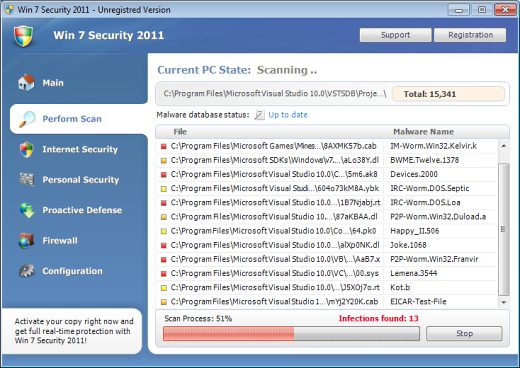
Win 7 Security 2011 scam is the fresh rogue antivirus program distinguished by generic names that are dependent on Operating system version running on PC. In the beginning of 2011, this malware has renewed its activity and has started to annoy computer users again. You get asked to update Microsoft’s security programs, you download and install some update and as a result you will get your computer infected with one of these fake antiviruses like Win 7 Security. This version is particularly nasty, as it blocks all programs from launching.
First symptom after infection is that instead of legitimate programs you launch Win 7 Security 2011 executable. It will claim that the process is infected and had to be closed, but in fact the program files are not checked at all. The scans Win 7 security 2011 makes are false, the resulting files are harmless or non-existent on the PC at all.
Only browsers launch normally, but the browsing itself is blocked by malware. Most of legitimate anti-malware websites are blocked, thus you might need to download the programs on another PC or from secondary locations like here: spyhunter. Some of the executables might be launched by right-clicking on them and running them as administrator. However, it will not allways work.
You are also bombarded by various system alerts like these:
System danger!
Your system security is in danger. Privacy threats detected. Spyware, keyloggers or Trojans may be working the background right now. Perform an in-depth scan and removal now, click here.
System Hijack! >
System security threat was detected. Viruses and/or spyware may be damaging your system now. Prevent infection and data loss or stealing by running a free security scan.
You can ignore them as everything that Win 7 Security 2011 says. Everything is false and only to convince you to give away your credit card details. This would pay the scammers and malware developers, thus I would suggest not doing so. You should remove Win 7 Security as soon as possible to prevent something breaking further what would require a complete reinstall of your Windows 7 OS.
How to get rid of Win 7 Security 2011
To remove Win 7 Security 2011 you will need to download and burn into cd several programs on clean PC or Alternate OS scaner. You might also want to try righclicking on some spyware remover like spyhunter and choosing run as administrator. If this method fails, there is an option (announced by security researcher Siri) using old keys for the same family of rogues: 1145-17884799-7733 and 1147-175591-6550 (the new one published by Xylitol). This should disable popups and restore exe execution which would allow running scanners like spyhunter to remove Win 7 Security 2011 or Win 7 Security virus.
Here instructions how to remove Win 7 Security using alternate PC:
a) Burn these programs to CD or write them to USB disk (you can use an MP3 player):
- Spyware Doctor ( https://www.2-viruses.com/spdoc.exe )
- Registry fix : https://www.2-viruses.com/wp-content/uploads/exeregfix.reg to restore normal execution of registry
- You might want to download Hitman Pro or Malwarebytes as alternate scanners. Though you are likely to be able to download them later on.
b). Boot normally. wait for Win 7 Security 2011 to launch, and run exeregfix.reg . This should allow launching legitimate programs
c) Delete or remove the files that are mentioned in our files box. You can use spyhunter to identify the infected files and additional infections. Do not forget update it before scanning. Remove what it finds.
d) Scan with spyhunter and secondary tools and reboot your PC. This should fully get rid of Win 7 Security 2011.
In some cases virus mutates and you cannot perform some part of these instructions. In such cases we recommend trying scans from within safe mode, or doing Alternate OS scans by tools from one of antivirus program makers, for example this : http://pctools.com/aoss
Multiname
Automatic Malware removal tools
(Win)
Note: Spyhunter trial provides detection of parasites and assists in their removal for free. limited trial available, Terms of use, Privacy Policy, Uninstall Instructions,
(Mac)
Note: Combo Cleaner trial provides detection of parasites and assists in their removal for free. limited trial available, Terms of use, Privacy Policy, Uninstall Instructions, Refund Policy ,
I just spent 2 days fixing my pc how do I stop this from happening again?
thanks
Richard : Install decent protection software. Paid malwarebytes + ESET Smart security, or Spyware Doctor+Antivirus, or other decent internet security suite.
Hi,
I read now what you saying about the win 7 security 2011 but its to late!!!
Yesterday i paid 60 dollars for that antivirus cause i thought that it was good!
What a stupid eh?My computer has big problems now!What can i do???
Can i take my money back?
Thanks!!
Konstantinos: contact your bank. Ask to change your CC and perform a chargeback.
@admin
Thank you!!!Is there a program to fix my computer or do i have to take it to a technician to fix it?
Thanks, I appreciate the info. I thought I had it the first time. I have 2 ids on the same computer partitioned so that what happens to one doesn’t necessarily happen to the other. Because on the main ID had problems, it clued me into the fact this was a marketing tool used by that company. Is there any entity that can shut these folks down? Other malware detectors are not able to delete this virus.
Thanks…
Ran the spyware doctor but I would have to BUY it to delete the files. Is this for real?
JBG: You can expand each of detection, it shows full path to affected file and delete it manually.
I just purchased it. And I am downloading SpyDoctor. Is there any way to stop payment and get a refund?
Contact your bank.
My computer no longer works after I brought this program, what I throught was an antivirus program!!! I need help!!!!
your item ‘c’ states ‘ Delete or remove the files that are mentioned in our files box.’ – where / what is this ‘box’?
i just removed it and now my itunes, firefox and a couple other programs pop up with…choose the program you want to use to open this file:….what do i do now im pretty sure it did some damage
This was a big help, Im a computer science major and figured that my antivirus wasnt working properly when this started to appear, not sure how it got installed (probably my brother) but lookin up this made me realize that this was a virus itself and the process to remove it is a big help, thanks.