
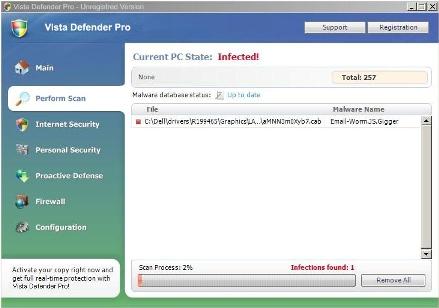
Vista Defender Pro is a rogue anti-spyware application from the same family as Vista AntiSpyware 2010. Once installed, it will display false system security threats and then will prompt you to buy a full version of this program to remove the threats which don’t even exist. The rogue program will display fake security alerts to convince you that your computer is badly infected. You should get rid of Vista Defender Pro virus as soon as possible. Read the removal instructions below.
Vista Defender Pro is a typical rogue security program. This security risk usually enters a computer with the help of Trojan viruses and other malicious programs. The rogue program is also promoted through the use of fake online anti-malware scanners, misleading site and etc. The fake scanners display pop-ups and warnings about serious computer problems, though your PC is actually clean.
While running, Vista Defender Pro will perform fake system scan and then state that your computer is infected with spyware, adware and Trojans. The scan results are false. This fake program will claim that you shuld purchase Vista Defender Pro to remove the infections. However, don’t buy it. It’s nothing more but a scam and obviously won’t clean your computer. To make things worse, this parasite will slow down your computer and hijack your Internet browsers. It will also block all found security programs and security related websites
If you find that your computer is infected with Vista Defender Pro, please use the removal instructions below to remove this scareware from your computer as soon as possible:
1. Click Start->Run (or WinKey+R). Input: “command”. Press Enter or click OK.
2. Type “notepad” and press Enter. Notepad will open.
3. Copy and past the following text into Notepad:
[-HKEY_CURRENT_USERSoftwareClasses.exe]
[-HKEY_CURRENT_USERSoftwareClassessecfile]
[-HKEY_CLASSES_ROOTsecfile]
[-HKEY_CLASSES_ROOT.exeshellopencommand]
[HKEY_CLASSES_ROOTexefileshellopencommand]
@=””%1″ %*”
[HKEY_CLASSES_ROOT.exe]
@=”exefile”
“Content Type”=”application/x-msdownload”
4. Save file as “exefix.reg” (without quotation-marks) to your Desktop.
NOTE: choose Save as type: All files
5. Double-click to open exefix.reg. Click “Yes” for Registry Editor prompt window.
6. Download Spyware Doctor or an automatic removal tool below. Update Spyware Doctor and run a full system scan.
Automatic Malware removal tools
(Win)
Note: Spyhunter trial provides detection of parasites and assists in their removal for free. limited trial available, Terms of use, Privacy Policy, Uninstall Instructions,
(Mac)
Note: Combo Cleaner trial provides detection of parasites and assists in their removal for free. limited trial available, Terms of use, Privacy Policy, Uninstall Instructions, Refund Policy ,
Thanks!
I zapped the virus manually!
Now I cant use .exe file extensions. So my only option iz to leave my cpu plugged in till I can get a external drive. Backup all my stuff and reformat my drive. Thx guys,
Try writing some dummy proof instructions for the average user next time.
It said for advanced users……….you aren’t advanced but need to learn to read
I downloaded the spyware doctor…. it cost me $40 but the stupid thing is gone, so I’m a happy panda. Take THAT stupid lying program. I wonder how many millions that spyware crud makes off poor unsuspecting people that are just terrified of viruses. It ought to be illegal
Hello,
I downloaded spyware doctor but everytime I try to install it, part way through installing, there is a “system crash” and my computer re-boots. I have tried everything it seems, fix.reg, fix.inf, malwarebytes (also leads computer to re-boot halfway through scan), CCleaner, Avira and Spyware Doctor. I want to try the manual removal but do not want to end up like ‘dum dum user’ above. Help!
dum dum user: I also made a mistake and deleted one too many, but the registry fix here worked for me to get exe extensions back.
use the following in a .reg file and execute.
Windows Registry Editor Version 5.00
[-HKEY_CURRENT_USER\Software\Classes\.exe]
[-HKEY_CURRENT_USER\Software\Classes\secfile]
[-HKEY_CLASSES_ROOT\secfile]
[-HKEY_CLASSES_ROOT\.exe\shell\open\command]
[HKEY_CLASSES_ROOT\exefile\shell\open\command]
@=”\”%1\” %*”
[HKEY_CLASSES_ROOT\.exe]
@=”exefile”
“Content Type”=”application/x-msdownload”
For dum dums who dont know how to execute a .reg file:
Click Start, Run. Type command and press Enter. Type notepad and press Enter.
Notepad opens. Copy all the text below into Notepad.
Windows Registry Editor Version 5.00
[-HKEY_CURRENT_USER\Software\Classes\.exe]
[-HKEY_CURRENT_USER\Software\Classes\secfile]
[-HKEY_CLASSES_ROOT\secfile]
[-HKEY_CLASSES_ROOT\.exe\shell\open\command]
[HKEY_CLASSES_ROOT\exefile\shell\open\command]
@=”\”%1\” %*”
[HKEY_CLASSES_ROOT\.exe]
@=”exefile”
“Content Type”=”application/x-msdownload”
Save this as fix.reg to your Desktop (remember to select Save as file type: All files in Notepad.)
At this point you need to close the rogue process in the task manager: AVE.exe and/or AV.exe otherwise it may repair itself
Double Click fix.reg and click YES for confirm.
Reboot your computer.
It seems as if Vista Defender has corrupted my ability to use the command and system32 access. When I type “command” into RUN app it says file not found. is this a new version of the virus?
Go to control panel. Go to backup and restore. Choose when you want to restore from, which will be before the virus entered your computer. Everything will be as it was before the TROJAN.
Keith: Only if restore points werent infected. This is quite often a case nowdays.
The registry fix listed here also works for “Total XP Security” as they are both built around the ave.exe file.
Best way to fix this is with spybot search and destroy. Its been around for ages and still is as reliable as ever.
By the way people, if your going to edit your registry like described above, please back it up first. Just hit file–>export in regedit.
Before this stuff, I did the only option I had at the time – 0 out the drives and reinstall with 7… everything runs perfect, although I had to trash 2 500G HDDs in the process 🙁