
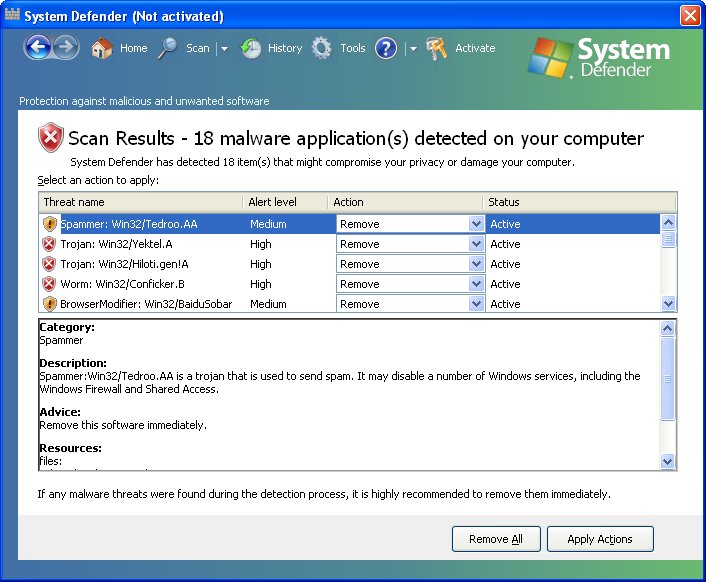
System Defender is a rogue anti-spyware application from the Virus Doctor rogue family. Basically, it’s just a new version of Windows System Defender. The rogue application uses false scan results and fake security alerts to scare the user of the compromised computer into purchasing the program. Do not pay for this bogus program. This is nothing more but a scam. A lot better idea is to remove this malware from your computer upon detection. Please note that removal delay will only worsen the situation because this parasite is able to download more malware onto the infected computer.
When running, the rogue program creates several harmless files which later will be detected as serious security threats. Those files are: ANTIGEN.dll, ANTIGEN.sys, ANTIGEN.tmp, cid.dll, CLSV.dll, ddv.tmp, PE.dll, PE.drv, PE.sys, ppal.exe, runddlkey.drv, std.sys, tempdoc.dll, tjd.exe, tjd.sys.Then, System Defender imitates system scan and list many infections, but won’t let you to remove them unless you first buy the program. In reality, though, your PC will be infected even if you purchase this application. What is more, System Defender will display fake security alerts, notifications and other pop-ups stating that your computer is under attack or infected by vary dangerous virus. That’s obviously a lie too. In order to protect itself, this parasite blocks Task Manager, System Restore and other system tools as well as security and anti-virus related websites. Internet Explorer will be also hijacked. You will see search results from search-gala.com. If you find that your computer is infected with this malware, please read the removal guide below and remove System Defender from your PC as soon as possible.
A new version of System Defender has been recently noticed on the Internet. It strongly reminds of Internet Defender and Security Defender. The program claims to detect lots of well known dangerous infections which in fact don’t exist on your system, for example, Trojan: Win32/Tedroo.AA, Trojan: Win32/Hiloti.gen!A, Worm: Win32/Conficker.B, BrowserModifier: Win32/BaiduSobar.
In order to disable System Defender it is recommended to use this code: D13F-3B7D-B3C5-BD84. Use a reliable antispyware program (spyhunter or Malwarebytes Anti-Malware) to remove System Defender and protect your machine from future infections. Remember to update these programs before scanning to have the full virus database.
Automatic Malware removal tools
(Win)
Note: Spyhunter trial provides detection of parasites and assists in their removal for free. limited trial available, Terms of use, Privacy Policy, Uninstall Instructions,
(Mac)
Note: Combo Cleaner trial provides detection of parasites and assists in their removal for free. limited trial available, Terms of use, Privacy Policy, Uninstall Instructions, Refund Policy ,
Thanks. This was very helpful. After using Malwarebytes I could tell it wasn’t entirely gone. This was confirmed when my google searches were being sent to Gala. I found it useful to go through the files manually and delete whatever was left over (there were tons of things Malwarebytes missed). I couldn’t find anything in the registry and I was scared of obliterating my computer so that is where I had to stop. Hopefully everything is fine now. I am still a little on edge about it.