
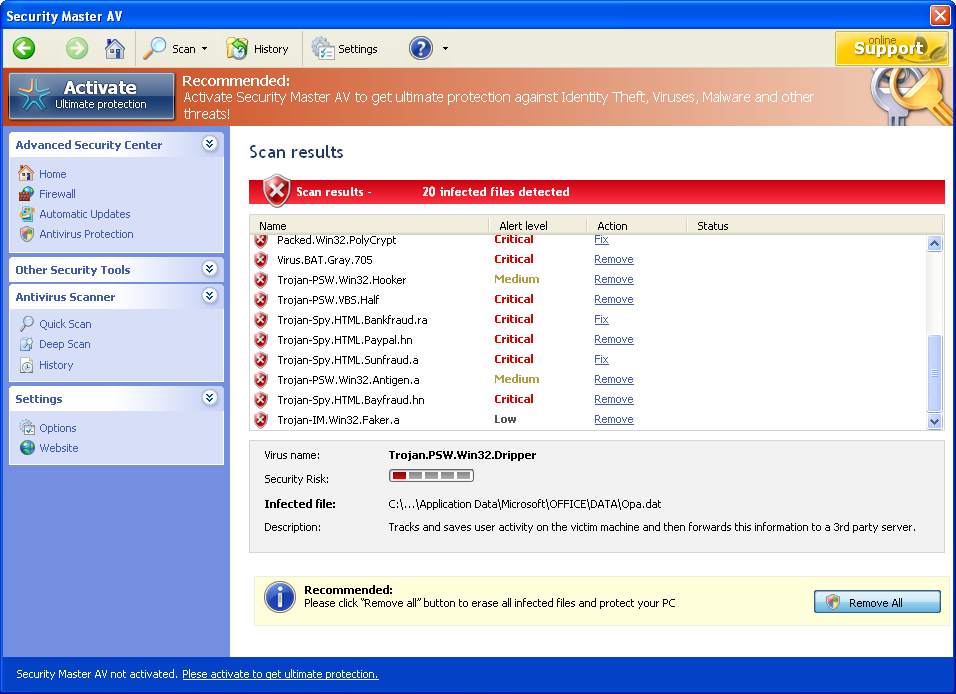
Security Master AV is a rogue anti-spyware utility developed to rip people off. It is released by the same hackers who should be blamed for creating the whole Virus Doctor family where My Security Engine, Security Antivirus and Security Guard are the earlier released rogues. Being no particularly different from its initials, SecurityMasterAV propagates itself via trojans that pretend to be online scanners, updates or video codecs needed to be installed. Without any aware people let these scams inside their computers that later assist Security Master AV to infiltrate the system.
Result of the secret infiltration of Security Master AV is a misleading campaign trying to make people worried about their PCs. It means that malware shows fake system scanners and multiple popup warnings that announce numerous viruses detected. This state of machine creates a need to fix it without any delay, so rogueware offers to purchase Security Master AV commercial version. Some of such notifications dislayed by this rogue look like that:
Warning!
Identity theft attempt detected
Hidden Connection IP:
Security Risk: High
Target: Microsoft Corporation KeysWarning! Virus detected
Threat Detected: Trojan-Spy.HTML.CitifraudSystem alert
Suspicious software which may be malicious has been detected on your PC. Click here to remove this threat immediately using Security Master AV.
The suggested way in reality is more than useless because you will purchase and install one rogueware program. It is not capable to fix any security issue and resolve privacy problems because it’s not a legitimate product. The commercial version of Security Master is known to have caused only OS troubles after being purchased intrusion, so save your money and keep away from it! Besides, Security Master AV makes the compromised computer vulnerable and may disable other antivirus programs installed on the target PC. It must be clear that you have to remove Security Master AV as soon as you notice it on your machine, so run a full system scan and eliminate it.
Automatic Malware removal tools
(Win)
Note: Spyhunter trial provides detection of parasites and assists in their removal for free. limited trial available, Terms of use, Privacy Policy, Uninstall Instructions,
(Mac)
Note: Combo Cleaner trial provides detection of parasites and assists in their removal for free. limited trial available, Terms of use, Privacy Policy, Uninstall Instructions, Refund Policy ,
Hello I think i may be suffering with the same problem as many other People and that’s fake viruses, Although It may be a hoax Scince i have had this On my laptop my internet explorer has stoped working and the only thing allowing is Hotmail..
What do I do ??
Thank’s shauna
Shauna: Try installing and running CCleaner after removing Security Master AV. Internet Explorer is relatively unsafe browser. If you can, use firefox or chrome (download their installs to flash drive and move to infected PC).
To remove Security Master AV I would recommend downloading spyware doctor (or other good remover), updating it and doing a full system scan.
i have ” Security Master AV ” updeting without i know , and ther a voise like screming i Don’t know what is that is it Virus !?
plz help me i Don’t know what to do ><"
I got the same thing.. I don’t even know how..
After I scan my computer with Spyware Doctor… It will then show me the infections on my computer… then ill click fix the problems. Then it redirects me to a webstie were i have to buy the software and ill thought that this was free.
I have deleted one of the processes and one of the files but i cant find any others, i have downloaded spyware doctor to remove it but it wont open same with my anti virus program (McAfee) the redirection of links and random pop-ups are getting really annoying I need help fast!! please help!
Spencer: read here http://www.2-viruses.com/how-to-fix-google-results-hijacker-google-redirect-virus-problem about fixing redirection problems. Use task manager, then start new process from within task manager and launch spyware doctor.
Landon : Spyware doctor is paid software. If you do not want to pay, locate the files it detects and remove them manually. Though I would advice to keep spyware doctor to avoid infections in the future.
I got infected with Security Master AV and I’ve tried everything to get rid of it, but nothing works! Manual uninstallation on top of 5 Anti-Malware, it just zombies its way back to life! I’m frustrated! What should I do?
Argh! I definitely have Security Master AV on my computer. I am not even able to get to the internet to download the fix. What else can be done? Can I download the fix to a cd (I am on a family members computer) and install it on my computer that way?? Thanks!
Sherry : Yes, though I would recommend reading here http://www.2-viruses.com/how-to-fix-google-results-hijacker-google-redirect-virus-problem about fixing internet connection first.
well , i have got the same errors as stated above . i have just downloaded the trial version and all the errors were gone for few days and now came the same problem .would u suggest me to download spyware to remove security master av
ya even after downloading spyware it is not running at all. could u suggest me an idea regarding it
Gautham: It is clear, that the trojan is still there, but the ads are not shown. They will, though. Start task manager, and see which processes are launched. Google each of them and stop ones that are not found as harmless. Alternativelly, Reboot into safe mode or do a scan from another user account.
Sir Admin, The Task manager won’t even work. I just downloaded the Spyware Doctor but it doesn’t start at all. Help me!
Austinne:
You have several options
1. Try launching task manager (ctrl+shift+esc) while you are being logged in. In some scenarios trojans are not loaded yet, and task manager starts before they are trying to close it.
2. Try rebooting, press F8 (before system boots this time), a menu will appear, choose safe mode with networking. In many cases parasites will not load then.
3. If oyu are using Vista/7, rightclick on spyware doctor executable and choose “Run as administrator”
4. You can also try creating another user account. Logout from first one, reboot, login into next one
5. You can try using rkill . We have alternate download location for it here : http://www.2-viruses.com/wp-content/downloads/rkill.com . It might kill some of processes related to parasites temporally.
If it fails, I recommend contacting some tech support, for example http://www.remotefixpc.com
the security master av came up on my compter.i dont know how to fix it and dont want to pay money to do it .my internet wont work and the security master av keeps popping up making screaming noises .please help i dont know what to do.
i am highly upset at the fact that i have a virus now my computer was doing great until i went on google and look at piture of trey songs and all i did was press view full image and then Security Master AV popped up saying i had several viruses i deleted the master av thinking that the problem would dissapaer but it didn’t and to be honest i love my computer now that this problem has taken place i wish i8 would have never gotten on my computer today i swear. i can’t get RID of this problem can anybody HELP ME PLEASE!!!!!!!!!!!!!! IM NOT TO PROUD THE BEG.
WAT IF THE TASK MANAGER IS NOT WORKING SINCE I GOT THIS AV SECURITY VIRUS THING WAT DO I DO ABOUT THAT WHEN I [PRESS SHIFT AND CTRL NOTHING HAPPENS LIKE IT USE TO WAT DO I DO I ALSO TRIED CTRL SHIFT AND DELETE AND STIL;L NOTHING HAPPENS PLEASE HELP ME @admin
Tammy: Reboot into safe mode then. Reboot, press F8, choose safe mode with networking.
You will have to fix registry afterwards to reenable task manager.
I have all of those same problems….what about using system restore to a previous point…would that get rid of this Security Master AV????
Roni – only partly. System Restore will not replace scans with anti-malware, antispyware programs. It will not fix all infections.
this SECURITY AV is really STUBORN,CANT open task manageer,disable my anti virus microsoft essential,window defender,all my program cant b open,help me pleaz,dont wana spend money
i got the security master removal tool and it worked,but then i tryed to download free anti virus, and it says i need to remove security master, even tho it had quit popping up after i used the removal tool. i had to do system recovery and i lost all my files,,,,,,but found some hidding in program files but i cant get them back, can someone tell me how to get my files back after system recovery?
I am worried now. I just purchased this Security Master AV because I could not access any websites on my computer without SMA popping up telling me I have virus on my computer. I am worried about my personal information when I use my computer can they get my information? If this is a scam I will never use Microsoft again I am going to Apple because there are just too many virus problems with Microsoft.
Michaela: contact your bank. They will reverse the payment for Security Master AV.
I would not recommend switching to Apple, as it is vulnerable to some exploits too, though it has much less choices in security programs. It is all about having good security suite on PC and practicing safe browsing habits.
I wasn’t aware that Security Master AV was a virus at first. Now that I know, I’ve been trying to get rid of it ever since. I’ve done full scans and it doesn’t detect anything. It’s on my family computer and my account is the only one affected. Will it soon spread? And if I delete my account will it get rid of it?
Vivian: If only one account is affected, copying “My documents” and deleting account is relatively safe way. Typically, it would reside in Application Data folder of your account, so files in My Documents are safe.
how do i find and remove the files that Spyware Docter detects as threats and infections?
Nick: press on plus sign by the infection found, it will show full file location. Like here:
http://www.2-viruses.com/wp-content/uploads/identifying-files.jpg
Although I would recommend automatic removal in most of the cases.
I downloaded spyware doctor, but it will not open/run. Any ideas?
Diana: Try rebooting into safe mode or right-click on executable and choose run as administrator. If it wont work, you will have to kill malicious processes before running Spyware Doctor
I have used Malawere to clean my computer from Securty Master AV. It works and clean almost everything, but my firewall keep saying that Master AV is on, and im having to reload many times the browser to enter any sites, specialy google. How can i remove it from the windows firewall alert? And if is this, i belive so, its blocking my browser, what can i do? Can you give me any help? Thank´s a lot.
Umm, i used security master av and had bought it. I didnt know it was a virus and a fake ,and now my comp is totally crashed, in order for me to use my comp i have to log in as a guest. Does any1 know how i can get my money bak and off my comp. thanks
Vincente: contact your bank for the money
for removal instructions, read the guide.
So I got the stupid thing on my desk top computer but I have no idea how… it’s not connected to the internet… It must have snuck on a while ago when it last was but I can’t get internet on this desk top anymore and I have no idea how to get rid of the stupid thing. It blocks the antivirus I had on it and wont let it run and it wont allow me to use control alt delet to stop it’s porcessess. I’m not computer savvy so I’m not comfortable enough to run around deleting files from my reg. What am I supposed t do now?