
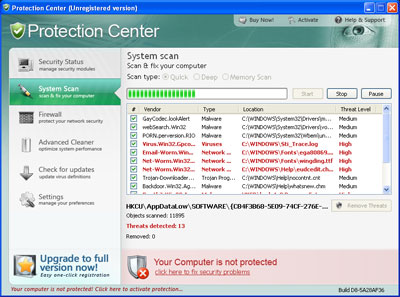
Protection Center is a rogue anti-spyware program distributed through trojans viruses that infiltrate targeted computer without any user’s consent or knowledge. When secretly installed, Protection Center configures the Operating System to launch its executable files each time the machine is rebooted. Just after that people start receiving fake reports about tons of viruses detected that look quite trustworthy but in reality are useless to believe. To avoid being completely bombarded by Protection Center messages, please constantly update your legitimate anti-virus and anti-spyware. Moreover, once you notice on your computer, remove Protection Center malware.
When Protection Center gets on board, this infiltration is led by following symptoms: it displays fake alerts and misleading system security notifications; triggers fabricated scanners and returns the results announcing that computer is badly infected. However, ProtectionCenter just like its malicious predecesors Digital Protection, Dr. Guard, Your Protection or Data Protection will never let its victims to remove these fake viruses “detected” and will claim that only its “licensed” version, which is paid of course, needs to be.
Warning! Virus threat detected!
Virus activity detected!
Email-Worm.BAT adware has been detected. This adware module advertises websites with explicit content. Be advised of such content being possibly illegal. Please click the button below to locate and remove this threat now.Warning! Network attack detected!
Network intrusion detected!
Your computer is being attacked from a remote PC.
Process is trying to steal your passwords listed below.Danger!
Harmful viruses detected on your computer. Click on the message to scan your computer for security threats for free.Danger!
Unauthorized person tries to steal your passwords and private information. Click on the message to prevent identity theft.Danger!
Unauthosrized <sic> access to your computer! Click on the message to install up-to-date antivirus software.
In other words, the basic goal of Protection Center rogue anti-spyware is to scare people into installing its full commercial software and make them pay their money for it. However, it is important to keep in mind that this application (its trial version and commercial version as well) in reality is useless and even dangerous one because it additionally slows the system slowdown, causes Internet connection troubles and may even let more malware inside. Keep away from Protection Center and do NOT purchase it. Remember that just after its pop-ups and scanners appearance you must remove Protection Center from your PC. get a reputable anti-spyware for eliminating this scam.
UPDATE! Protection Center also “recommends” for its victims to remove perfectly legitimate security programs that it finds installed on the compromised PC. Malware displays such alert:
Uncertified Spyware Doctor antivirus software detected on your computer. You need to remove Spyware Doctor software for a correct operation of the Protection Center.
Attention: If you don’t remove Spyware Doctor software, the performance of your computer will dramatically degrade. Press “OK” to remove the Spyware Doctor.
Automatic Malware removal tools
(Win)
Note: Spyhunter trial provides detection of parasites and assists in their removal for free. limited trial available, Terms of use, Privacy Policy, Uninstall Instructions,
(Mac)
Note: Combo Cleaner trial provides detection of parasites and assists in their removal for free. limited trial available, Terms of use, Privacy Policy, Uninstall Instructions, Refund Policy ,
I was one of the stupid ones and purchased the warrinty in a moment of panick. I already spoke with my bank and they told me to fire off an e-mail to the company before they can do anything. I was just wondering if anybody knows the e-mail address to do that?? I would really appreciate it. Thank you!