
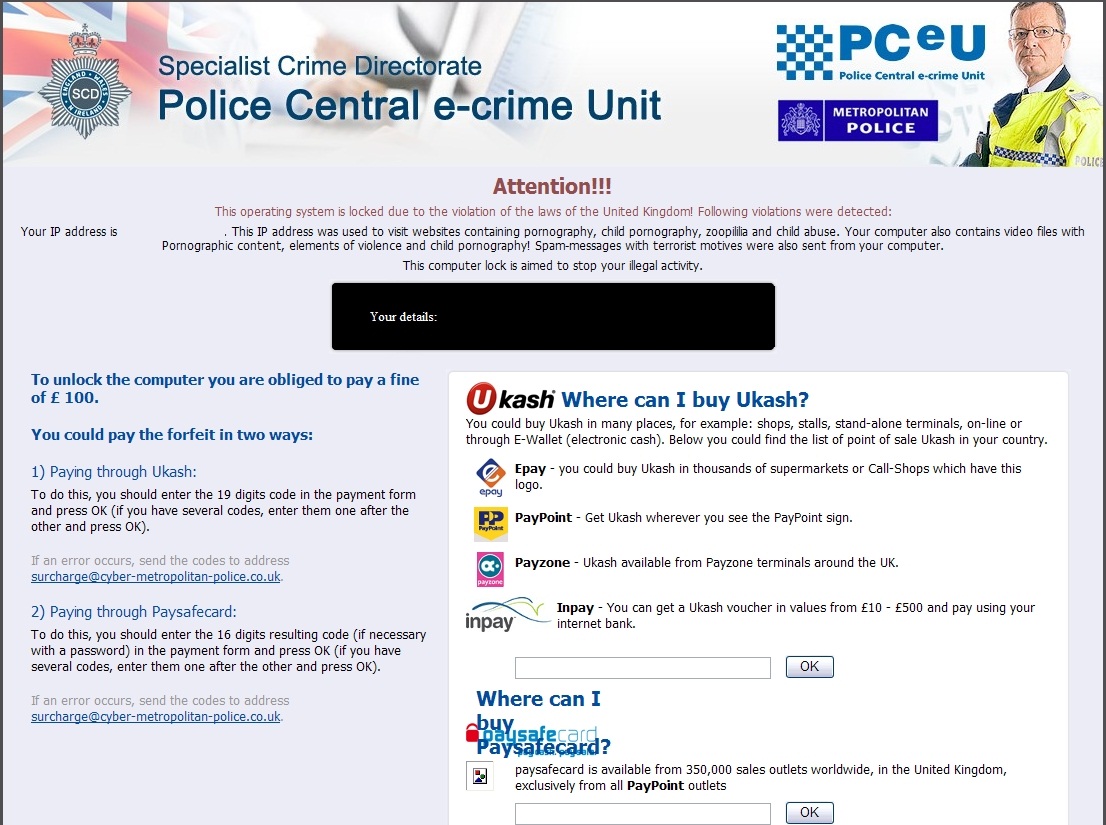
Be aware of the Police Central e-crime Unit ransomware that has been spreading around these days. This ransomware, just like Metropolitan Police scam, or PCEU virus tends to lock entire computer in order to scare its victims and get some money from them. To trick computer users, this program also displays an alert claiming that his IP is found to have visited websites containing pornography, child pornography and other websites having illegal content and now he must pay a fine of 100 pounds. In addition, users are asked to pay only through the Ukash or Paysafecard prepaid payment systems. Don’t fall for this dangerous application! This ransomware has nothing to do with Specialist Crime Directorate of Police Central e-crime Unit (UK’s Metropolitan Police) which is mentioned on the title of this fake alert.
As soon as you get this malware, you will find your computer completely locked and you can’t do anything on it. Anything! You will see only this tricky alert supposedly sent by the Police Central e-crime Unit saying that you have violated the law by visiting websites containing pornography and that your computer also contains video files with Pornographic content, elements of violence and other illegal content. Firstly, keep in mind that this is done for the only reason – to scare PC users and get their money. Secondly – remember that this notification is deceitful, misleading and can be removed from your desktop only by removing the Trojan It’s highly recommended to ignore Metropolitan Police fake alerts and remove this ransomware without any delay. Note that there have been noticed the same-looking ransomwares displaying similar alerts in French, English, German, Portuguese and other languages.
There are several ways how to remove Police Central e-crime Unit virus depending on its versions.
a) If you can boot in safe mode, you can try running msconfig and disabling all startup entries. Then scan with anti-malware programs in normal mode.
b) If you can use safe mode with networking, scan with Spyhunter or other anti-malware programs directly – they are likely to detect and remove this ransomware.
c) If you can access safe mode with command prompt only, run regedit. Search for infected Shell keys under Winlogon. The malicious keys will reference files from %TEMP% or %appData%. Change them to explorer.exe instead.
We recommend following these steps to eliminate the blocking:
1. Restart your computer, press F8 while it is restarting;
2. Choose safe mode with networking;
3. Launch MSConfig;
4. Disable startup items rundll32 turning on any application from Application Data;
5. Restart your computer again;
7. Scan with https://www.2-viruses.com/downloads/spyhunter-i.exe to find the file and remove it. Here is a video guide, showing how to do all the steps:
If you cannot use Safe Mode, try rebooting into safe mode with command prompt. Here’s how to delete Police Central e-crime Unit ransomware using this approach:
- Reboot into safe mode with command prompt. Police Central e-crime Unit ransomware should not be launched this time.
- Run regedit. Search for Winlogon.
- There will be a key labeled Shell under Winlogon. It should refer to Explorer.exe or be blank. If there is something else referring an executable in one of users folders, replace it with explorer.exe.
- Save changes, reboot to safe mode with networking.
- Run msconfig and disable all unnecessary startup entries. You should be able to reboot normally.
- Install and run https://www.2-viruses.com/downloads/spyhunter-i.exe. Scan with it the PC and delete Police Central e-crime Unit virus executables it finds.
Here is a video guide illustrating this virus removal method:
Automatic Malware removal tools
(Win)
Note: Spyhunter trial provides detection of parasites and assists in their removal for free. limited trial available, Terms of use, Privacy Policy, Uninstall Instructions,
(Mac)
Note: Combo Cleaner trial provides detection of parasites and assists in their removal for free. limited trial available, Terms of use, Privacy Policy, Uninstall Instructions, Refund Policy ,
If you have an operating system with 2 or more user profiles, you can disconnect yourself from the internet and log on in another profile and either run downloaded fix software from a USB drive or run your usual Anti-Virus software. Or perform a system resore from the otehr user profile – then a full Virus scan (method I used).
I sorted my PC this way when it was infected bu this Malware.
I got this nasty ransomware virus.
Started in safe mode (by repeatedly pressing F8 as you boot up), then installed and ran malwarebytes:
http://download.cnet.com/Malwarebytes-Anti-Malware/3000-8022_4-10804572.html
Found 5 threats, including a change to the registry which is why the popup covered my screen every time I started my PC.
Malwarebytes scan sorted the problem.
🙂
easy solution is to go to the guest account, or another user account which is unnafected, then use system resore to roll back to a previous restore point. after that get yourself an up to date virus scanner and run a deep scan
OK I tried the free removal tool download. Hit the F8 key as instructed & selected Safe Mode with prompt but all it’ll let me do is open in XL, the download doesn’t even show up on the list to select from. What can i try now please? Every option I choose from the F8 menu just takes me to XL & moment that boots up the ‘Police Central e-crime Unit’, screen appears!
I’m happy to try different ideas but I’m no whizz with the computer so need easy instructions please.
I have just bought and downloaded Spyware Doctor but my internet connection went down before I could register it. Now I am back on the internet so how do I register the spyware to get it working? The problem is that I am currently operating on iexplore because of this damn police virus. Thanks
i’m using the damn virus explorer too.but the main problem is i did try the instructions to set up trojan killer.but after restart, no matter how many times i have pressed f8..the boot menu selection just wont showed up!!! Help!!
Yes i have this virus at least for times now and iam getting sick to death with it really. Last year i had something like it the police ukash virus on 23th dec and to have it all fixed now. I don’t see why i should keep going to computer shops just have it repaired then use it again only to find it there a new scam like it.
matthewdarlington
Most of the computer shops are not interested in protecting your PC or spending money to secure it. I recommend purchasing a better antivirus or getting anti-malware program. In most cases this is due poor antivirus and/or browsing infected sites.
Probably too late now but press and hold the F8 button should work! @angela kiew
I have got the metrapolian police virus for a second time now. last time had to pay at computer shop. This time trying to do it my self. Download the pc doctor free scan like they all say then to remove it they want you to pay. So save yourself all the trouble and just take it shop.
Help….. I
My Pc is infected with the PCEU trojan – I’ve followed your instructions however after selecting ‘Safe Mode with Prompt Command’and the XP Pro – the next window comes up is the same ‘ choose mode to start with’. When I try to hard start with my usb stick in [I’ve downloaded the exe fix to get rid of this trojan]- screen says ‘operating system missing’
any suggestions will be gratefully appreciated as I’m now at wits-end with this!! I cannot get further than the Safe mode prompt instruction – if I leave it, the darned PCEU screen comes on……..
Thanks
try to start in safe mode with networking(hit f8 on start) and try to download malewarebytes free version, then run a full scan. (make sure you save the file under a different random name, in case the malicious software tries to stop you loading malewarebytes. If you cannot get this software to operate, utilise dr web cure it, which is a free on line scanner, that does not use the pc to store any programs. hope this helps.
I too have been infected by the “Police e-crime” trojan even though I have up-to-date Norton 360 protection. I have been recently considering using the recovery discs to format my pc and restart in original factory condition anyway.
Would this completely remove this trojan and any other dormant nasties?
kenco:
in 99%, Yes. In 1% – no 🙂 Though if you recreate partitions (do not format them only) you can be almost certain to remove all the parasites.
However, if you protection and browsing won’t change, it is more than likely that you will be reinfected again. Just common sense.
Install all updates, try using different antivirus/internet security suite (Kaspersky is very good, I use ESET for many years, etc). I would use an anti-malware program with real time protection from different company than antivirus as well.
@Giedrius Majauskas (admin)
Thank you Giedrius for your reply. I restored the pc to original factory condition and I am happy to say that it is totally clear and furthermore the pc is again as new and much faster again. The downside was obviously the time taken out to reinstall all the software etc.
Thank you for your advice re future protection. I always thought that I was well protected and I always back everything up on external hard drives, in fact I store very little on the pc hd which was just as well in this case as I didn’t have to worry about losing anything, just my time.
Good advise to everyone; always burn a set of recovery discs when buying a new pc and more importantly, keep them safe, they are invaluable when things go wrong!
i too have recieved this virus from streaming family guy online :/ but the thing is, it only locked down a user rather than my whole computer. thankyou for the advise 🙂
TO REMOVE POLICE CENTRAL E-CRIME UNIT RANSOMWARE FOR FREE…..
FIRST OFF ALL DO NOT PAY THE RANSOM FOR THIS VIRUS AS THIS TROJAN IS NOT CONFIGURED TO RECOGNISE A SUCCESSFULL PAYMENT, AND THEREFORE WONT UNLOCK YOUR SYSTEM.
i was unwittingly victim to this ransomware “police central e-crime unit”.
first a restore point is needed, i cant stress how much backing up your system once it is running fine is very important. when booting keep pressing f8 on most systems, to boot in safe mode with command prompt
then restore your backup to an earlyer date. my backup was only 3 hours priur to infection.
then do a full scan of your hard disks with your anti-virus. also using another pc with internet connection, download
2 things, first microsoft safty scanner http://www.microsoft.com/security/scanner/en-us/default.aspx and secondly malwarebites http://download.cnet.com/Malwarebytes-Anti-Malware/3000-8022_4-10804572.html
N.B you only need to download and install the trial version of malwarebites to completly remove these registry trojans, the files where mostly looking for start “HKEY_”….. but it will be impossible to name all the files unlike many other programs will scan and only fix once you have purchased, malwarebites will also remove them, purchasing the full version is for realtime scanning and scheduled scans, it also has a file assasin to delete locked files. like i said manualy you can run this anti-malware program without purchase. i highly recomend it. once you have downloaded paste them onto a flashdrive/usb stick
run the infected system in safe mode and install these 2 programs. run them both (full scans) and i advise you use both these tools regular. the only problem i was left with was sertain files I.E mp3s, jpeg images and all my favourats list of links in my web browser where “locked” so i had to delete them all. i have everything on DVD disks
so no big problems getting back to normal. i live in lancashire and the police central e-crime unit lock i recieved stated it was from west yorkshire police constablry. if i had expliced images of childporn or sadomasichism the police wouldnt worn me with a simple fine. they would be threw my door. UKASH, the only thing i no about ukash is you can purchase vouchers from paypoint machines in petrol stations etc. and internet hackers use this method of payment also for selling details of the digital strips from bank/credit cards to the lower down the chain fraudsters that print those details onto duplicate cards in order to commite crime using these cards as payment.
Grant Hartley :
Learn some more about registry keys before suggesting that HKEY are evil…
Differently form MBAM, SH and SD have better protection from process killing parasites (SH kills malicious processes itself upon launch), thus might launch in more serious cases without additional intervention.
Giedrius :
i only advise as per “police central e-crime unit” ransomware.
the HKEY registry value data had been edited, if you read my first post
again you will find my method of removal was a FREE process.
sh and sd will scan your system but expect payment before they will
remove or quarantine any infected files. i was only explaining what i
did to overcome this problem.
Hi,
A family member has contracted this ransomware but it’s somehow disabled Safemode. Whichever flavour of safe mode you select it’ll crash and reboot the laptop. Reading up on some other AV/firewall vendor sites this may be down to it deleting some registry entries required for safe mode boot.
Any ideas?
If not I’ll plug away at it till I’ve killed it then I’ll post the solution here.
I noted the use of combofix earlier, I can’t run this from USB due to lack of safe mode – however it does come included in Heren’s BootCD. My first attempt will probably be to boot from that and try and run Combofix from there.
Skilldibop
Nods, alternate OS scanners would be my choice as well.
Grant Hartley – so very helpful. You are a gent
Cleared this up for a few people recently, source was a poisoned ad. Do yourself a favour and install ad block extensions to your browser to lower the risk of a drive by.
Hi Grant Hartley and folks
I got this horrible virus yesterday and got rid of it today. First I followed Grants advice:
I downloaded microsoft safty scanner http://www.microsoft.com/security/scanner/en-us/default.aspx and secondly malwarebites http://download.cnet.com/Malwarebytes-Anti-Malware/3000-8022_4-10804572.html
I run them both with full scan, but that did’nt solve the problem, though some infections and threats were found and erased.
So in safe mode with net I downloaded pc tools spyware doctor and run a full scan, and it found 9 severe threats and 109 infected files (2 Troyans), but to get rid of them I had to register and pay for the program. That solved the problem 😉
Like some others, my PC would not run in safe mode. It just seemed to hang up. I have a second PC so I removed the drive from the laptop and connected it to my PC. (The laptop is Windows 7 Ultimate 32 bit and the PC Windows Professional 64 bit. It doesn’t matter as long as the drive can be seen).
I downloaded Malwarebytes and (as on other occasions) it identified 5 infections and removed them. Malwarebytes allows you to scan any or all drives.
When I put the drive back in the laptop, it booted no problem. I downloaded Malwarebytes on the laptop and it found a further 35 infections. These were removed and I am scanning again now to be absolutely sure I am clean.
PS I had full version AVG updated on my machines. I have never had a problem until yesterday when the laptop locked up on what appeared a quite innocuous magazine website.
Thanks for all the advice above. OurPC was affect with this but not the 2 laptops we use (we use BullGuard on all 3). I rebooted in Safe Mode then went back to an restore point. This seems to have done the trick. Now running a full scan on all 3. Hope this is of some help to someone.
I got this virus today on my laptop, i have downloaded combofix to my flash drive and followed instructions to safe mode with command prompt but then it just comes up with an administrator window…what do i do then?? i have no idea how to use computer in safe mode…
I removed it in this order-1.Switch off computer-And go into Safety Mode with Networking by pressing F8 just just before your computer kicks in normally.2.When you are in Safety Mode With Networking-Download and use (msert.exe)Microsoft Safety Scanner to find and kill the bug.3.Then Download and use Trend Micro Housecall-this will clean up any further Virus or spyware on your computer.3.Then Download and use Microsoft Windows Malicious Software Removal Tool,this will clean up any files left behind.4.Perform A full scan with all,all these programs are free to use.Then finish off by cleaning your computer with your own cleaning software,shut down and restart.5.You should now be in control of your own computer.
when i restart my pc in safe mode al i get is a white screen ??? what now please
Benny you should try norton power eraser cd. Also, another option would be safe mode with command prompt, then running msconfig and regedit. There are more than one version of this malware.
If you computer has been locked by this scam Trojan and will not boot into safe mode. The only way to really get rid of it is to get USB stick 2GB or bigger and get someone with a clean system to load Ubuntu Linux as a bootable drive and boot you computer into that operating system. The bug cannot run in Linux at all. Search for files created on the date of the infection and move them to trash, then purge the trash.
It’s not a quick fix as by the time it has messed up your safe-mode, it has written itself into the boot sector but deleting the files that the registry keys point to will mean it will no longer be able to run when you re-boot into MS Windows.
You then need to get Wise Registry Cleaner and clear those now empty keys. Then re-install your antivirus (because it will be corrupted I assure you) and run a full, deep scan. I suggest Avira because it does a very good scan for rootkits which this bug lives on.
The bottom line is, if you keep re-booting with the computer connected to the modem, router or whatever you use to connect to the internet, the damage being done is deeper every time you re-boot so if you don’t undestand all of the help items here, find a good friend who does and get them to clean it for you. If you do take it to your local computer store, they will just format the whole system and start from scratch and all your data will be lost, for which they will charge you! That means the scammers still nail your wallet!
Pete: you are wrong.
Ransomware does not cause more damage each boot, that is first. It does not have that goal.
Second, if you boot from any other OS, the ransomware probably won’t load. Alternate windows install works too, in some cases even other user on same windows installation.
It depends on the particular version of the Trojans.
@Jack
spot on Jack! That did the trick
I knew there must be a simply way around this 🙂
Karen,
I found the easy solution to this problem as Jack said was to boot up your pc in safe mode with networking by continuoesly tapping the F8 key and log on to your guest account as this should be unaffected by the virus, then roll back your computer by doing a system restore to an earlier time, you can then use anti-malware such as Malwarebytes which has a free version to successfully remove infected files, no need to pay a computer shop to do this for you.
Gor this virus. Had the same problems with safe mode managed to get onto the command prompt and run explorer to be able to access the flash drive.
Now my win 7 system loads up without aero and without being able to connect or access the wireless card. Please help!
Got this trojan, but no way will it let me into any safemodes, it just takes me back to normal startup, irrespective of pressing F8. Any advice ? I’m no computer expert.
bill. Norton Power eraser CD is an option that should work. If you have no time or way to burn it, I have managed to clean a similarly infected PC this way :
Reboot system normally. There is a slim time span the ransomware launches, like 10-20 seconds.
1. Start->Run.
2. Enter http://www.2-viruses.com/downloads/spyhunter-i.exe . Keep entering the full string blindly even if you do not see it (the screen is blocked by ransomware. Press enter.
3. Reboot. Start->run, you will see the same string. PRess enter. Run Spyhunter installer (you might have to repeat step 3 couple times). If in look, spyhunter installer will KILL malware.
@Rich Straz
Hi Rich
I have just had this nasty virus. You thanked Jack and said it did the trick but I cant find a post from Jack?! How did you get rid of it?
Thanks
Sue
Sue, look at March 19th, Jack’s post.
Hi I got this virus a few weeks ago and it locked my screen and i decided that as i was busy the next 2 weeks i would not be using the pc and go back to have a look at its removal.
went on 2 weeks later and the screen is no longer locked an no sign of the master page filling the screen, how can i check that – it may be in my system without me seeing it, in a different form.
i have installed – malwarebytes anti malware trial and windows had just updated automatically its malicious malware tool – this was a few days ago – also avg 2011 free version had failed to pick it up a fortnight ago
is it still ok to download combofix or other
Dave: If you still have problems and manage launch software, try hitman pro and spyhunter. Hitman Pro beats almost any tool for quick checking for hidden non-rootkit malware.
thanks GM admin – will do – hope it has sorted, perhaps over the 2 weeks when unused the Pc gathered updates that were able to adress what it had missed before. but there is no locking of screen or the Virus master page filling it. Lets hope .
GM (admin) – Thanks for your advice, but I’m getting nowhere.I burned Norton Power Eraser from the net to a blank CD on another computer, and then put it into the infected PC, but it doesn’t run automatically, so I went to My Computer and D-Drive to start it, but the trojan seems to cut in and stop it. I have shortcuts to 2 or 3 anti-malware programmes on my desktop, but if I try to start one in the window of time before the trojan starts, the trojan soon cuts in and seems to stop further progress. I’m not a computer expert. Any help much appreciated. Bill
Bill
You need to reboot and boot from NORTON Power Eraser CD. This is an antivirus, that has its own operating system so no Virus can block it.
@Reuben
Thanks Reuben
I was stumbling may towards a solution on your lines – cos I had discovered the other profiles worked and my own profile didn’t (ie was affected) even in Safe mode – so it was very reassuring to see that I appear to be on the right track from your entry. Not our of the woods yet but I reckon I am on the way. Virus scan running from anther profile as I type this on my laptop!
Best Wishes RR
@Giedrius Majauskas (admin)
GM – Thanks for your advice, I checked it out by rebooting my “good” PC using F8 and the NPEraser CD I burned from the net, it gave me 3 boot choices – Floppy drive or CD Rom or Sata3M Maxtor, I booted from CD drive and all went well with NPEraser. Then I rebooted my infected PC using F8 and my CD, but it won’t give me these choices, I’ve tried many times. I just get the normal
Safe Mode screen with Safe Mode, Safe M. with Networking, Safe M. with Command Prompt(etc), and the Trojan just takes that on to normal startup. F12 boot device menu shows the IDE CD-ROM device, but only ever leads to F1 retry boot. No joy. I also get : Memory population mismatch/DIMM slots 1 and 3 disabled/Please populate memory in pairs. I’m learning fast, but not fast enough. GM – any advice more than welcome. Bill
Bill : Go to your Bios on infected machine (it should be F2 or Del or similar just after HARD reboot (powering off machine completely, then powering on. It should be written somewhere on the screen). Then search for boot device order, pick CD.
It is quite common to disable this feature on fully working machine, but it is not malware that did so.
@Giedrius Majauskas (admin)
GM – Thanks again for your help. I went to F2 Setup on hard reboot and found “Boot Sequence”. (The machine is a Dell.) Enter gave me : 1.IDE CD-Rom (ticked) 2. Hard Disk Drive C (ticked) 3. Diskette Drive (unticked), so it seems CD isn’t disabled. !*%!^¬? Hmm. Do I give up ? Bill
Bill: uncheck other 2. Maybe CDROM has some issues, or maybe it is CD Drive, and you burned a DVD which is unreadable on that drive.
@Giedrius Majauskas (admin)
GM – Thanks again for your continued help. I tried unchecking, but no success there with NPEraser. Regarding the drive, I have burned both a CD and a DVD using Nero, both with NPE, from my good PC. They work on my good PC. My infected PC has a CD and a DVD drive. I’ve used both drives with the CD and the DVD, no success. I get: Memory population mismatch/DIMM slots 1 and 3 disabled/Please populate memory in pairs, and it returns to the safemode choices screen, which it then blocks. F12 opens but I get F1 and “retry boot.” Any ideas ? Bill
Complete novice.
Have got to safe mode with command prompt what do I type for the Launch anti-malware programs from your USB drive?.
Jim
i still have but to stop it from blocking me i simple hit control alt del as soon as i log on till i get to the screen saying start task manager then leave on that screen for a few minuites and hit cancell proble solved for time being
A word of encouragement for those infected. I got this on about August 10th. I tried everything possible for 10 days or so, although I’m no expert, including advice from here and other sites. No luck. Safemode useless. Wouldn’t boot fron a CD or DVD. Anti-viral software blocked. At my wits’ end. Gave up. Returned to my infected PC on about 29th. No sign of trojan. No idea why. Ran anti-viral software of different sorts. Nothing found by any of them. Have no idea why trojan has gone, or if it’s gone, although it must have done if anti-virals have found nothing. Don’t give up !
I was fortunate enough to be infected with only the mild version of this kind of ransomware. The original “recipe” worked for me. I’m just grateful for the many people, who make it possible for IT-dummies like myself to fix the problem without spending a lot of money.
well done jack, system restore point after clicking f8 in safe mode….then scan with antivirus or antimalware, i almost when to pay the credit as well,wud ve been scammed,thanks every1
almost went to pay*
@GVW
followed your advice…worked great..thanks..
Hi Guys,
I just picked up this nasty virus while looking at info on credit scores and trawling through forums and ads and things. Managed to deleted it in a few mins and my computer seems fine now.
Basically, I had the version that will not let you start in safe mode. All I did was log in as normal and quickly get task manager up (ctrl, alt, delete) and delete anything that looked wrong. Mine was called ccccc.exe or something similar. It’s basically a speed game……..
I left clicked on open file location and it was found in the roaming folder. So having the application location I cancelled the process in task manager and deleted the application. No problems now, can run in safe mode again and after three shut downs and restarts my computer has been working fine.
Interestingly I had a nightmare on a friends computer who had a seriously nasty version of it. They couldn’t see any applications or get on the net. That meant I needed the safe mode/registry method/file location delete routine which worked but sucked. Two weeks later, same he got the virus again!
Doing a full scan on Malwarebytes but my computer seems ok 😀
Just remember, don’t freak out and never pay!
Hinge: The problem is protection from parasite in your friends case 🙂 Update Java (at least) and install Chrome for your friend instead of IE. And get anti-malware program with real time protection + good enough antivirus.
Right so i installed and ran combofix, rebooted, now windows won’t load even in safe mode? any ideas
T: Run repair install. It might be that there was rootkit infection as well. Alternate OS Scanners are a bit more secure way of fixing the problem. Or anti-malware programs like spyhunter if you can launch them.
I restored mine and it didnt make any difference, i couldnt get my fsecure antivirus software to run in safe mode.
I ran avast and it found nothing. Id been told to use Rkill and that found nothing.
The only thing I think worked was malwarebytes.
Download malwarebytes from free on another computer, save on usb stick and then use it on infected computer in safe mode.
Mine detected 26 items, 3 of which i think were the police thing. seems fine again now. fingers crozzed!
***FOR ANYONE WHO CAN’T BOOT TO SAFE MODE***
I, like others, receive a BSOD (blue screen) when trying to boot into any version of safe mode.
To get around this, I used Rescue Disk 10 from reputable Antivirus company Kaspersky.
What you need: A blank USB memory stick (or one you can wipe.
http://support.kaspersky.com/viruses/rescuedisk/main?qid=208286083
The instructions on how to download, install, alter your BIOS settings to boot from the memory stick etc. can all be found at the above link. Hopefully the admin (many thanks to GM for this site by the way, great work) won’t mind me posting an external link.
Altogether took me about 15 minutes to download/install and run the USB stick, then about 30 minutes for the scan and altogether about 1hr to get back into a fully-working version of Windows XP (though this works fine for Vista and Win7 too).
Good luck all.
Got this or something very similar to this on my laptop the other day, the only difference was that it had also hacked into my webcam and claimed it was for photo identification or something of that sort, instantly removed the battery and waited a while, rebooted in safe mode. I then ran a quick scan with MS security essentials, and removed a couple of this, but how can i be sure this is no longer lying dormant on my laptop? Since then i have also disabled my webcam by disabling the driver software for it, is that enough to stop hackers accessing it or do i need to do more?
I’ve just had the police e-unit threat, I thought WTF I was scared for a moment or two, but I’ve got good PC knowledge so I thought it was a bit suspect after further inspection, there was no contact number and I think the police wouldn’t just send you a message like this, I’m quite sure if it was that serious as it suggested they would be at your door, any way I logged on to another user and downloaded the spyhunter malware which I’m running at the moment, it makes me think how many people have thought this was genuine and payed up? Anyway hopefully now I’m sorted thanks to you guys thanks a lot 🙂
Paul
At least several percent pay due to lack of information about such threats.
Ive got the virus and followed the various instructions above but cannot seem to get rid of it. I am on windows 7 home edition. Any ideas?
Jim: try creating Hitman Pro kickstarter USB disk on another PC http://www.2-viruses.com/reviews/hitman-pro
Boot from it.
Then download other programs and scan the PC.
I have this on my laptop running windows 7 home edition and have tried to follow the advice but when i open in safe mode but when i try and run from this the bloody thing pops up again I have tried going into safe mode with command prompts but it wont open the prompts bit it just seems to go through the windows files
ANy Help please ?? Its a real pain in the proverbial I am emailing from my work computer
Keith: Use alternate OS scanner. Eg. Hitman Pro kickstarter USB.