
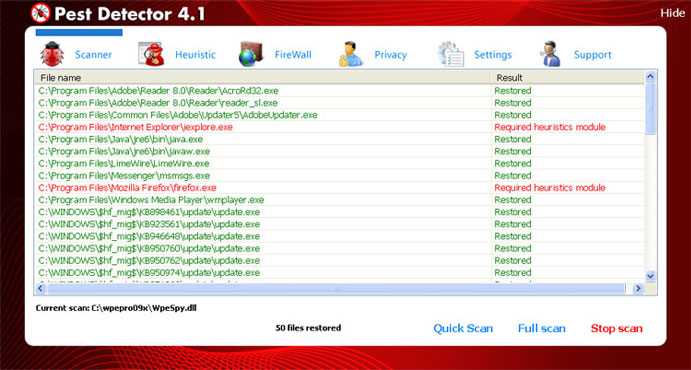
Pest Detector 4.1 is one more scam program that was created by computer hackers in order to gain some easy money form innocent computer users. It’s a part of fake Microsoft Security Essentials Alert project which is currently one of the most actively spreading infections on the Internet. The main goal of Pest Detector 4.1 application is to rip computer users off by selling a fake product as a security tool.
The program causes tons of unwanted actions on the system, such as annoying security notifications that are displayed without any reason and state completely fabricated information. Usually they report about system infections and offers activating Pest Detector 4.1 in order to avoid more damage to your system. Unfortunately, in most cases the only malicious file on the system is Pest Detector 4.1 itself. For his reason, you shouldn’t trust any messages stating that this program will help you to protect your computer.
Another effective tactic used to mislead computer users into thinking their systems contain infections is running a system scan. Usually, this is done after each computer reboot. After performing it for a few minutes, Pest Detector 4.1 displays some supposedly malicious files and claims that the best thing for you is purchasing a full version of Pest Detector 4.1 and removing detection with this tool. However, this shouldn’t be taken for granted as the program only wants to sell Pest Detector 4.1 to as many users as possible.
Do not trust any information presenting Pest Detector as a reputable security tool and do not pay for anything related to this badware. Instead of trusting it, you should eliminate Pest Detector 4.1 from your machine with a reputable antispyware program.
Automatic Malware removal tools
(Win)
Note: Spyhunter trial provides detection of parasites and assists in their removal for free. limited trial available, Terms of use, Privacy Policy, Uninstall Instructions,
(Mac)
Note: Combo Cleaner trial provides detection of parasites and assists in their removal for free. limited trial available, Terms of use, Privacy Policy, Uninstall Instructions, Refund Policy ,
My home computer has gotten the scam pest detector 4.1 It has blocked my internet access so now I can’t download a spyware to remove it. How can I remove this.
Charles : try rebooting into safe mode with networking, and disable proxy server in browser.
@admin
Can you please tell me how to do this step by step Thank you
I tried admin’s recommendation with a pro, it didn’t work. What’s next. Can I download something on my usuable computer and burn to a disk to then use on corrupted computer?
June: Have you scanned with any of the tools in safe mode?
Have you tried other ways to kill malicious processes before the scan, like written here: http://www.2-viruses.com/resources/tutorials/how-to-kill-malicious-processes ?
Try downloading and using these programs : Spyware Doctor (link above), Malwarebytes anti-malware executable (do not forget to update these programs), TDSS Killer from Kaspersky.
If you can’t launch these programs, there is alternate os scanner, you would need to burn a disk and boot from it: http://www.pctools.com/aoss
when the program comes up, hit alt, ctrl, delete. then go to processes, end the hofix.exe. If the screen stay blank go to the task manager and start a new task and search for internet explorer, it should load, then proceed to download and install spydoctor
What if the Pest Detector still pops up while im in safe mode?
Dexter Loh
Popups in browser or alerts?
If these are alerts, Try to determine process of Pest Detector. Process explorer might help, check this guide: http://www.2-viruses.com/resources/tutorials/how-to-kill-malicious-processes .
If these are popups, you need to check this guide : http://www.2-viruses.com/how-to-fix-google-results-hijacker-google-redirect-virus-problem , aka disable add-ons, proxy, change DNS server.
hey all if you are running a router reload your router and reset it t. i did that and enablemy internet,,, am goin g thru the same thing damn hackers get a life!