
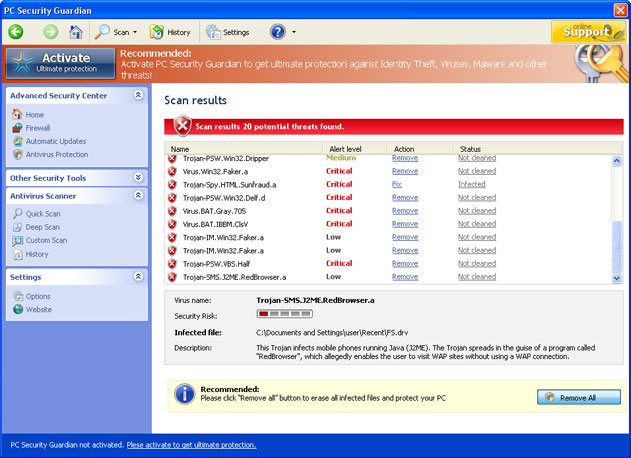
PC Security Guardian is a rogue antispyware program that has the same origins as Security Guard, Smart Internet Protection 2011, Internet Security Essentials and many others. The program is installed with a help of Trojan viruses which also configure it to start automatically when the system is restarted.
Once inside, PC Security Guardian generates its fake scanner and pretends looking for infections. Later on it even provides you with a list of supposedly detected threats and then undoubtedly asks to pay for a full version of PC Security Guardian so that it could remove those infections. Here are the treats that PC Security Guardian may display after scanning your system: Trojan-PSW.Win32.Dripper, Virus.Win32.Fake.a, Trojan-Spy.HTMLSunfraud.a, Trojan-PSW.Win32.Delf.d, Virus.BAT.Gray.705, Virus.BAT.IBBM.ClsV, Trojan-IM.Win32.Faker.a and similar. Even though these a real infections, it doesn’t mean at all that any of them exist on your system. PC Security Guardian only attempts to scare you and swindle your money away.
In addition, the program will keep displaying various pop up messages and security alerts stating that your computer is badly infected and recommending scanning your system with PC Security Gardian. You may also find it difficult to open certain programs and instead receive warning messages saying that the file is infected. to make it clear, PC Security Gardian will do everything in order to convince you that your system is at risk and you must do something about it. For example:
Warning! Access conflict detected!
An unidentified program is trying to access system process address space.
Process Name: AllowedForm
Location: C:\Windows\…\notepad.exeWarning! Identity theft attempt detected
Memory access problem
WindowsErrorForm has encountered a problem at address 0x1FC408.
We are sorry for the inconvenience.
If you see this error again, operational information can be irrevocably lost.
In reality what you must do once found PC Security Guardian on your system is ignore all its scan results or security notifications and remove this application itself from your system. make sure to scan your computer with a reputable antispyware program, for example, spyhunter or Malwarebytes Anti-Malware. This will definitely ensure that you will not miss any infections on your system. S!Ri has also provided a registry code of PC Security Guardian: U2FD-S2LA-H4KA-UEPB which will help to get rid of this badware.
Automatic Malware removal tools
(Win)
Note: Spyhunter trial provides detection of parasites and assists in their removal for free. limited trial available, Terms of use, Privacy Policy, Uninstall Instructions,
(Mac)
Note: Combo Cleaner trial provides detection of parasites and assists in their removal for free. limited trial available, Terms of use, Privacy Policy, Uninstall Instructions, Refund Policy ,
I find it very difficult to trust your information. The program you claim to remove wants me to buy their program. To get rid of it, I’m supposed to buy yours! Sorry, you do not impress me as any more trustworthy than the pc security guardian program itself. NO SALE
Steven – this is up to you. You can also try other programs, that remove it for free, but do not offer free limited protection. Also, You can expand each detection of Spyware Doctor, and delete the file manually.
Im finding it difficult to stop and erase this PC Guardian and I would like for you to remove it from my pc. I don’t think that I should have to be the one to go in and remove, download or anything to have this removed. Your administration should remove this, so remove please. I will not purchase this software due to I already have one installed.
David Harrington: we are not related to PC Security Guardian. Read removal instructions.
You don’t HAVE to get his program. Just as long as you have any Anti-Virus program. That PC Guardian thing however is a virus.@Steven
I had this on my computer. I have McAfee and the tech did a remote view and cleaned it out. This thing was embedded deep in my system but he got it. Took over an hour to the tune of $90. It was worth it though, a big headache that is now gone.