
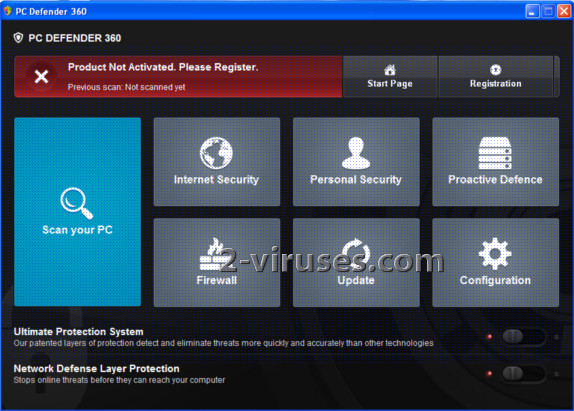
PC Defender 360 is a rogue antivirus program that pretends to be a legitimate security tool, but in fact it only imitates functions of antivirus. It is a new version of Antivirus System, another rogue antivirus that was released in the middle of July 2013. Normally, the program gets inside the system with a help of Trojan viruses, when the user visits some malicious website. It can also pretend to be a legitimate program that is required in order to watch some video online, etc. Once inside, PC Defender 360 takes over the system completely.
First of all the program imitates performing system scan and warns about detecting a bunch of infections that must be removed as soon as possible. Basically, it will offer you purchasing a full version of PC Defender 360 and promise that it can remove all dangerous threats that have been detected before. The truth is that it does not have any useful features and it cannot detect or remove anything. However, if you try to make a payment, you will have to submit your personal information and the creators of PC Defender 360 will be able to use your credit card for malicious purposes.
Additionally to a fake scanner, the program constantly attacks infected system with fake security notifications which are meant to make users think their computer is at risk. These messages warn about spyware attacks, identity theft detected and similar issues. Here are several examples of the message that you may receive once infected with PC Defender 360:
Security Alert
Vulnerabilities Found
Background scan for security breaches has been finished. Serious problems have been detected. Safeguard your system against exploits, malware and viruses right now by activating Proactive Defence.
Upgrade to full version of PC Defender 360 software package now! Clean your system and ward off new attacks against your system integrity and sensitive data. FREE daily updates and online protection from web-based intrusions are already in the bundle.
Security Alert
Unknown program is scanning your system registry right now! Identity theft detected!
Threat: Hoax.HTML.OdKlas.a
PC Defender 360 Firewall Alert
iexplore.exe is infected with Trojan-Downloader.JS.Agent.ftu. Private data can be stolen by third parties, including credit card details and passwords.
Name: cmd.exe
Version: 5.1.2600.5512 (xpsp.080413-2111)
Company: Microsoft Corporation
Location: C:\WINDOWS\system32\cmd.exe
Windows recommends activating PC Defender 360.
Click Activate to register your copy of PC Defender 360 and perform threat removal on your system.
The truth is that PC Defender 360 only wants to swindle your money away so it does all what is possible to convince you into purchasing its full version. It cannot detect any threats, and all the problems that the program reports about are falsified. Remove PC Defender 360 as soon as you detect it on your computer. Because the program makes some modifications in your system, the removal process might be a bit tricky. First of all, you will have to disable malware process manually to run any anti-malware programs. This can be done in several ways.
If you have other user account available, run antimalware scan, e.g. Spyhunter after logging to it. If you can run a full system scan, the malware can be removed. This is a very good reason to keep a separate administrator account that is used for such situations only. If this fails, follow the instructions below.
Special removal instructions of PC Defender 360
- Reboot, while system boot starts press F8.
- Choose safe mode with networking.
- Start->Run enter https://www.2-viruses.com/downloads/spyhunter-i.exe . Save file on place you remember. Reboot normally.
- Rename Spyhunter installer from .exe extension to .com extension and run. You will need to be able to see extensions of the known file types. This will restore .exe file associations.
- Install and scan with Spyhunter, Hitman Pro, Malwarebytes Anti-Malware and other anti-malware programs (they should be able to install and run normally now). Delete PC Defender 360 startup entries and follow the instructions.
PC Defender 360 removal video guide
Automatic Malware removal tools
(Win)
Note: Spyhunter trial provides detection of parasites and assists in their removal for free. limited trial available, Terms of use, Privacy Policy, Uninstall Instructions,
(Mac)
Note: Combo Cleaner trial provides detection of parasites and assists in their removal for free. limited trial available, Terms of use, Privacy Policy, Uninstall Instructions, Refund Policy ,