
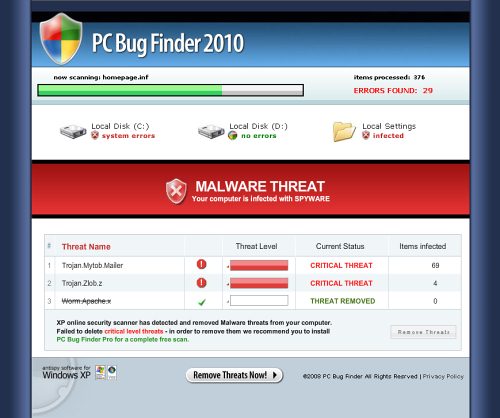
PC Bug Finder Pro is a fake security program deceiving people into believing they need this program for fixing tons of infections that PC Bug Finder Pro claims to exist on your computer. The main way this scam program is distributed is by hijacking Internet browser and redirecting people to PCBugFinder.com website. Here is what happens next.
The website of this malicious application contains a system scanner. Unfortunately, this scanner is fake and it only imitates looking for infections. No matter if the system contains many or a few infections or even if it is completely clean, the bogus scanner by PC Bug Finder Pro will state that the system is badly infected. Next, the pop up add will show up and once clicked, the installation process of PC Bug Finder Pro will begin.
Once the application is installed, the scanner will be run again and more threats will be found. Finally, you will be offered to purchase a full version of PC Bug Finder Pro promising that this version will be able to remove the infections found.
You shouldn’t trust PC Bug Finder as it is just one more rogue anti-spyware program. By the way, contrary to most of the rogue programs, PC Bug Finder Pro is not that much annoying in terms of displaying fake security alerts, etc. However, you should get rid of it anyway. Below we provide you with a removal guide of PC Bug Finder Pro for manual removal. Do not let yourself to be fooled by cyber criminals who create this kind of programs.
Automatic Malware removal tools
(Win)
Note: Spyhunter trial provides detection of parasites and assists in their removal for free. limited trial available, Terms of use, Privacy Policy, Uninstall Instructions,
(Mac)
Note: Combo Cleaner trial provides detection of parasites and assists in their removal for free. limited trial available, Terms of use, Privacy Policy, Uninstall Instructions, Refund Policy ,
I believe I was scammed in the same manner as the PC Bug does. I was googling
for information on a sewing topic, when suddenly a window popped up and said
my computer had been infected with several serious viruses. Believing it was
my owy security sytem on my computer, I followed the directions to remove the
virus and was eventually charged $130 by a company called “PCBug-Repair.com”
The whole thing was a set up which I couldn’t get out of by canceling or xing out. I did a stupid thing by clicking on the PC Bug repair icon.
I paid $85 australian dollars for this and i think have they made a fool of me. it did nothy and i was charged this money.
Yes I fell victim to this fraud. I was charged 75 dollars to remove a threat that said it was downloading my credit card info. I purchased it immidietly thinking it was through my own spyware software. BIG MISTAKE!!!!!!!!
I have also fallen victim to this scam today.
It is impossible to remove from your computer yourself and it stops all your other security working.
I have contacted my bank who are refunding my payment as it is a case of fraud but I have now got to pay to have an IT expert remove it from the computer.
They made it look as if it was from microsoft, I could really kick myself.
After trying just about everything, I down loaded Spydoctor. It cost me £ 20.00 but it found it straight away and deleted it from the system. It also found a a lot of other problems which it also fixed. I would highly recomemend this program to all of you infected with this fraud. Also, contact your bank as they will refuind you your payment.
I was frightened into buying this phony security program. It would not let me out of the loop. Every time I tried to cancel the program it only reverted to another window that insisted I needed protection. I fell for this and paid $79.95 to rid my PC of so-called virtues and worms. It turned out to be a scam. I tried to call the phone number and they did not accept calls. I called my credit card, and I’m in the process of getting my money back.
was trying to update my security and this PC Bug Repair showed up. Thinking it wasa for my regular security I gave them my CarD Number and said ok. Called Fraud with my credit card and they are flagging the account with PC Big Repair name etc.
very interesting” today i received a :”refund confirmation” from Pc Bug repair in the amount of $79.95 It is rather interesting they paid attention to my original comment that i had contacted the Fraud division of my credit card company. The flag is still there from the card company and I will wait and see if PC Bug sent me another lie. I have learned not to fool with companies that I have not looked up on Consumers or any other fact finder. Being caught with your pants down is not a good thing in this day and age, Don’t you think?
Sandra Kawashima
If they are caught red handed, sometimes they send refunds for their credit card processing facilities might be blocked too soon. Many users do not bother to investigate.
I fell for it last night – $79.95.
I am not computer smart. I had made an online purchase and concluded that transaction and returned to my facebook account and was in the process of doing something when a pop-up showed up and said I had inadvertantly accessed a program that was a rogue program and now I had 20 trojan viruses, key stroke bugs, and malware infections. The program identified these programs and scared me spitless because I had just recently removed some viruses. It was between 2:00 a.m. and 3:30 a.m. the morning of November 21 and I ended up paying $79.95 on my credit card bill. I got a confirmation number with a partial key code to install the program…..but the keycode did not come with the confirmation email reply. By law, I have three days to change my mind about buying something and I am trying to stop this purchase from going through. Help me eliminate this purchase. I feel so stupid…..THANK YOU.
OMG…Ive just done the same thing…I purchased this as well at the end of October 2010, just went to find it again on my computer and cant find it anywhere…so just put the name in the serach engine and came up with your comments…I feel such a fool…i’m usually so good with things like this…but computer system would not let me go anywhere else.. it completly blocked everything to get the viruses off my computer…so I had no choice..I bet I wont be able to get a refund now? I paid with my Debit Card…
Ask your bank to revert the charge and maybe change the card number
I also had this Trogan Horse sent to my comp. fell for it paid the 79.95, two days later it came on my laptop, stupid me paid it again, I call my bank and got there number called and they refunded my money, I also turned them into the BBB. This company needs to be stopped, lets find away, then Tar and feathers them.
I have been charged $79.95 by PC Bug Repair but never authorized or provided by account informaiton. I called the number that was on my bank account for the charge and they stated they are only the call center and could not help me. I want to know how it is legal for someone to access your information without you providing it to them. I have called this company 3 times and they cant find any of my informaiton in their system. I am disputing this with my bank but I would like to know how to prosecute them?
The single chance is your bank. Usually, all cc’s are passed through bogus payment services, quite often only numbers are collected and they are charged a bit later. In some cases they are charged several times.
I was also charged £56.32 i cancelled my credit card as soon as i realised what i had done and now the charge has appear again on my new account. The card company say they can do nothing and that i need to contact pc bug repair to cancel the service and then to get an e mail from them to forward to my credit card company. Can anyone advise me of their e mail address
I just called the number listed on my credit card bill. I spoke to a representative who clamed they were legit. It was not my computer that the program was downloaded into but the one with the PCBug download is now at a computer repair shop so obviously the program does not work. The email I have from my receipt is [email protected].
@kathy Email is [email protected]
@Susan
please let me know how to get money back from this sorry outfit as i was scammed by not being able to do anything on my computer even after i turned it off and on several times and could not get away from the add. I feel like i have been raped and thought i was doing the right thing and am mad as heck.
What a scam…I was on my computer and I could not do anything..the Security Shield pop-up kept coming up. It cost me 79.95. For refund call 1-800-391-7790 or email [email protected], now getting it off my computer
i just checked my credit charges from last week, 79.95 from a “pc bug repair 3917790 NJ” and i definitely Never opted for Personal Computer services of any kind. I immediately click “x” or try to close through my browser. Which, sadly.. i admit had not been updated. Even sadder, my virus protection did not prevent this mishap. At no time did i forfeit my credit card information.
Fortunately, my credit union is apt at dealing with such nonsense.