
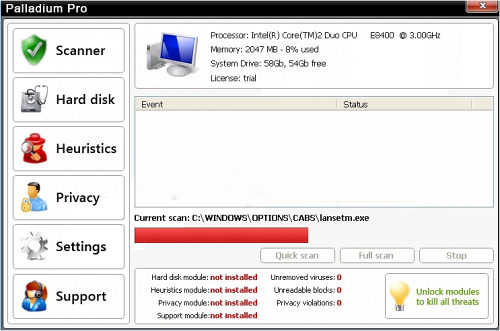
Palladium Pro is freshly released malware which was noticed to be copying earlier released trickily designed Fake Microsoft Security Essentials. This scam will also display Microsoft Security Essentials alert for making you think that your computer is infected and then will definitely offer you to register its fake license. Be aware that if you pay for Palladium Antivirus, you will simply share your money with scammers who may even steal your credit card details. Remove Palladium Pro without any delay!
Palladium Pro reaches computers through trojan viruses, so PC users can hardly do anything about it. However, if you have anti-virus and anti-spyware softwares that are updated constantly, you may avoid such malwares secretly installed on your machine. Additionally, Palladium Antivirus’s intrusion into your PC is always followed by dropping harmless files that later will be detected as viruses and making some changes to Windows Registry of the host computer to launch everytime your PC is rebooted. The modified Registry will run executable of this malware without asking and you will find yourself interrupted by numerous popup ads and scanners. All these messages of Palladium Antivirus Pro are usually telling the same lie about low security guard of your PC and tons of viruses that should be uninstalled. Note, that these detections are earlier created files that do not pose any harm. Malware will claim something like this:
Microsoft Security Essentials Alert
Potential Threat Details
Microsoft Security Essentials detected potential threats that might compromise your private or damage your computer. Your access to these items may be suspended until you take an action. Click ‘show details’ to learn more.
Microsoft Security Essentials Alert
Solution found
Microsoft Security Center has detected the submitted suspicious file as “Trojan.Horse.Win32.PAV.64.a”.
Threat level – very high.
Required action – Antivirus software is required to find and delete all traces of the virus.
Click “Ok” to allow operation system to install the trial version of Palladium to solve the problem.
System reboot is required to complete the installation.
Reporting something malicious which is not there is a part of the malicious campaign of Palladium Pro and most of other malwares that all shouldn’t be followed. Remove Palladium Pro ASAP because it will continue its annoying activity and will also increase the additional risk to your PC, like promoting other computer viruses into your system.
Special NOTES for the removal of Palladinum Pro: When you find your PC infected, instead of a normal screen of start up, you will see a start screen with a Palladinum Pro logo. Instead of pressing one of its offered “Normal Startup” or “Safe Startup”, launch Windows Task Manager (ctrl+alt+delete) and stop palladium.exe process. Windows will ask if you are sure about this, so you should also press Yes. Additionally, you will see a blank screen with Task Manager running, so to return at your Windows desktop click the File menu, run New Task, write explorer.exe into the Open field and press OK. Now update your anti-spyware (spyhunter or Malwarebytes Anti-Malware are recommended) and run a full system scan.
According to malware researcher S!Ri, you should also create a sold_pal file in %APPDATA% to register Palladium Pro and to simplify removal procedure. However, this will not remove Palladium Pro on its own, but it will stop it from blocking everything one launches.
Automatic Malware removal tools
(Win)
Note: Spyhunter trial provides detection of parasites and assists in their removal for free. limited trial available, Terms of use, Privacy Policy, Uninstall Instructions,
(Mac)
Note: Combo Cleaner trial provides detection of parasites and assists in their removal for free. limited trial available, Terms of use, Privacy Policy, Uninstall Instructions, Refund Policy ,
my desk top computer was infected yesterday by this fake security. Now my problem is when i open my computer palladium pro appear and I can’t acess to internate and my documents. i need Ur help to solve this problem.
Mesfin: Have you tried safe mode with networking? Also, try launching task manager and killing process called Palladium.exe.
That just happened to my computer,I did the task manager launching,and now it is ok…
How can we tell others about this…
i have also a problem, when i used taskmngr. i cant access it the palladium will also appear,, help me please
reDZ: Try rebooting in safe mode and trying doing removal instructions from it.
I have just been infected on my other computer by Palladium Pro. When I go into safemode with network, I get the Windows screen asking for my password. When I enter the password, it goes back to Palladium. Please help.
I can’t get on to my computer to download the Spyware Doctor program.
Gail: Have you tried killing palladium pro process?
i can’t get rid of Palladium Pro. it comes up on my scree, and won’t let me get anywhere else not even when i ctl alt delte. it has fozen everything unless i agree to register i even reboted twice. help!
i need your help getting removing Palladium Pro. i can’t get to anything it froze my screen. I can not ctl alt delet, because it won’t do anything, and i can not download spyware doctor. please help. thank!
the palladium pro still appear after i restart my laptop..
Ok sir ill try it again
Anita: Have you tried rebooting in safe mode with networking and creating the file in appropriate dir as it is posted in guide?
I have tried to bring up task manager and palladium will not let me do anything it just keeps telling me I need to purchase the whole package to get my programs to function properly. please help I have important work to get done.
Thank you this is very helpful but i have some problems there is a lot on what the virus is but not enuff on how to get rid of it and weather microsoft security essentials is non reliable as that is the program i use as my anti virus but that is the program that gave me the Palladium virus my questions are should i get a new anti virus can i trus microsoft security essentials???
At the first second you see the Palladium startup menu hold control alt delete.
Click Process
Find Palladiumpro.exe or Palladium.exe (forgot the name of it)
Click end task and the click ok to confirm the box that pops up.
Now go back to applications tab in ctrl-alt-delete
click start new task
it will come up with a new window that will say something like—> open: cmd
click ok
A black box will appear.
Now type in explorer.exe
THIS WILL ONLY RESTORE YOUR DESKTOP it is up to you from then on to look for a means of removal
I opened an email supposedly from Facebook, said for id protection my password had been changed. Once I opened the email my computer went nuts.
Coworker brought me his dad’s computer with this infection. I tried the ctrl-alt-del to no avail. I also tried safe mode with networking and couldn’t get in since the program disabled task mgr. So I started the computer in safe mode with command prompt and was able to navigate to the right directory to remove the files. Once the files were removed I rebooted the computer and removed the rest of the infection. Hope this helps!
Nate your idea worked great on my coworkers computer.
just in case someone is not very savvy here is what I did.
1. Restart computer
2. press F8 before computer starts to fully reboot
3. boot to safe mode with command prompt
4. type in cd c:\users\”username”\appdata\roaming and hit enter
5. type dir hit enter
6. look for palladium.exe
7. type del palladium.exe hit enter
8. hit ctrl+alt+del
9 restart computer
10. at this point computer will reboot like normal
11. Delete all shortcuts to the file
12. go to windows explorer and navigate to the same file directory as above c:\users\”username”\appdata\roaming
13. delet all the other related files %UserProfile%\Application Data\completescan_pal
%UserProfile%\Application Data\install_pal
%UserProfile%\Application Data\palladium.exe
%UserProfile%\Application Data\uid_pal
%UserProfile%\Desktop\Palladium.lnk
14. update antivirus, spyware, or any other malware removals you have and run antivirus programs to verfiy.
hope this helps and thanks again nate.
Thanxs for the info – it arrived today on one of my network PC’s – how it got in only knows as we have firewalls and a proxy – we also use Kaspersky but it got through Maleware bytes – just wanted to say thanks.
HELP…having the problem as Mesfin….any ideas??? Please!!
Reboot, and press F8 while system booting.
Choose safe mode with networking.
@J
Hi there J,
where are the related files you mention, and how do I find them to delete them?
REALLY not tech savvy.
Hello all,
i have this problem this palladium dont let me access anything, not task manager. I try do hit ctrl, alt and delete it doesnot work. can anyone help me with this problem?
Thanks
THANK YOU SO MUCH FOR EXPLAINING HOW TO REMOVE THIS VIRUS. I WALKED STRAIGHT THROUGH YOUR STEPS AND WORKED PERFECTLY!! THANK YOU SO MUCH!!!!!!
please help me about this palladium pro. i cannot access on my internet. what will i do? thanks.
I got infected with this scam and the only way I fixed it was rebooting in safe mode and doing a system restore. When I checked the uninstall programs in the control section, it no longer appeared and my system went back to it’s original state and working fine now.
having the same problems, finally was able to get to the search mode, NO SIGN of this palladium have shown up! I was able to usa a malbybes program and super-antivirus scan and NOTHING showed up here. I DON’T KNOW WHAT ELSE TO DO!!!
RF: do a full scan. Personally, I would recommend Spyware Doctor over superantispyware in this case. Also, try running EmsiSoft Anti-Malware
Not computer savy but when I hit F8 and then C:\Windows\system32> comes up..it does not allow me to type in cd c:\users\”username”\appdata\roaming and hit enter. Help, Im stuck!
this palladium pro virus has my computer totally locked up. I cant get past a blank screen. I will do cntl alt del at startup but it then takes me to the BIOS setup utility screen.. NOT the windows startup screen??? What do i do now??
press F8 at startup not (ctrl+alt)+del
@Mike
this problem has been a thorn in my side for a month now. thanks for da advice.
my (other ) computer will not allow me to download the spyware doctor because of a “smart engine” app. when spyware dr says it will remove the smart engiime…it still will not ewmove it. I have tried 3 times.
Also when I access in safe mode and type in cd c:\users\”username”\appdata\roaming and hit enter
it says ditectory not found. I have been trying ALL these things for 3 days, and no luck so far .
if I was to reset my default settings, would I loose all my data and homepage and favorites?
one more thing…where in task manager do I go, the only one I have is word perfect task manager. PLEASE HELP ME!!!
@J
The step 4 type in cd c:\users\”username”\appdata\roaming and hit enter
tells me it cannot be foundplease help
anyone there to help?
@Jessica
I fixed the Palladium Pro Virus through the advice from 2-viruses.com I followed their instructions exactly and it worked. This is what you do:
Removal of Palladinum Pro: When you find your PC infected, instead of a normal screen of start up, you will see a start screen with a Palladinum Pro logo. Instead of pressing one of its offered “Normal Startup” or “Safe Startup”, launch Windows Task Manager (ctrl+alt+delete) and stop palladium.exe process. Windows will ask if you are sure about this, so you should also press Yes. Additionally, you will see a blank screen with Task Manager running, so to return at your Windows desktop click the File menu, run New Task, write explorer.exe into the Open field and press OK. Now update your anti-spyware (Spyware Doctor or Malwarebytes Anti-Malware are recommended) and run a full system scan.
Hey guys, this palladium thing has effed up my comp.
So when I reboot, I hit f8 and nothing happens. And I hit f8 with command (enter button right) and still no safe mode..
I have to actually hold the off button as my comp won’t restart or open the internet (I’m replying now on my berry)
Any help guys? Thanks so much!
Sorry I’m very comp illiterate, umm also how and where is task manager located? Thanks
@drew
Ok sooo palladium has infected me so bad I can’t launch task manager, the internet, restart or safe mode.. What do I do? And I’m fairly computer illiterate.. Thanks!
I have the same problem in SAFE MODE. The first I did was SAFE MODE restart, and palladium pops up as usual. Could not find it in the control panel – software window to delete it. Did not get me further.
Will try the above tips.
Lounching task manager? Have a Japanese version, cannot understand “task manager”. Any easy road map how to go?
Thanks!
Slynch: On older os it is C:\Documents and Settings\Your username\Application Data
RF: Task manager can be launched by pressing ctrl+shift+esc or hitting ctrl+shift+del and choosing from menu.
thought i had got rid of the virus, but it reappeared. PLEASE HELP ME. I work during the day and need to do my homework at night, i am getting too far behind in school.
Bren: Always do a scan after removal.
which doctor i should download
I have followed the recommendations and my computer still has that annoying logo at the beginning.i can get in after the necessary ctrl alt del but when i reboot the same process has to be repeated.does anyone out there have the same problem and if so is there a solution?allen
@linda mac donell
I fixed the Palladium Pro Virus through 2-viruses.com I followed their instructions exactly and it worked perfectly. This is what you do:
Removal of Palladinum Pro: When you find your PC infected, instead of a normal screen of start up, you will see a start screen with a Palladinum Pro logo. Instead of pressing one of its offered “Normal Startup” or “Safe Startup”, launch Windows Task Manager (ctrl+alt+delete) and stop palladium.exe process. Windows will ask if you are sure about this, so you should also press Yes. Additionally, you will see a blank screen with Task Manager running, so to return at your Windows desktop click the File menu, run New Task, write explorer.exe into the Open field and press OK. Now update your anti-spyware (Spyware Doctor or Malwarebytes Anti-Malware are recommended) and run a full system scan.
Thanks AP it worked
My system was just infected. I installed and ran spyware doctor and when it reboot to finish rwmoving the vurus, it gave me the blue screen of death. Fatal system error c000021a. Am I up the creek without a paddle?
I did follow the instructions to remove it first!
Andrew: for this problem, contact pctools support : http://www.pctools.com/support it is either a known issue that can be fixed or fresh version of rootkit.
My PC is infected with the PalladiumPro. I need help to remove it. How much
I removed Palladium Pro but somehow not completely so now I often get pop-up warnings like “Window cannot find…”. Please show me how to fix this problem. I’m a PC dummy so please help me.
@Haxuan
I fixed the Palladium Pro Virus through the advice from 2-viruses.com I followed their instructions exactly and it worked. FOLLOW EVERY SINGLE STEP. If you don’t follow the instructions exactly, the virus will not go away completely.
This is what you do..
Removal of Palladinum Pro:
Reboot your machine, then…
Instead of a normal screen of start up, you will see a start screen with a Palladinum Pro logo. Instead of pressing one of its offered “Normal Startup” or “Safe Startup”, launch Windows Task Manager (ctrl+alt+delete) and stop palladium.exe process. Windows will ask if you are sure about this, so you should also press Yes. Additionally, you will see a blank screen with Task Manager running, so to return at your Windows desktop click the File menu, run New Task, write explorer.exe into the Open field and press OK.
Now to completely get rid of the entire virus: Update your anti-spyware (Spyware Doctor or Malwarebytes Anti-Malware are recommended) and run a full system scan.
AP
@ stephan:
Theres the help on this page, how to remove palladium pro virus. follow those instructions. or run an anti malware program like Malware Bytes or Super anti spyware.
Good Luck
Windows task folder should be cleaned up too as it tries through those tasks to contact one ***** webpage in Ukraine. Those tasks showed up there after that thing infected few of our computers.
As for the Smart Engine app, it’s folder is hidden in the appdata/roaming folder, kill that and it should let you connect to the net
our college dr.m.g.r university providing us HCL ME NETBOOK L 05. when i press the start button dr.m.g.r logo is coming on my laptop screen before windows get started. can u plz tell me how to remove this logo from my laptop?
reply as soon as possible……….