
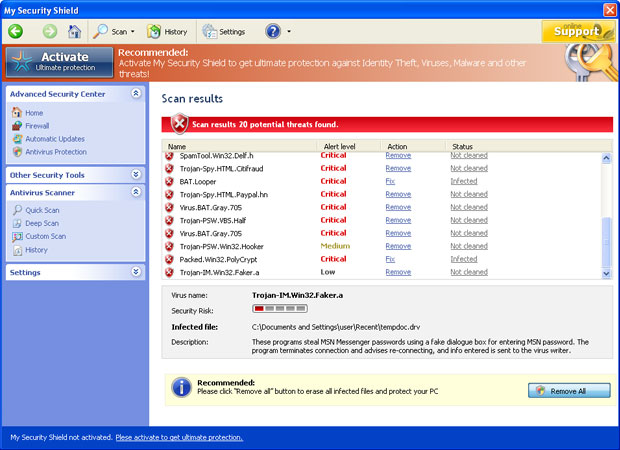
My Security Shield should never be trusted because it is a typical rogue anti-spyware which has many similarities to the earlier released Security Master AV, My Security Engine or Virus Doctor. However, you may also be having problems with its newer version Security Shield which has slightly different GUI. Just like any other scam, MySecurityShield offers to purchase its license by telling people that they have tons of viruses on their PCs. In reality, all the files reported by this scam as infections are nonexistent system files or the ones that My Security Shield creates after getting on board. Remember that these “viruses” should be ignored instead of being removed from the PC, here is their list:
%UserProfile%\Recent\cid.drv
%UserProfile%\Recent\CLSV.tmp
%UserProfile%\Recent\DBOLE.exe
%UserProfile%\Recent\delfile.sys
%UserProfile%\Recent\fan.dll
%UserProfile%\Recent\grid.sys
%UserProfile%\Recent\kernel32.exe
%UserProfile%\Recent\kernel32.sys
%UserProfile%\Recent\PE.dll
%UserProfile%\Recent\PE.tmp
%UserProfile%\Recent\runddlkey.drv
%UserProfile%\Recent\SICKBOY.drv
%UserProfile%\Recent\std.dll
%UserProfile%\Recent\tempdoc.tmp
%UserProfile%\Recent\tjd.sys
Undoubtedly, My Security Shield is designed to mislead people into thinking their computers are infected and sell its “license”. So trying to annoy them to death, malware will also display numerous pop-up ads, alerts and notifications that will all announce viruses. However, in reality such messages should be ignored just like the scan results. Some of alerts look like that:
Warning! Access conflict detected!
An unidentified program is trying to access system process address space.
Process Name: AllowedForm
Location: C:\Windows\…\notepad.exe
Warning! Identity theft attempt detected
Memory access problem
WindowsErrorForm has encountered a problem at address 0x1FC408.
We are sorry for the inconvenience.
If you see this error again, operational information can be irrevocably lost.
Warning! Virus detected
Threat Detected: Trojan-PSW.VBS.Half
Description: This is a VBScript-virus. It steals user’s passwords.
My Security Shield will never leave you alone because it is usually set to start just after Windows is launched. If you have it on board, you are most likely to have “caught” this threat through a Trojan or directly from some kind of fraudulent website. The one and the best solution after noticing My Security Shield on PC would be running a scan with completely trustful anti-spyware and removing its files. Of course, you can delete My Security Shield manually, but you should be very careful. If you have already purchased this fake security app, contact you credit card company to dispute the charges.
My Security Shield might hijack other websites using hosts file. It is critical to empty hosts file and double check security settings during this rogue removal.
Automatic Malware removal tools
(Win)
Note: Spyhunter trial provides detection of parasites and assists in their removal for free. limited trial available, Terms of use, Privacy Policy, Uninstall Instructions,
(Mac)
Note: Combo Cleaner trial provides detection of parasites and assists in their removal for free. limited trial available, Terms of use, Privacy Policy, Uninstall Instructions, Refund Policy ,
Hi I had this thing called My Security Guard and it tricked me!!! GRRRRRRR! I never bought the full version as I hought for a moment, full may mean even more viruses. I hate this program and somehow got rid of it without deleting all the files and theregedit.exe thing.
Hey there, I got this my security shield on my computer and I don’t know how to remove it? I downloaded spyware doctor.. but the program itself isn’t launching. I even tried running as admin but still it does’nt work.
Any help I will appreciate.
Thanks
Kl1P : try running it in safe mode with networking.
You can try running Combofix not many people have heard of the program its not fancy with pretty graphics or anything like that its free and it will remove security shield first time.
I DON`T NOW HOW TO MEMOVE IT. pLUS HELP ME.I brazil thank you.
I don`t no how to remove “my security my security shield.
i`m from brzil. Thaks you for your help.
I got ‘My Security Shield’ off ebay. I knew straight away it wasn’t legitimate but still too late because it was already on my computer. I started to download a couple of the reccommended solutions but wasn’t told the cost before downloading so I cancelled. Anyone got any ideas? I’m furious. We pay enough for computers, games and spend a fortune on ebay. This sh*t is illegal. Its also, fraud at its highest level. But greedy computer companies, bad politicians, police and rats who dont want to earn a proper wage couldn’t give a toss about us mere mortals.
Someone should start a global consumer union then we can put the greedy fat cats out of business if they don’t support us mere mortals.
Anyone tell us where this pest originated from? I also cannot launch spy Doctor, as it has been blocked by MSS, whici I innocently picked up on the internet. All the above instructions from Spy Dr are good and well but it isn’t showing how you STOP MSS processes; how you DELETE MSS files, not howe y ou remove registry entries and files. Where do we find all this stuff in order to action it????
How do you volunteer a laptop to run safe mode???
Lee: Try alternate download location, or try rebooting into safe mode with networking.
reboot, press F8 and choose from menu.
This application also appears to modify the hosts file so google and other popular sites redirect
ip address is 217.23.7.114
thank you for this info
I posted an analysis of another version of ‘My Security Shield’ rogue
http://blog.abuse.ma/2010/09/20/roguesmy-security-shield-infection/
(french)
++
HELP!! My computer is has this dam fake sh*t called ” security shield” I’ve tried everything that I know to take it off , it just doesn’t seem to work. Also have downloaded spyware doc. Or whatever its called and even that program its starting to be a pain in th ass. I would’ve thought that my virus protecter would’ve caught this before it even got to my computer, I guess it didnt. Anyways I try to scan it with Macfee but it doesn’t even let it start up. Or the internet. Pleasee help. I’m a college student, as you could now I need to pratically do everything on the computer, its the only one I have, and this piece of sh*t is not letting me do my work.
its saying that my security is not allowed to download things
my purchase experied from smart engine and i got a free norton subscription but ur publication still pops up that is very anoying can u pls take it off my computer tank you
Zack: Disable proxy server in browser, or reboot into safe mode with networking.
Security Shield does not let Spyware Doctor to complete a scan. It turns of my computer at the middle of the scanning process. How to resolve this problem? Is there abbreviated scan option or only full system scan?
Update spyware doctor, and do a scan in safe mode instead of normal mode.
Okay This Is Stupid-Your ‘Amazing Plan’ did not Work!! PLEASE HELP!!!
Rebeca: My security shield is replaced with Security shield : http://www.2-viruses.com/remove-security-shield
Are you sure you commenting under right parasite?
hello my securety center said that i not may open spyware doctor what do i do i f*cking hate it
Try safe mode with networking.
Hi
security shield is getting very annoying i downloaded spy hunter 4 and payed for it but it still dosent detect security shield what should i do.
1. I recommend using something else than Spyhunter.
2. Read these instructions : http://www.2-viruses.com/remove-security-shield . Thats new version of Security Shield.
admin .. thanks really !!
at first i used you activation code ..
then , the pop ups seemed to stop but as i read it .. i found out that stopping the pop ups is not really the solution because you really have to remove that F*cking security shield ..
after that , i went to the task manager and stopped the security shield .. then i went to the file location ..
i deleted it and , it’s not here now 🙂
thanks a lot .. you really made me happy this night 🙂
i just want security shield to stop pestering me every few seconds
To: jonathan or any others having this problem: A friend of mine recently got this problem.. The program literally stops any program you try to access from running. You cannot even do a cntrl+alt+del… So here’s what you need to do… 1. Restart your computer… 2. As soon as your computer boots up, exactly when your desktop background shows up, press Cntrl+alt+Del… Remove this processes right away! before the program loads and you have no more task manager until another reboot. End these 3 processes FAST!
MS345d_2129.exe
DBOLE.exe
kernel32.exe
Right Afterward, end any other unfamiliar processes, if you cannot find these processes simply and a bunch of them right away, usually system processes will not allow you to end them anyways. It is a good idea to be familiar with your programs installed on your computer and the processes running them to root out the problems.
Once you are done this, you can go online, and if this messed up your wireless, then you may need to reinstall the router software on your computer. If you can still access the internet, get CCleaner, it is a freeware, run it, run the cleaner by clicking the button, and also run the registry cleaner. Finally, download Malwarebytes’ and use that to remove everything else, you may need to transfer these programs from another computer, through cd/dvd/usb if you have no access to the internet or are still not allowed running programs.
Dear Security Shield Customer Services
I was online then I get a warning that I have a pc problem and to clear it I should ( CLIK HERE !! ) ,I did that then later after it show that I have few files and programs need to be removed but I should buy your program US $ 70.00 .
I am not sure if I can afforded to buy it, then I rejected , since that moment I still getting ( SECURITY SHILED WARNING, FIREWALL ALERT , SECURITY SHIELD NOTIFICATION …..etc. ) ,And it doesn’t help to click ( X ) still coming back.
Please I don’t need to face a such problem and making my life hard by not finishing my work , I feel a such way is forcing us to buy a software no matter what ..I CANNOT AFORDED .OK.
Please how I can stop all these warning?
Please I need your kind instruction how I can stop it.
Thank you for your attention.
My regards.
Yours sincerely,
Reda Moselhiy
Reda: we are not related or whateversort affiliated with Security Shield/My security shield. We just offer removal instructions for that parasite. There is no real company behind them, just bunch of scammers.
I got the shield security program. I was able to stop it from atomaticly running then was able to delete it from my computer C drive. but when i go to delete it out of the registry its not there or is hiding under a different name. In CURRENT USER/SOFTWARE/MICROSOFT/WINDOWS/CURRENT VERSION/RUN ONCE File there is name: (default) type: Reg_sz. in the RUN file there is name: (default) type:REG_Z and two others named: msnmsgr and sidebar……………please help dont know which one to delete….
Please help me! I cannot delete the stupid My Security Software of my computer! D: It keeps popping up. Just like it did now… Please help me! I am not sure what to do. I deleted it off my computer the file. But it still pops up. Because its on my task bar!
Thanks, Danielle!
You haven’t deleted all right files. Start task manager, and stop processes listed in our guides or similar. Once you stop right process, My security shield will disappear. Delete that file. Scan with removal software.
Please help me!!!!!
Can’t find a address to end my contract with MSC.
Iam not using it for more than a year and they will still have the money.
Info and Support address is not exesseble.
Thanks, Henk.
My security shield is a scam.
You should change your credit card.
Hey they must have updatedit cas my friends laptop got it now we can’t do anything can’t even go on the internet and know I don’t know what 2 do so can some one email me at [email protected]
Please, please help. I have MSC on my computer, I didnt pay for it or anything, I found out it was fake. So I downloaded this Spyware Doctor and tried scanning my computer, but then it wouldnt remove them. Just said I had to buy Spyware Doctor. I have no idea what to do, I cant buy the program!Please tell me what to do to get rid of My security shield, I need t get rid off it fast!
Serena: you can delete files manually SD finds. Or you can try other removers. However, I would recommend upgrading your security afterwards.
HELP! I downloaded the crappy security shield and now I cant access any of my pictures or programs! this is a school laptop and i need to know how to stop this madness! Please, please, please help! Please?
I KNOW HOW TO DELETE THIS CRAP!
Type in this regristration code.
64C665BE-4DE7-423B-A6B6-BC0172B25DF2
A new file should show up allowing you to uninstall all this S***
Thank thank thank compfix