
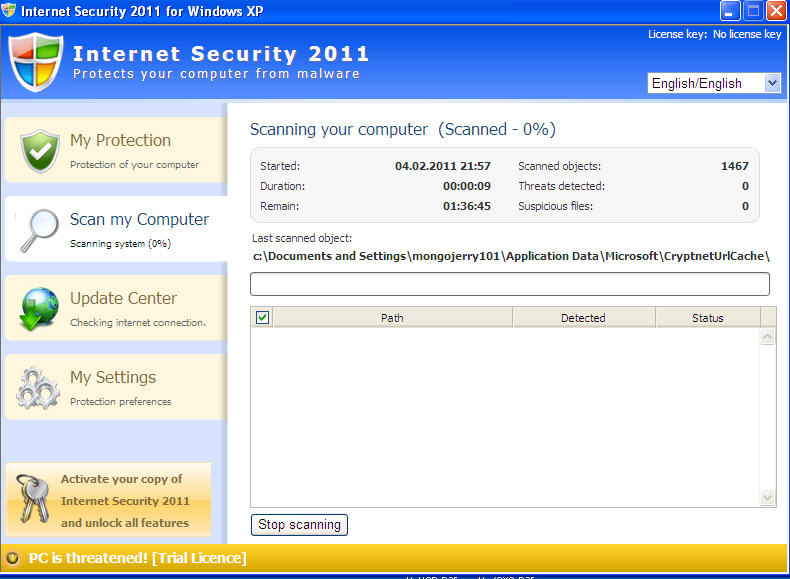
Internet security 2011 is a fake antivirus application. It is fake for 2 reasons: first, it is distributed by malware: trojans, exploits, worms. You might get infected by clicking on advertisements that claim that your PC is infected without even scanning your PC first. The second reason is that Internet Security 2011 scan results are fake positives: The threats it detects are not real, but either harmless or non-existing files. Deleting any file Internet Security 2011 labels as bad might result in serious computer problems.
Once on PC, Internet Security 2011 will start causing havoc: it will show countless alerts while blocking execution of legitimate programs. the alerts will look like this:
Attention! Network attack detected!
Your computer is being attacked from remote host. Attack has been classified as Remote code execution attempt.
Attention! Threat detected!
NOTEPAD.EXE is infected with Trojan-BNK.Keylogger.gen
Private data can be stolen by third parties including card details and passwords.
It is strongly recommended to perform threat removal on your system.
Windows Security Alert
Your computer is making unauthorized copies of your system and Internet files.
You should immediately run full scanning of your system to prevent any unauthorized access to your data.
Click YES to run Antivirus scanner right now.
All these messages are false. However, on the second execution of legitimate programs, Internet Security 2011 will have changed permissions to them. You will get “Access Denied” message, or, on new systems the message will look like this: “Windows cannot access the specified device, path, or file. You may not have the appropriate permissions to access the item.”. To overcome that, you will have to launch specific command during repair procedure (the command should be executed from command prompt or start->run, however it is advisable to disable Internet Security 2011 first) :
cacls [Path to program] /G Everyone:F
Special Internet Security 2011 removal guide
There are couple versions of Internet Security 2011. Some can be removed by simply scanning with removal tools like spyhunter or Malwarebytes Anti-Malware. For some, removal process is more complex.
Internet Security 2011 comes with rootkit. This complicates removal procedure somewhat, thus in many cases an reinstall might be an option. If you want to retrieve data, you might use alternate OS CD. However, it is possible to remove Internet Security 2011 manually as well.
- Download these tools:
- spyhunter
- TDSS Killer from http://support.kaspersky.com/downloads/utils/tdsskiller.zip
- http://download.bleepingcomputer.com/sUBs/MiniFixes/Inherit.exe
- http://www.gmer.net/
- http://download.sysinternals.com/Files/Junction.zip
- Malwarebytes
- If you can’t download on infected PC, use USB drive to move them, on burn them on CD on non-infected PC
- Go to C:\Windows\System32. There should be 2 files named userinit.exe. Rename one with shield icon to userinit.bad
- Right-click on your computer icon on desktop, properties, device manager (or start Device manager from menu). Go to System Devices, right-click on “[cmz vmkd] Virtual Bus” and disable it
- Rename C:\windows\WinSxS\x86_Microsoft.Windows.Shell.HWEventDetector_6595b64144ccf1df_5.2.2.3_x-ww_5390e909\shsvcs.dll to shsvcs-baddll.dll
- Launch regedit
- Search for key that looks like to HKLM\System\CurrentControlSet\Services\VBMAXXXX, where XXXX are numbers or number/letter combo. Right -click on it, Click “Advanced”, Check both “Inherit from parent….” and “Replace permission entries….”. Then change start value from 3 to 4
- Search for HKLM\System\CurrentControlSet\Services\Userinit, replace start value from 3 to 4
- Reboot
- Remove (or save) the files C:\windows\WinSxS\x86_Microsoft.Windows.Shell.HWEventDetector_6595b64144ccf1df_5.2.2.3_x-ww_5390e909\shsvcs-baddll.dll, C:\Windows\System32\userinit.bad, c:\Windows\System32\Drivers\VBMAXXXX.sys (where XXXX are random numbers).
- Run Regedit and delete keys edited before reboot.
- Do a check in Control Panel program list for Internet Security 2011 or Antivirus 2010. Run uninstallers (yes, they might be there).
- Open Device manager. Uninstal “[cmz vmkd] Virtual Bus”
- Extract Junction.zip to C:\ then start->run-> c:\junction.exe -s c:\ >log.txt.
- Open the log.txt and look for files that failed to open. It is normal that user.dmp, pagefile.sys, and some Microsoft.NET framework files fail to open
- Drag the files failed to open to inherit.exe OR USE the command in the main article to reenable their execution
- Run TDSS Killer and gmer to check for rootkit infections that accompany Internet Security 2011
- Do a full scan with updated spyhunter and Malwarebytes Anti-Malware to see if there are any other infection or unremoved Internet Security suite 2011 files
You would be less likely to get such infections like Internet Security 2011 if your anti-malware protection system would be up to date.
Note: “Internet Security 2012” parasite belongs to completely different malware family. The removal is different, so you should check appropriate guide.
Automatic Malware removal tools
(Win)
Note: Spyhunter trial provides detection of parasites and assists in their removal for free. limited trial available, Terms of use, Privacy Policy, Uninstall Instructions,
(Mac)
Note: Combo Cleaner trial provides detection of parasites and assists in their removal for free. limited trial available, Terms of use, Privacy Policy, Uninstall Instructions, Refund Policy ,
i have one problem.I can not access the internet on the computer.By the way i am using another computer.
……..install iobit 360 .it is a freeware and run it it is too easyy process ..and do hijack scan also ..it will works 100% perfect .. and u will have aditional fetures alsoo . kepp smilingg enzoy…….