
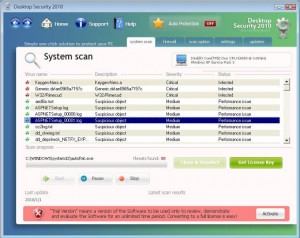
Desktop Security 2010 is one of those “professional” anti-spywares aiming to fool PC users into purchasing them. Other examples that can be marked out are Security Tool and Antivirus Live applications. DesktopSecurity2010 usually surprises PC users by its appearance because it comes unnoticeably with a help of Trojans. When inside, it starts struggling for convincing unaware users that lots of spyware are detected on their PCs. Finally, the “full” version is offered as the only program capable to fix everything and for the installation money is required.
As it was written above, DesktopSecurity 2010 is installed through Trojans infections while you’re trying to update your video codecs. Moreover, free of charge malware scans and spam e-mails may also contribute for this malware, so it is highly recommended avoiding them. It seems that all these malicious means of distribution have been used by scammers more often these days. When Desktop Security2010 gets inside, then suddenly people start getting numerous system scanners, popup ads and notifications, for example:
Security Center Alert
To help protect your computer, Desktop Security 2010 has blocked some features of this program.
Name Sft.dez.Wien
Risk High
Description Sft.dez.Wien is a virus attempts to spread itself by attaching to a host program, and can damage hardware, software or data in the process. This worm can be blocked from firewall and antivirus software.Spyware Warning
Your online guard helps to stop unauthorized changes to your computer
Details: Spyware detected on your computerYour computer might be at risk
Antivirus detects viruses, worms, and Trojan horses. They can (and do) destroy data, format your hard disk or can destroy the BIOS. By destroying the BIOS many times you end up buying a new motherboard or if the bios chip is removable then that chip would need replacing.
Click this balloon to fix this problem.No firewall is turned on
Automatic Updates is turned off
Antivirus software might not be activated
Click this balloon to fix this problem.
As you can see, badware classically announces about severe infections and it is almost right because computer is really has one major spyware inside and that is Desktop Security 2010. However, this malware expects people to become scared and pushes them into purchasing the “licensed” its version.
Please, keep in mind that when ignored Desktop Security 2010 makes the targeted computer to slow down dramatically and initiates constant system failure. Moreover, it affects the machine’s performance and lets more malware inside. Considering all these facts, there is no doubt that Desktop Security 2010 must be deleted. Get rid of Desktop Security 2010 as soon as possible once it is detected on you computer and use a reputable anti-spyware for doing that successfully.
Update
Before performing Desktop Security 2010 removal do following:
In activation window of Desktop Security 2010 enter following key : LIC-1800-FE88-8788-BBED-B26C-899B-14A6-4503-4618-EB85-B7A8-371D-1097-FEBC-B41D-C2B1-7A5F
This should disable Desktop Security from blocking other programs and will allow easier removal.
Thank you, Oscar Zelaya for the tip.
Update 2
Desktop Security 2010 seems to have been updated because now it uses sounds while it seeks to convince users that they need to purchase its fake license. Until now, Desktop Security 2010 has been showing its fake system scanners just like any other malware, but these days it was noticed to apply a lady’s voice trying to announce that there have been viruses detected. Just after Desktop Security 2010 finishes its scan, lady’s voice shouts “New virus found!!” and “Please activate your Antivirus software”. Don’t take them seriously, it is the same rogue anti-spyware which need to be eliminated!
Automatic Malware removal tools
(Win)
Note: Spyhunter trial provides detection of parasites and assists in their removal for free. limited trial available, Terms of use, Privacy Policy, Uninstall Instructions,
(Mac)
Note: Combo Cleaner trial provides detection of parasites and assists in their removal for free. limited trial available, Terms of use, Privacy Policy, Uninstall Instructions, Refund Policy ,
I have got this virus, I have downloaded Norton 2010 updated the definations ran the scan, it quaritines some but leaving some of the trojan on pending. Although this has stoped the annoying pop ups, and the virus found sounds, I am still unable to uninstall the program, it was also stoping me from uninstalling other programs. Wat can i do to uninstall this?
i dont get any of this stuff i would like toknow step~by~step of how 2 remove this annoying stuff i’ve had for about 1/2 a year now nd i feel like throwing my computer could anyone help me please
I just did a system restore and it fixed it
@jenny
There is a way to remove it manually. I beleive a system restore does a drive partiton format and you loose anything that was not on the computer when you bought it, (that you haven’t backed up)… A backed up hard drive that is infected is better than loosing your hard drive altogether. I’m fixing a PC tomorrow, 7/18, and will post my notes. If you have all the info and really know what you are doing it still takes about 20-30 minutes. And as previously stated you can really mess up your PC if you do the incorrect thing. Since each PC infection is somewhat unique a ‘step-by-step’ is hard. But I’ll post what I do tomorrow. First thing is to try to copy any data files (word docs, excel, PDF’s, music files, pictures, etc. Copy these to a big flash drive, 16GB ($40), or to something like a WD passport, 500GB($90), or 1TB ($120).
This worked for me:
1) Download and run Rkill. (This will stop the virus from working)
2) Download Spyware Doctor and perform a quick scan. It will find it. If you only have the trial version of SpyDoc you can’t make the program repair it, so delete manually every single file and registry (using regedit), that belongs to SecurityDesktop according to the scan.
3) Now, it should look like it’s gone. But if you let it be, it will show up again after you restart your computer. So you need to run msconfig and in the Startup tab uncheck everyting that should not be there. In my case it was some file called “m” and the second one something like “jcf” – I don’t remember but it was 3 letters. In your case those might be called differently. (If you’re not sure which files are they, google every single one and check if they’re used by any normal software or system.)
4) Delete the content of your Temp files. “Windows/Temp” and “C/Document and Settings/User/Local Settings/Temp”. You can safely remove everything that your system allows you.
5) Restart your computer and see if you were succesful.
Yep this is a pretty nasty one. There is actually a text file in the folder called enemies-names.txt which lists a lot of very nefarious things that are possible. Very scary stuff. If you are not worried about losing data and can reformat the hard drive, that is probably the surest method of removal. Otherwise, find someone who knows DOS… The instructions posted above for manual removal are very good and were instrumental in helping me figure this out. Everything said about the possibility of making it worse if you’re unsure about regedit, etc. is correct. That being said, I would add the following:
use F8, boot into safe mode, sign on as Administrator and go to a DOS prompt. Use CD\ to go to the root directory. Use dir /as /ah /s security*.exe to search for the securitycenter.exe file. This was the file I found that I believe to be the culprit on this particular computer. It was in the “c:\documents and settings\%user%\Application Data\Desktop Security 2010” folder. Also in the Application Data folder there will probably be another folder with the same or very similar date stamp that has a very long name of random characters. The one I saw was like 19957AEF23B5D6…. 32 characters long. It has very similar files as the Desktop Security 2010 folder. Delete the files in both of these folders. For files in these folders that won’t delete, at the DOS prompt, use attrib -a -r -h securitycenter.exe or whatever the filename is that won’t delete to change the file attributes. Then try to delete the file again, del .
Now with those folders empty, you’re still in safe mode, delete everything in the temp folder of that user – c:\documents and settings\%user%\Local Settings\Temp\*.* The Word8.0 folder may not delete, that’s OK.
Remove the shortcuts from the user desktop, quick launch area and program folder and startup group.
You can check the registry at this point for entries listed above, but you also need to do it again as the user, not as the administrator. Reboot, sign on as the user who had the problem, go through the registry entry check.
I have to attribute the basis for these steps to George V. from 3/26/2010. Thanks George, where ever you are…
thank you nhieu lam.
hey guyz..!!!
ive jus bought a new laptop n this stinkin thing got into it.Ive been tryin alot to remove this but em feeling helpless now…..
can any 1 help????????????