
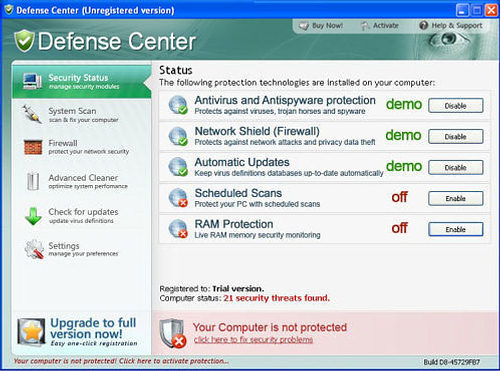
Defense Center is a rogue anti-spyware, typical clone of many other malwares – Protection Center, Data Protection, Digital Protection, Your Protection, User Protection and Dr.Guard. Just like its initials, DefenseCenter spreads itself through Trojans viruses that infiltrate one’s machine via fake video codecs required for watching videos online. Users are mostly convinced that they need to install updates into their system for watching something online, however, only Trojans are let inside. So, just after noticing something unusual, scan your PC and delete Defense Center immediately.
When trial version of this rogueware is installed, fake alerts and system tray notifications reach PC users. Defense Center poses to scan the system for malware and then claims nothing else but tons of viruses detected. For example:
Warning! Adware detected!
Adware module detected on your PC!
Zlob.Porn.Ad adware has been detected. This adware module advertises websites with explicit content. Be advised of such content being possibly illegal. Please click the button below to locate and remove this threat now.Danger!
A security threat detected on your computer. TrojanASPX.JS.Win32. It strongly recommended to remove this threat right now. Click on the message to remove it.
Antivirus Alert – Critical threat detectedWarning
Network attack detected
Network attack has been detected. Process is attempting to access your private data.Warning! Network attack detected!
Network intrusion detected!
Your computer is be attacked from a remote PC.
Attack from <ip address>:27040
Process is trying to steal your passwords listed below. It is highly recommended to block this threat now.Danger!
A security threat detected on your computer. This malicious program may steal your private data. Click on the message to ensure the protection of your computer.Danger!
Harmful viruses detected on your computer. Click on the message to scan your computer for security threats for free.
These multiple security issues and infections alerted automatically create the need to get rid of them. Defense Center offers to purchase its licensed version then as the only possible way to do this and users are simply ripped off. Keep in mind that the main reason why Defense Center was created is stealing your money, so don’t follow this malicious plan and do not purchase Defense Center.
In fact, all alerts and scanners of Defense Center are totally fake and report invented infections. Just like its famous predecessor Digital Center, Defense Center uses scare techniques to make you purchase its useless licensed version. Do not believe the misleading pop-ups triggered by it and instead of purchasing remove Defense Center. Scan with a reputable anti-spyware to find all its malicious files. Ignore all the messages including:
Danger!
Unauthorized person tries to steal your passwords and private information. Click on the message to prevent identity theft.
Note: Defense Center is known to attempt to disable well-known antispyware and antivirus programs installed, such as Spyware Doctor, AVG, Avira, McAfree, F-secure, Nod32 and others. If malware detects some of these programs, it will display such alert trying to mislead users:
Defense Center!
Uncertified antivirus name antivirus software detected on your computer. You need to remove antivirus name software for correct operation of the Defense Center.
Attention: If you don`t remove antivirus name software, the performance of your computer will dramatically degrade. Press “OK” to remove the antivirus name
Defense Center may disable your Task Manager as well, so you should then download Process Explorer from Microsoft to solve this problem.
BEFORE Performing manual or automatic Defense Center removal do following:
1. If you have internet problems on the infected PC, go to Tools->Internet options->connection->Lan settings and disable proxy server. This should allow normal downloading of removers and prevent internet loss after Defense Center processes are killed.
2. Start MSConfig (Windows -R, Msconfig).
3. Go to startup tab and remove all entries referencing your user directory, Defense center directory or some completely random executable names.
4. Reboot, Choose safe mode with networking.
This should make removing Defense Center easier.
Automatic Malware removal tools
(Win)
Note: Spyhunter trial provides detection of parasites and assists in their removal for free. limited trial available, Terms of use, Privacy Policy, Uninstall Instructions,
(Mac)
Note: Combo Cleaner trial provides detection of parasites and assists in their removal for free. limited trial available, Terms of use, Privacy Policy, Uninstall Instructions, Refund Policy ,