
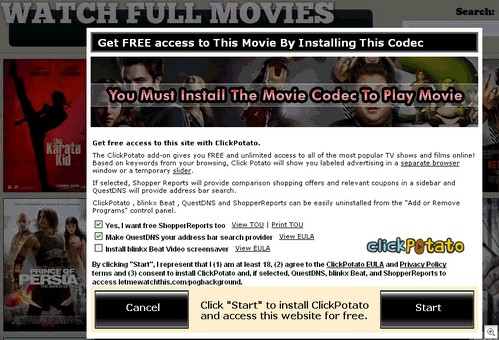
If you think pop-up which suggests installing “ClickPotato” to gain the access to movies is created for the good intentions or purposes you are wrong! Even though, it claims to be capable and let you watch the newest Hollywood movies and that looks quite appealing.
Just like Zango or Pinball, that are known from the past, “ClickPotato” acts in the same way:
1) The person is going to watch a new release of the movie online.
2) However, instead of expected video he sees a pop-up telling that “You must install the movie codec to play movie” which is malicious “ClickPotato”. Message also assumes that it has free ShopperReports and QuestDNS option and also offers installing blinkx Beat Video Screensaver.
3) If you finally let “ClickPotato” program on your PC, page declares: “In exchange for access to an endless array of popular videos, ClickPotato displays occasional promotional messages based on your Web search and browsing.”
The sad news is that every other movie will show you the same error offering “ClickPotato”. Stay away from installing this adware called “ClickPotato” and to remove it scan with a reputable anti-spyware!
Automatic Malware removal tools
(Win)
Note: Spyhunter trial provides detection of parasites and assists in their removal for free. limited trial available, Terms of use, Privacy Policy, Uninstall Instructions,
(Mac)
Note: Combo Cleaner trial provides detection of parasites and assists in their removal for free. limited trial available, Terms of use, Privacy Policy, Uninstall Instructions, Refund Policy ,
Spyware Doctor ads are worse than a virus. It’s frustrating having to carefully pick one’s way thro a site so as to not accidentally download SD shit. How many poor newbie suckers a day unknowingly download SD thinking they are downloading something useful. You should be ashamed, you scare away users. Many people I know refuse to download anything at all, let alone try anything out. Their “Program Files(x86)” is a wasteland. Outside of MSOffice, all they know is SUPERAntiSpyware and NIS. If a new icon turns up on their desktop they freak out. Computing should be fun, not scary.
MM
Malcolm: It is better to avoid programs that display advertisements and track user behavior. People should not be scared to install programs, but only when they fully understand what program does. If they are OK with advertisements, then I have no problem with that as long as people installed themselves. If their kids installed, or installed the program mistakenly, then it is not ok.
There are various free “games” that require programs to install, and in small print it is displayed that you might see advertisements. Sometimes not even while playing some crappy game. That is not ok.
this thing just wreck my pc
please tell me how to remove antimalware protection from my pc
so where the heck CAN you watch episodes and movies without downloading it OR all this other attached junk?
watch out which version you download. It has that click potato in it. I ran malwarebytes and it found 28 viruses in my computer.
I used REVO UNINSTALLER and it got the crap off my computer then it had me delete all the roots myself by showing me whee they were… clickpotato tried to fight back but I WON… i won.
SEARCH REVO UNINSTALLER
Performing a full system scan with Avast. I know I have ClickPotato installed, so hopefully it should be detected.
I too accidentally installed click potato. I dont see all the stress. I have been able to watch every movie i have ever wanted to. TV shows as well. Sure occassionally will get a pop up ad but i just x out of those. and they never come up during a movie or show.have removed click potato from my system a few times and reinstalled on purpose, still no problems with my machine. Running AVG Full and AVG PC Tuneup Full. Super Anti Spyware Full. Have been Having a great time for Bout 6 months now. I Love Click Potato!! I feel bad for those who have had issues but lets not put it down totally. after installing AVG Tuneup there are no traces of click potato software in my system yet i still am able to visit site and watch all i want for free Yayyyyy Me!!!!!!
steebo i have to agree with you i have no problems with it usually 1 advert every time i watch something and i too just x out of it
Click Potato just about had me throwing my poor laptop out the window.
after my work IT guy doing several anti malware searches and virus detects, and gettind rid of everything he found.
my laptop was still slow and working crappy..but worse of all i couldnt get into any of my files or floders or use any Microsoft programs or even save anything- if i tried (and i did sooo many times keep trying)..the whole system would crash. Even any of my internet engines would crash too.
A major pain in the ass, because i have been job hunting and not being able to access my old files for my CV and other needed attachements has been nightmare.
But yay thanks to this helpful page re: clickpotato.. i think i will have it destroyed and have my old faithful pc back to me by the end of the day.
Thanku everyone for your advice 🙂