
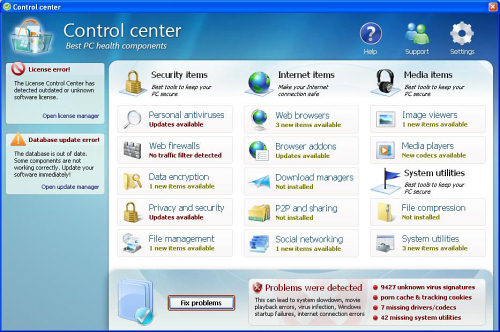
CCenter (sometimes called Control Center) is a counterfeit antispyware program. It reaches the system with a help of Trojans that spread through fake on-line scanners or when it happens to download infected files from insecure web sources. CCenter malware is known to modify Windows registry, creates fake random files and affects all processes that run when you are using your PC.
Additionally, Control Center causes desktop hijack. The computer starts running slower, the Internet browser keeps redirecting you to the wrong pages and you continuously get numerous pop up alerts when this malware starts doing its dirty job. Besides, every time you start the computer, fake system scanners are launched. These scanners supposedly detect tons of infections that according to CCenter can only be removed if you purchase this scam.
The truth is that CCenter is only trying to trick users and steal their money. Control Center is not a tool to remove spyware and solve computer problems. Contrary, it’s a malware that has no useful functions at all. What is more, it makes your Operating System even more vulnerable and gives access to other spyware, so you risk on your privacy. Do not purchase CCenter in any case!
Please contact you credit card company to dispute the charges if you have already purchased Control Center. Check the removal information below and get rid of CCenter application immediately!
Automatic Malware removal tools
(Win)
Note: Spyhunter trial provides detection of parasites and assists in their removal for free. limited trial available, Terms of use, Privacy Policy, Uninstall Instructions,
(Mac)
Note: Combo Cleaner trial provides detection of parasites and assists in their removal for free. limited trial available, Terms of use, Privacy Policy, Uninstall Instructions, Refund Policy ,