
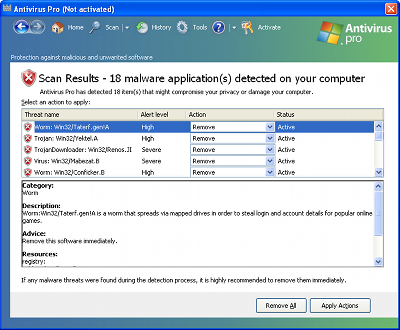
Antivirus Pro is the application that can be described with one word – ‘dangerous’. Moreover, it is categorized as rogue anti-spyware, so it will be closely connected to Trojans that get through security vulnerabilities found without any permission asked. The first thing that should make you think that something is wrong is continuous alerts and scanners coming up every time you reboot your computer. Pay attention to them and if you see the program that you haven’t installed to your computer, run your ‘licensed’ anti-spyware to make sure that Antivirus Pro is a virus.
As it was mentioned above, Antivirus Pro comes without any permission asked. Similarly like Antivirus Center or Internet Protection, it does that with a help of Trojans that mostly come from fake scan websites you may visit accidentally during a random Internet session. After this scamware manages to come inside, it will additionally modify your computer’s settings to manage to launch after computer is rebooted. Classically, it will begin reporting some threats that are allegedly inside your system putting it at risk. Never believe such information given by Antivirus Pro!
Additionally, you will receive bogus security scanners as well, that will pretend to check your computer for Trojans, worms, rootkits and other malware. Antivirus Pro won’t leave you alone any time and may even disconnect you from the internet to scare you into purchasing its license.
Please never do that! As a rule, these so called infections are files or registry entries Antivirus Pro creates after intrusion. This faked problem created is additionally expected to make you worry about your computer and data which is on it. Instead of paying for Antivirus Pro and ‘fixing’ your machine, you should remove Antivirus Pro instead. If simply ignored, this malware creates other side effect on your PC – it causes continuous slow downs, internet connection loss and other problems. As you may have already realized, it’s strongly recommended to remove Antivirus Pro. Please, rely on a reputable anti-spyware to have all infected files removed for you. To help for removal, you van also use this registry code, given by S1Ri:
D13F-3B7D-B3C5-BD84
Automatic Malware removal tools
(Win)
Note: Spyhunter trial provides detection of parasites and assists in their removal for free. limited trial available, Terms of use, Privacy Policy, Uninstall Instructions,
(Mac)
Note: Combo Cleaner trial provides detection of parasites and assists in their removal for free. limited trial available, Terms of use, Privacy Policy, Uninstall Instructions, Refund Policy ,
Just down loaded Spy Hunter by Enigma Software Group USA LLC. Now this is a free down load to remove Antivirus pro from my computer, mind you this is free. After the scan from the above FREE mentioned program, it told me I had 1526 problems so I clicked on the fix part of the program I was told in order to fix these problems I would have to purchase the program that I just scanned my computer with mind you this was going to remove all the malware like antivirus pro for free not true so I tried to uninstall the Spy hunter and conveniently ‘\SH4Service.Exe’. never installed. Now I can’t get rid of Spy Hunter or antivirus pro. I wonder if Enigma Software Group USA LLC is part of the problem instead of the cure
Gerald Russo: We do not list Spyhunter as free. However, in most cases its installer KILLS malware processes during installation, thus enabling the removal of MAIN malware executable manually. Majority of other anti-malware programs (both free and paid) try to protect their installer only from being killed, thus does not work well against aggressive rogues.
You can also try fake-register Antivirus PRO or delete the executable from safe mode or booted from alternate OS.