
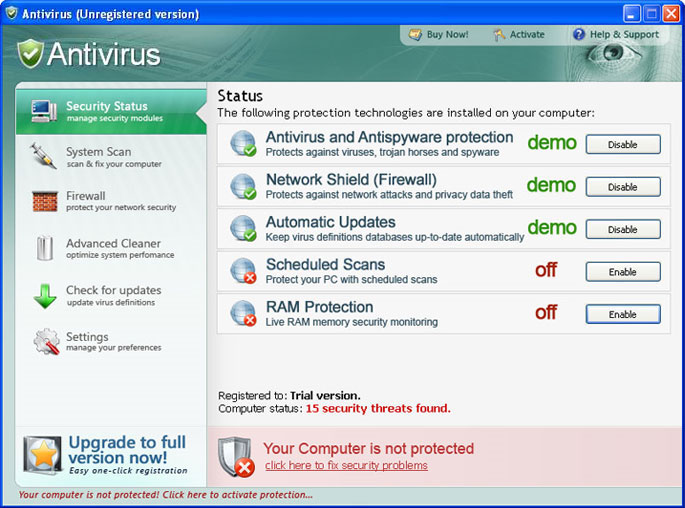
Antivirus is a fake security program which is designed to start its activities once after being installed. Just like Defense Center or Protection Center, this program automatically scans the computer for viruses each time Windows are logged in. It must be added that before imitating doing this, Antivirus creates fake files in the system and later after checking detects them as infections.
Antivirus usually reports about hundreds of Trojans, worms and other spyware and tries to scare unaware PC users in that way. Additionally, the program promotes its “licensed” version and asks paying the money for its removal services which are known to be useless. The promotion also consists of hijacking the Internet Explorer of the PC and redirecting the user into some malicious websites where this rogue anti-spyware can be easily downloaded. PC slows down and Windows Security Center is replaced by this scam.
All the PC users should obviously see that Antivirus is a useless application. Don’t agree spend your money for this rogue antispyware because it won’t increase your PC protection. It is highly recommended uninstall Antivirus immediately after detetction.
UPDATE! A new version with a new appearance has been noticed recently! This variant of Antivirus (also called as AnVi) scam was made to look very similar to legitimate security program called Nod32. Antivirus poses to scan computers for malware and also shows alerts to make users pay their money for it.
This malicious program is also known to use the Pragma TDSS infection. Categorized as rootkit, Pragma TDSS hides on OS and makes it difficult for the user to visit legitimate security web-sites. This rootkit terminates legitimate antivirus programs as well and displays such alerts when people launch them:
Uncertified {antivirus name} antivirus software detected on your computer. You need to remove
{antivirus name} software for correct operation of the Antivirus.
Attention: If you don`t remove {antivirus name} software, the performance of your computer will
dramatically degrade.
Press “OK” to remove the {antivirus name}Warning! Keylogger detected!
Keylogger activity detected on your PC!
PDM.Keylogger activity has been detected. Process is trying to redirect keyboard input. Your passwords and other private information are at risk. Please click the button below to block and remove this threat now.Warning! Adware detected!
Adware Module detected on your PC!
Zlob.Porn.Ad adware has been detected. This adware module advertises websites with explicit content. Be advised of such content being possibly illegal. Please click the button below to locate and remove this threat now.It is highly recommended to remove this threat from your PC.
You are using a trial version. It is recommended to purchase a commercial version.Most of the viruses and worms on your PC because of visiting pornosites or warez/torrent sites.
Dangerous! Antivirus detected some harmful programs on your PC! Tthey may corrupt your information or send it to hackers. Please, OPTIMIZE YOUR PC. IT RUN ONLY 10%.
Warning! Network Attack Detected!
Your computer is being attacked from a remote PC.
Attack from <ip address>
Process is trying to steal your passwords listed below. It is highly recommended to block this threat now.Antivirus alert – Critical Threat Detected
Warning: Network attack detected
Network attach has been detected. Process is attempting to access your private data.Unauthorized person tries to steal your passwords and private information. Click on the message to prevent identity theft.
User’s activity loggers detected!
It’s strongly recommended to remove detected threats right now!
You are using a trial version.
It is recommended to purchase a commercial version.Danger!
Harmful viruses detected on your computer. This malicious software may harm your computer. Click on the message to ensure the protection of your computer.
Please, don’t believe all these messages displayed out of nowhere. The only thing you need to do is to remove Antivirus just after its appearance on your PC.
Automatic Malware removal tools
(Win)
Note: Spyhunter trial provides detection of parasites and assists in their removal for free. limited trial available, Terms of use, Privacy Policy, Uninstall Instructions,
(Mac)
Note: Combo Cleaner trial provides detection of parasites and assists in their removal for free. limited trial available, Terms of use, Privacy Policy, Uninstall Instructions, Refund Policy ,
I been trying to get information so I can get this anti virus plus out of my computer cause is not working it keep blocking my internet if I use it at any time